The file menu in the Nissan Armada driving recorder system allows users to conveniently manage all recorded content, including photos and video files. Through this interface, you can view, organize, and delete stored media directly from the touchscreen display, making it easy to maintain storage and access important recordings when needed.
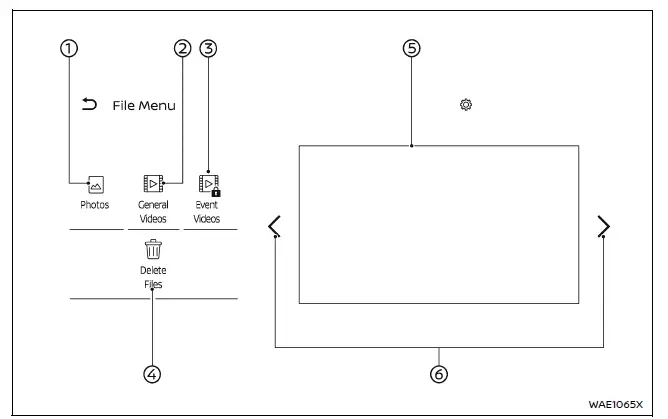
- Photos
Select this option to browse and display saved images captured by the Nissan Armada driving recorder. - General Videos
Access and play continuous recording footage stored in the system. - Event Videos
View recordings triggered by specific events such as impacts or manual activation in your Nissan Armada. - Delete Files
Choose and remove unwanted files to free up storage space on the microSD card. - File list
A complete list of saved files will be displayed.Select any file from the list to view photos or play video recordings.
You can also delete selected videos or images directly from this menu.
-

Use this control to navigate between different pages of stored content.
NOTE:
- For safety reasons, the Nissan Armada does not allow access to the file list or playback of stored media while the vehicle is in motion.
- The recording function of the Nissan Armada driving recorder is temporarily disabled while viewing the file list or playing back recorded videos.
The Nissan Armada file management system is designed for simplicity and efficiency, ensuring that drivers can quickly access important recordings while maintaining safe driving practices.
Other materials
Steering wheel
Basic information
WARNING
Never attempt to adjust the Nissan Armada steering wheel while the vehicle
is in motion. Doing so may result in loss of control and could lead to a serious
accident.
Do not position the Nissan Armada steering wheel closer than necessary
for safe and comforta ...
Ignition Coil, Spark Plug and Rocker Cover
Exploded View
Bank 1 side
Ignition coil
Spark plug
Rocker cover
Rocker cover gasket
Blow-by hose 1 (bank 1)
Clamp
Blow-by hose 2 (bank 1)
Intake camshaft position sensor
Exhaust camshaft position sensor
Crankcase pressure sensor
Comply ...
Rear Door Pocket Lamp
Exploded View
Rear door pocket lamp is integrated structure with rear door finisher. For exploded view of rear door finisher, refer to Exploded View.
Replacement
CAUTION:
Disconnect the battery negative terminal or remove power circuit fuse when performing the operation for preventing electric lea ...