The Nissan Armada driving recorder system uses a set of informational icons to clearly indicate its current operating status. These icons are displayed on the driving recorder screen and provide real-time feedback, allowing the driver to quickly understand system conditions without navigating through menus. This intuitive visual system enhances usability and ensures that the Nissan Armada driver remains informed at all times.
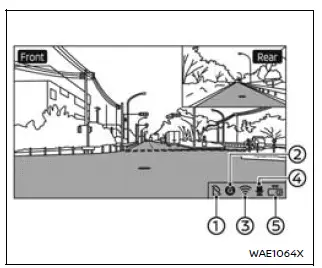
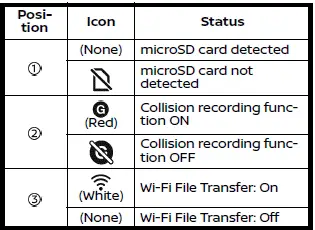
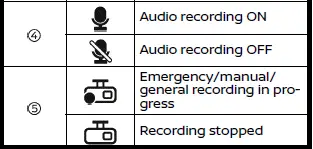
NOTE:
- If no icon appears in position 1 on the Nissan Armada display and recorded images or videos are not being saved, this may indicate that the microSD card does not have enough available storage space. In this case, it is recommended to delete unnecessary files to free up space.
- If
 is displayed, the microSD card in your Nissan Armada may be malfunctioning.
If formatting the card does not resolve the issue, replace it with a compatible
new microSD card.
is displayed, the microSD card in your Nissan Armada may be malfunctioning.
If formatting the card does not resolve the issue, replace it with a compatible
new microSD card. - If
 ,
,
 (gray), or
 (gray) is displayed, there may be a malfunction in the Nissan Armada vehicle
system or the driving recorder itself.
(gray) is displayed, there may be a malfunction in the Nissan Armada vehicle
system or the driving recorder itself.
In such cases, it is strongly recommended to have your Nissan Armada inspected by an authorized Nissan dealer to ensure proper system functionality and safety.
Other materials
Condenser
Exploded View
Radiator
Condenser outlet pipe
O-ring
Condenser & liquid tank assembly
Condenser seal
Refrigerant pressure sensor
Condenser inlet pipe
: Pawl
: Always replace after every disassembly.
: N·m (kg-m, in-lb)
, , : Indicate ...
Vehicle Security Alarm Does Not Activate
Description
Alarm does not operate when alarm operating condition is satisfied.
Diagnosis Procedure
CHECK DOOR SWITCH
Check door switch. Refer to ComponentFunctionCheck.
Is the inspection result normal?
YES>>
GO TO 2.
NO>>
Replace the malfunctioning door switch
CHECK HOOD SWITCH
Check ...
Battery Current Sensor
Exploded View
Without ProPILOT ASSIST 2.1
Battery fix frame
Battery cover
Negative cable
Battery current sensor
12V battery
Battery fix rod
Battery fix rod clip
Battery tray
Battery positive terminal
Battery positive terminal cover
Battery terminal with fusible link ...