
Nissan Armada 2025-2026 Owner's Manual: File menu
The file menu in the Nissan Armada driving recorder system allows users to conveniently manage all recorded content, including photos and video files. Through this interface, you can view, organize, and delete stored media directly from the touchscreen display, making it easy to maintain storage and access important recordings when needed.
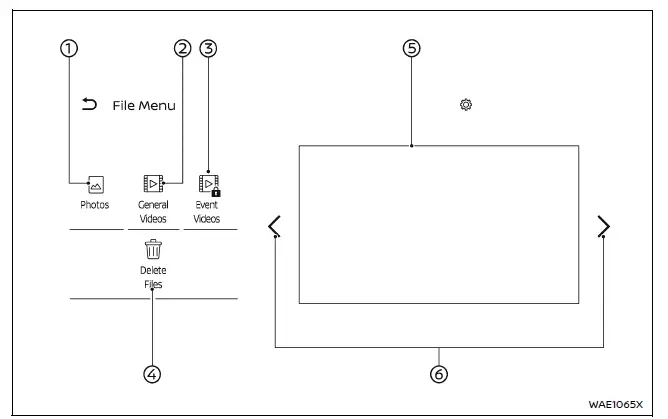
- Photos
Select this option to browse and display saved images captured by the Nissan Armada driving recorder. - General Videos
Access and play continuous recording footage stored in the system. - Event Videos
View recordings triggered by specific events such as impacts or manual activation in your Nissan Armada. - Delete Files
Choose and remove unwanted files to free up storage space on the microSD card. - File list
A complete list of saved files will be displayed.Select any file from the list to view photos or play video recordings.
You can also delete selected videos or images directly from this menu.
-

Use this control to navigate between different pages of stored content.
NOTE:
- For safety reasons, the Nissan Armada does not allow access to the file list or playback of stored media while the vehicle is in motion.
- The recording function of the Nissan Armada driving recorder is temporarily disabled while viewing the file list or playing back recorded videos.
The Nissan Armada file management system is designed for simplicity and efficiency, ensuring that drivers can quickly access important recordings while maintaining safe driving practices.
 Informational icons
The Nissan Armada driving recorder system uses a set of informational icons to
clearly indicate its current operating status. These icons are displayed on the
driving recorder screen and provide r ...
 In Car Camera menu
The Nissan Armada In-Car Camera system allows you to capture video and photos
inside the vehicle cabin, making it an excellent tool for recording memorable family
trips, monitoring passengers, or ...
Other materials:
2nd row seats
Basic information
The second row seating system in the Nissan Armada is designed to provide a balance
of comfort, flexibility, and safety for passengers. Proper operation and positioning
of the 2nd row seats in the Nissan Armada are essential for ensuring maximum occupant
protection and maint ...
How to park with predictive course lines
WARNING
If non-standard tire sizes are installed on the Nissan Armada, the predictive
course lines may not display accurately.
On slippery or snow-covered roads, the Nissan Armada predicted path may
differ from the actual vehicle movement.
If the Nissan Armada battery is disconnected o ...
Basic information
The Nissan Armada Traffic Sign Recognition (TSR) system is designed to enhance
driver awareness by identifying and displaying the most recently detected road signs,
particularly speed limits. Using the advanced multi-sensing front camera unit positioned
near the interior mirror, the Nissan ...

0.0036