Removal and Installation
REMOVAL
Remove the front grille. Refer to Removal and Installation.
Remove the front camera mounting screws  , then remove the front camera
  .
.
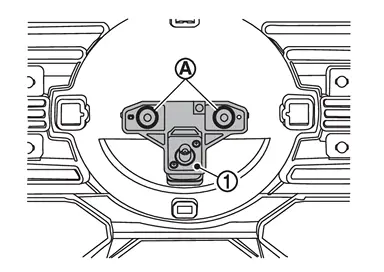
INSTALLATION
Install in the reverse order of removal.
Perform parameter writing. (With ProPILOT Assist 2.1) Refer to Work Procedure.
Perform camera image calibration. Refer to Work Procedure.
CAUTION:
Perform the calibration and perform the writing to the around view monitor control unit when removing and replacing each camera, removing the camera mounting parts (front grille, door mirror, etc.) and replacing the around view monitor control unit.
Other materials
Transfer Assembly
Exploded View
Transfer assembly
: N·m (kg-m, ft-lb)
Removal and Installation
WARNING:
Jacking up or lift up the vehicle may the vehicle height to go down which cause a personal injury and/or damage to the air suspension component parts. Refer to Precaution for when Jacking and Li ...
Precautions
Precautions for Removing Battery Terminal
When disconnecting the 12V battery terminal, turn off the ACC power before disconnecting the 12V battery terminal, observing “How to disconnect 12V battery terminal� described below.
NOTE:
Some ECUs operate for a certain fixed time even after ignit ...
Glove Box Lid Lock Cylinder
Exploded View
Glove box assembly
Sleeve
Glove box lid lock cylinder
Removal and Installation
REMOVAL NOTE:
Glove box lid lock key cylinder is integrated with glove box assembly. So, glove box lid lock key cylinder cannot be removed from glove box assembly and it cannot be replaced without ...