Front fog lights
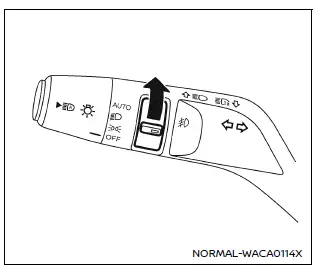
Front fog lights (example)
In the Nissan Armada, the front fog lights are designed to improve visibility in challenging weather conditions such as fog, rain, or snow by illuminating the road surface at a lower angle.
To activate the fog lights in the Nissan Armada, first rotate the headlight switch
to the
 position, and then turn the fog light switch to the
 position.
To turn the fog lights off, rotate the switch back to the OFF position. In the Nissan Armada, the fog lights will only operate when the low beam headlights are active and will automatically switch off when the high beams are engaged.
This ensures proper lighting distribution and prevents glare for other drivers.
Other materials
NISSAN All-Mode 4WD system
The NISSAN All-Mode 4WD system in the Nissan Armada is engineered to deliver
maximum versatility and control by offering multiple selectable drive modes, including
AUTO, 4H, and 4L (if equipped). This intelligent system allows the driver to adapt
the Nissan Armada to a wide range of road and o ...
Suspension Arm
Exploded View
Frame
Stopper rubber
Suspension arm
Axle housing
: Always replace after every disassembly.
: N·m (kg-m, ft-lb)
Removal and Installation
REMOVALWithout Dynamic Digital Suspension and Electronic Air SuspensionRemove tires. Refer to ROAD WHEEL TIRE : Removal &a ...
Additional Service When Replacing Ipdm E/r
Description
After replaced IPDM E/R, it is necessary to perform control unit configuration. For details, refer to Work Procedure.
Work Procedure
REPLACE IPDM E/R
Replace IPDM E/R. Refer to Removal and Installation.
>>
GO TO 2.
WRITING vehicle SPECIFICATION
Perform configuration (IPDM E/R). R ...