Headlight switch
Basic information
CAUTION
In the Nissan Armada, always operate the headlights with the engine running to prevent unnecessary battery discharge and ensure reliable electrical system performance.
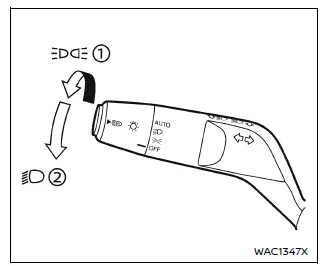
Example
Lighting
Type A (if so equipped):
- Rotate the switch to the
 position, and the Nissan Armada will activate the front parking lights, tail
lamps, license plate illumination, and instrument panel lighting.
position, and the Nissan Armada will activate the front parking lights, tail
lamps, license plate illumination, and instrument panel lighting. - Rotate the switch to the
 position, and the headlights will turn on while all other exterior lights remain
active. The daytime running lights in the Nissan Armada will automatically turn
off in this mode.
position, and the headlights will turn on while all other exterior lights remain
active. The daytime running lights in the Nissan Armada will automatically turn
off in this mode.
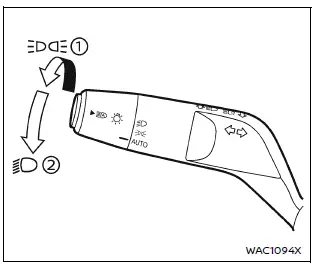
Example
Type B (if so equipped):
- Rotate the switch to the
 position, and the Nissan Armada will turn on parking lights, tail lights, license
plate lights, and instrument panel illumination.
position, and the Nissan Armada will turn on parking lights, tail lights, license
plate lights, and instrument panel illumination.
In this position, the Intelligent Auto Headlights function is also enabled, allowing automatic light control.
- Rotate the switch to the
 position, and the headlights will illuminate while all other lights remain on.
Daytime running lights will be deactivated.
position, and the headlights will illuminate while all other lights remain on.
Daytime running lights will be deactivated.
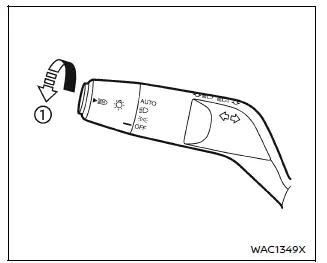
Example
Intelligent Auto Headlights
Type A (if so equipped):
The Nissan Armada Intelligent Auto Headlights system automatically controls headlight operation based on ambient lighting conditions, enhancing convenience and safety.
To activate the Intelligent Auto Headlights in the Nissan Armada:
1. Ensure the headlight switch is set to the AUTO position 1.
2. Turn the ignition switch to the ON position.
3. The Nissan Armada will automatically switch headlights ON or OFF depending on surrounding light conditions.
To deactivate this function, rotate the switch to OFF,
 or
or
 position.
The Nissan Armada system automatically activates headlights in low-light conditions, such as at dusk or during rain when windshield wipers operate continuously.
If the ignition is turned OFF and a door is opened, the Nissan Armada headlights may remain illuminated for approximately 5 minutes, providing convenient exit lighting.
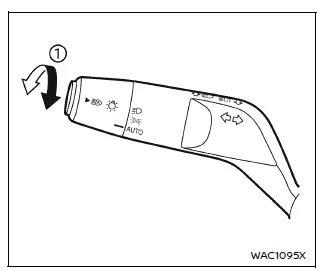
Example
Type B (if so equipped):
The Nissan Armada Intelligent Auto Headlights system also supports automatic lighting control in Type B configurations, offering seamless adaptation to driving environments.
To activate the system:
1. Ensure the switch is set to the
 or AUTO position 1.
2. Turn the ignition switch ON.
3. The Nissan Armada will automatically manage headlight operation.
To deactivate the system, rotate the switch to the
 position.
The Nissan Armada automatically turns headlights ON in darkness and OFF in bright conditions, ensuring optimal visibility at all times.
If the ignition is ON and the parking brake is applied, the headlights will remain OFF to conserve energy.
When the
 position is selected, headlights will switch OFF when the ignition is turned OFF,
the gear selector is placed in P (Park), or the parking brake is engaged, while
other lights remain active.
position is selected, headlights will switch OFF when the ignition is turned OFF,
the gear selector is placed in P (Park), or the parking brake is engaged, while
other lights remain active.
Additionally, the Nissan Armada headlights will automatically activate during twilight or rainy weather conditions when windshield wipers are in continuous operation.
If the headlights are ON in AUTO mode and the ignition is turned OFF with a door opened, the Nissan Armada will keep the lights on for approximately 5 minutes, enhancing convenience and safety when exiting the vehicle.
This intelligent lighting system in the Nissan Armada improves driving comfort by automatically adapting to environmental conditions, reducing driver workload and increasing overall road safety.
Automatic headlights off delay:
In the Nissan Armada, the automatic headlights off delay function allows the headlights to remain illuminated for a short period after the ignition is switched OFF, improving visibility when exiting the vehicle in low-light conditions.
After turning the ignition OFF and opening then closing all doors, the Nissan Armada headlights can stay on for up to 180 seconds. This delay duration can be customized through the vehicle settings.
Drivers can adjust the delay from 0 seconds (OFF) up to 180 seconds depending on personal preference. The factory default setting in the Nissan Armada is 30 seconds.
This feature adds both convenience and safety, especially when parking in dark areas or garages.
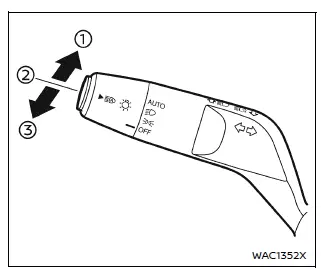
Example
Headlight beam select
- To activate the high beam in the Nissan Armada, push the lever forward and
release it. The high beam headlights will turn on and the
 light illuminates in the instrument cluster.
 - To return to low beam, pull the lever back and release it, switching the Nissan Armada lighting system back to normal driving mode.
- To flash the headlights in the Nissan Armada, pull the lever toward you. If high beam is already active, pull the lever twice to flash.
High beam assist
The Nissan Armada high beam assist system enhances nighttime driving by automatically switching between high and low beams based on surrounding traffic conditions.
This system operates at speeds above approximately 19 MPH (30 km/h). When the Nissan Armada detects an oncoming vehicle or a vehicle ahead, it automatically switches from high beam to low beam to prevent glare.
Precautions on high beam assist:
WARNING
- The Nissan Armada high beam assist is designed as a support feature and
does not replace driver responsibility.
The driver must always remain attentive, monitor road conditions, and manually adjust headlights when necessary.
- The system in the Nissan Armada may not automatically switch beams under
certain conditions. In such cases, manual operation is required.
- Adverse weather conditions such as rain, fog, snow, or strong winds.
- Presence of external light sources similar to vehicle lights.
- When oncoming or leading vehicles have dimmed, obstructed, or misaligned headlights.
- Sudden or continuous changes in ambient lighting conditions.
- Driving on uneven terrain, hills, or roads with elevation changes.
- Curved or winding roads.
- Reflection from road signs or mirror-like surfaces.
- Strong reflections from trailers or cargo of other vehicles.
- Dirty or damaged headlights on the Nissan Armada.
- Vehicle tilt caused by load imbalance, tire damage, or towing conditions.
- The timing of switching between high and low beams in the Nissan Armada
may vary depending on:
- Brightness and intensity of surrounding vehicle lights.
- Movement and direction of other vehicles.
- Situations where only one light source is visible.
- Presence of motorcycles or two-wheeled vehicles.
- Road conditions such as curves, slopes, and surface type.
- Passenger load and cargo weight affecting vehicle angle.
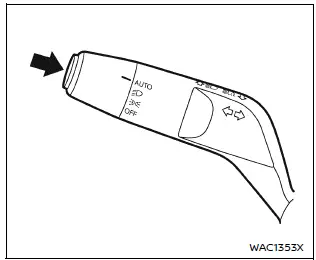
Example
High beam assist operations:
To activate the high beam assist system in the Nissan Armada, press the switch
while the headlight control is in AUTO mode (or
 position, depending on the model).
When active, the high beam assist indicator will illuminate on the Nissan Armada instrument panel while headlights are ON.
If the indicator does not appear, it may indicate a malfunction. In such cases, it is recommended to have the Nissan Armada inspected by an authorized Nissan dealer.
When vehicle speed drops below approximately 13 MPH (20 km/h), the Nissan Armada automatically maintains low beam operation for safety.
To deactivate the system, press the switch again.
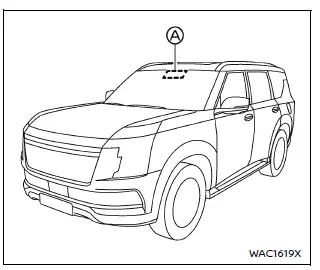
Ambient image sensor maintenance:
In the Nissan Armada, the ambient image sensor A, which supports the high beam assist system, is positioned in front of the inside rearview mirror and plays a critical role in detecting surrounding light conditions.
To ensure reliable operation of the Nissan Armada high beam assist system and to prevent potential malfunctions, it is essential to follow these maintenance guidelines:
- Always keep the Nissan Armada windshield clean to allow accurate sensor readings.
- Do not place stickers, films (including transparent ones), or accessories near the ambient image sensor, as they may interfere with its functionality.
- Avoid impacts or physical damage around the sensor area, and never touch the sensor lens directly to prevent contamination or scratches.
If the ambient image sensor in the Nissan Armada is damaged, especially after an accident, it is strongly recommended to consult an authorized Nissan dealer for inspection and repair.
Battery saver system
- When the Nissan Armada headlight switch is set to the
 or
or
 position while the ignition is ON, the lighting system will automatically turn
off after a certain period once the ignition is switched OFF.
position while the ignition is ON, the lighting system will automatically turn
off after a certain period once the ignition is switched OFF. - If the headlights are turned ON after the ignition is switched OFF, the Nissan Armada will automatically turn them off after approximately 5 minutes to preserve battery life.
- If the headlight switch remains in the
 or
or
 position after automatic shutdown, the lights will turn on again when the ignition
is switched back to ON in the Nissan Armada.
position after automatic shutdown, the lights will turn on again when the ignition
is switched back to ON in the Nissan Armada.
CAUTION
- When leaving the Nissan Armada for extended periods, always set the light switch to OFF (if equipped) or AUTO to prevent unnecessary battery drain.
- Never leave the headlights ON while the Nissan Armada engine is not running, even if the system automatically switches them off.
Daytime Running Light (DRL) system
The Nissan Armada LED Daytime Running Lights (DRL) automatically activate when the engine starts and the parking brake is released, improving visibility to other road users.
The DRL system operates when the headlight switch is in the OFF (if equipped),
 (type
A: regardless of light conditions, type B: during daylight), or AUTO position when
headlights are not engaged.
(type
A: regardless of light conditions, type B: during daylight), or AUTO position when
headlights are not engaged.
When the Nissan Armada headlight switch is turned to the
 position, the LED DRL transition to parking light functionality.
If the parking brake is engaged before engine start, the Nissan Armada DRL will not activate.
Once the parking brake is released, the Nissan Armada DRL will illuminate and remain active until the ignition is switched OFF.
This feature enhances daytime visibility and contributes to overall road safety.
WARNING
When the Nissan Armada DRL system is active with the headlight switch in the OFF position, the tail lights are not illuminated. Always switch on the headlights at dusk or in low visibility conditions.
Failure to properly activate headlights in the Nissan Armada may increase the risk of accidents and endanger both the driver and other road users.
Turn signal switch
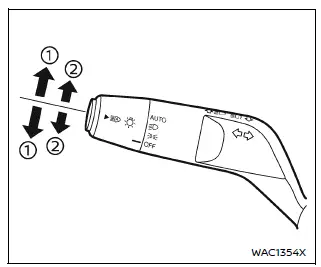
Example
- Turn signal
In the Nissan Armada, move the lever upward or downward to indicate the intended turning direction. After completing the turn, the signal will automatically cancel.
For models equipped with an automatic return lever, the control returns to its neutral position after being released. To manually cancel the turn signal, lightly move the lever in the opposite direction and release it.
- Lane change signal
To signal a lane change in the Nissan Armada, move the lever slightly until the indicator flashes without locking into position. Hold it until the maneuver is complete.
Alternatively, briefly tap the lever and release it—the Nissan Armada will automatically flash the turn signal three times.
Choose the appropriate signaling method based on traffic conditions to ensure safe and clear communication with other drivers.
Other materials
Types of tires
Basic information
WARNING
When replacing tires on your Nissan Armada, always ensure that all four
tires are identical in type (for example: Summer, All Season, or Snow) as well
as in construction.
Using mismatched tires can negatively impact vehicle stability, handling,
and safety ...
Front Drive Shaft
Exploded View
Removal and Installation
WARNING:
Jacking up or lift up the vehicle may the vehicle height to go down which cause a personal injury and/or damage to the air suspension component parts. Refer to Precaution for when Jacking and Lifting Up the vehicle with Electronic Air Suspension Sys ...
Steering Shaft
Exploded View
STEERING SHAFT
Steering shaft
Lower joint
Hole cover*
Clamp*
Hole cover seal
Collar
Upper joint
*: Replace and as a set.
: Always replace after every disassembly.
: N·m (kg-m, ft-lb)
: N·m (kg-m, in-lb)
Removal and Installa ...