The NISSAN All-Mode 4WD system in the Nissan Armada is engineered to deliver maximum versatility and control by offering multiple selectable drive modes, including AUTO, 4H, and 4L (if equipped). This intelligent system allows the driver to adapt the Nissan Armada to a wide range of road and off-road conditions, ensuring optimal traction, stability, and performance at all times.
4WD shift procedure: In the Nissan Armada, selecting the desired 4WD mode is simple and intuitive. The driver can switch between modes using the dedicated control switch located on the instrument panel. Depending on the configuration, the Nissan Armada offers two or three drive modes: AUTO, 4H, and 4L (if equipped), each tailored for specific driving environments.
The available 4WD modes in the Nissan Armada are integrated with the Drive Mode Selector (if equipped), which further enhances driving dynamics. When "SPORT" or "ECO" mode is selected, the system restricts access to 4H and 4L to prioritize efficiency or performance. Conversely, when "SAND", "ROCK", or "MUD/RUT" modes are activated, AUTO mode becomes unavailable, allowing the Nissan Armada to focus on maximum traction in demanding terrain conditions.
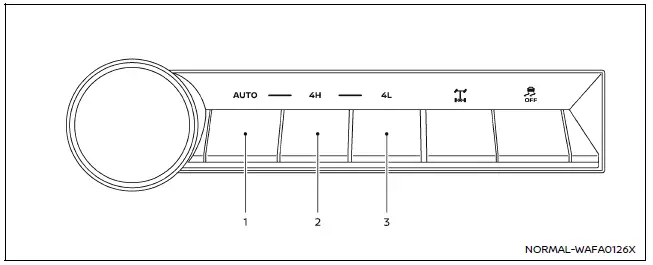
Example
1. AUTO (4WD AUTO)
Available Drive Mode (if so equipped): STANDARD, SPORT, SNOW, TOW or ECO
Wheels driven: Rear wheels or automatically all four wheels
Conditions of use: Ideal for everyday driving in the Nissan Armada on paved roads or in situations with variable traction such as wet or lightly slippery surfaces
Shift procedure: (4H to AUTO)
While driving straight, press the AUTO switch to return the Nissan Armada to automatic torque distribution mode.
(4L (if so equipped) to AUTO)
Bring the Nissan Armada to a complete stop, shift the transmission into N (Neutral), and press the AUTO switch while holding the brake pedal.
2. 4H
Available Drive Mode (if so equipped): ROCK, SAND, MUD/RUT, SNOW, TOW or STANDARD
Wheels driven: All four wheels continuously
Conditions of use: Suitable for driving the Nissan Armada on loose, uneven, or slippery surfaces such as gravel, sand, mud, or snow
Shift procedure: (AUTO to 4H)
While driving straight, press the 4H switch to engage enhanced traction.
(4L (if so equipped) to 4H)
Stop the Nissan Armada, shift to N (Neutral), and press the 4H switch while holding the brake pedal.
3. 4L (if so equipped)
Available Drive Mode: SNOW, TOW, ROCK, SAND, MUD/RUT or STANDARD
Wheels driven: All four wheels with maximum torque distribution
Conditions of use: Designed for extreme driving conditions where maximum traction and low-speed control are required, such as steep inclines, rocky terrain, or deep sand and mud
Shift procedure: Stop the Nissan Armada completely, shift the transmission into N (Neutral), and press the 4L switch while firmly pressing the brake pedal.
The Nissan Armada 4WD shift switch electronically manages the transfer case, allowing seamless transitions between AUTO, 4H, and 4L (if equipped). This ensures precise control and optimal performance across all driving conditions.
To engage or disengage 4L (if equipped), the Nissan Armada must be fully stopped, the transmission must be in N (Neutral), and the brake pedal must be depressed. This safety procedure prevents drivetrain damage and ensures proper engagement of low-range gearing.
WARNING
- When parking your Nissan Armada, always apply the parking brake before turning off the engine. Confirm that the 4WD shift indicator is stable and that the ATP warning message "AWD error Apply parking brake" is not displayed. Failure to do so may result in unintended vehicle movement, even when the transmission is in P (Park).
- Ensure that the 4WD shift indicators in the Nissan Armada have stopped blinking and are either steadily illuminated or turned off before shifting the transmission into gear. If the transmission is shifted out of N (Neutral) while the indicators are still blinking, the vehicle may move unexpectedly, creating a potential safety hazard.
CAUTION
- Never switch the 4WD selector in the Nissan Armada between 4L (if equipped) and 4H or AUTO while the vehicle is in motion. Performing this action while driving may lead to serious drivetrain damage and unsafe vehicle behavior.
- The 4H mode in the Nissan Armada is designed to provide enhanced traction on loose or slippery surfaces. However, excessive speed in this mode can increase fuel consumption, raise drivetrain oil temperatures, and potentially damage components. Driving above 62 MPH (100 km/h) in 4H is not recommended.
- The 4L mode (if equipped) delivers maximum torque and traction for extreme
off-road conditions.
When using 4L in the Nissan Armada, avoid high speeds, as the maximum recommended speed is approximately 31 MPH (50 km/h) to prevent mechanical stress and maintain control.
- When driving in a straight line, shift the Nissan Armada 4WD system to AUTO or 4H as needed. Avoid changing the 4WD mode while turning or reversing, as this may affect vehicle stability and drivetrain performance.
- Do not operate the 4WD selector (between AUTO and 4H) while descending
steep slopes in the Nissan Armada.
Instead, rely on engine braking and select lower transmission gears to maintain safe downhill control.
- Do not attempt to shift between AUTO and 4H while the rear wheels are spinning, as this may damage the Nissan Armada drivetrain.
- Avoid driving the Nissan Armada on dry, hard-surfaced roads while in 4H or 4L (if equipped). Doing so can cause unnecessary tire wear, increased noise, and added strain on drivetrain components. For normal road conditions, the AUTO mode is recommended for optimal efficiency and performance.
- At low ambient temperatures, the Nissan Armada transfer case may not immediately shift between 4H/AUTO and 4L (if equipped), and the 4L indicator may blink. After driving for a short time and warming up the system, the shift operation should become available.
When driving on rough or uneven terrain with the Nissan Armada,
- Adjust your speed carefully according to road and surface conditions to maintain stability and control.
When the vehicle is stuck,
- Place stones, sand, or wooden blocks under the tires of the Nissan Armada to improve traction.
- Select 4H or 4L mode (if equipped) to maximize grip and torque distribution.
- If necessary, gently rock the Nissan Armada back and forth to build momentum and free the vehicle.
- In deep mud or snow, the use of tire chains can significantly improve traction and recovery capability.
CAUTION
- Avoid excessive wheel spin in the Nissan Armada.
Spinning the tires too aggressively may cause them to dig deeper into mud, sand, or snow, making it more difficult to recover the vehicle.
- Do not shift gears while the engine is running at high speeds, as this may result in transmission or drivetrain malfunction in the Nissan Armada.
Other materials
Rear window defroster and outside mirror defroster
Example
In the Nissan Armada, the rear window and outside mirror defroster switch is
conveniently located on the front climate control panel for quick and easy access.
To clear fog or frost from the rear window and outside mirrors in the Nissan
Armada, start the engine and press the defros ...
A/t Fluid Warmer
Exploded View
A/T assembly
A/T fluid warmer
O-ring
: N·m (kg-m, in-lb)
: Always replace after every disassembly.
: Apply ATF
Removal and Installation
WARNING:
Jacking up or lift up the vehicle may the vehicle height to go down which cause a personal injury and/or damage to ...
Refrigerant Pressure Sensor
Removal and Installation
REMOVALCAUTION:
Perform lubricant return operation before each refrigeration system disassembly. However, if a large amount of refrigerant or lubricant leak is detected, never perform lubricant return operation. Refer to Perform Lubricant Return Operation.
When disconnec ...