Inspection
WARNING:
-
Jacking up or lift up the vehicle may the vehicle height to go down which cause a personal injury and/or damage to the air suspension component parts. Refer to Precaution for when Jacking and Lifting Up the vehicle with Electronic Air Suspension System.
LOOSENESS OF CONNECTED PART
Check each fixing bolt and nut for looseness using torque wrench. For each tightening torque, refer to followings;
Refer to Exploded View.
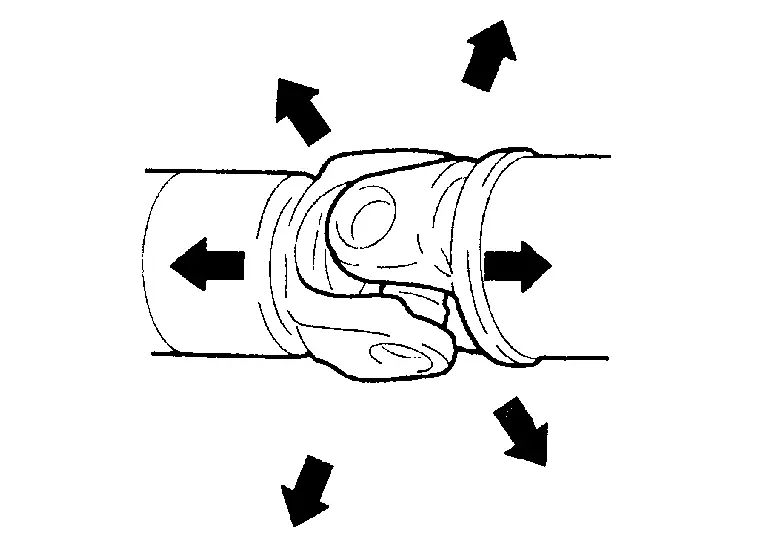
BACKLASH OF JOINT PART
Move the joint of propeller shaft up and down and from side to side (axial direction of shaft and right angle to shaft) to check that the joint has no backlash extremely. If the joint has a malfunction, remove propeller shaft and perform inspection.
APPEARANCE AND NOISE
Check propeller shaft tube surface for dents or cracks. If malfunction is detected, replace propeller shaft assembly.
VIBRATION
If vibration is present at high speed, adjust the propeller shaft phase first.
Check the propeller shaft for bend and damage. If damaged, replace propeller shaft assembly.
Perform a cruise test drive to check the propeller shaft for runout. If vibration occurs, separate propeller shaft at final drive companion flange; then change the phase between companion flange and propeller shaft by the one bolt hole at a time and install propeller shaft.
If vibration is still detected, measure propeller shaft runout after removing it. Refer to Inspection.
Other materials
In-Cabin Microfilter
Exploded View
Refer to Exploded View.
Removal and Installation
REMOVALRemove glove box lid inner. Refer to Removal and Installation.
Disengage fixing pawls, and then remove filter cover.
: Pawl
Remove in-cabin microfilter.INSTALLATIONNote the following items, and then install in the reverse o ...
Additional Service When Replacing Around View Monitor Control Unit
Description
CAUTION:
When replacing the around view monitor control unit, always replace it with a new one. Around view monitor system does not operate properly in case of reuse of the around view monitor control unit from another vehicle.
When before writing the around view monitor control unit ...
Telematics
Telematics System Symptoms
Symptom Table
RELATED TO TELEMATICSOn board (on the vehicle) Symptoms Check items Radio wave icon display Pop-up message Possible malfunction location/Action to take
Telematics operation is not available.
Check the display when Telematics is operated.
—
— ...