The Nissan Armada NISMO models are equipped with distinctive aerodynamic and styling components that enhance both performance and visual appeal at the front, sides, and rear of the vehicle.
- Front spoiler
- Side sill extensions
- Rear bumper with the aerodynamic diffuser
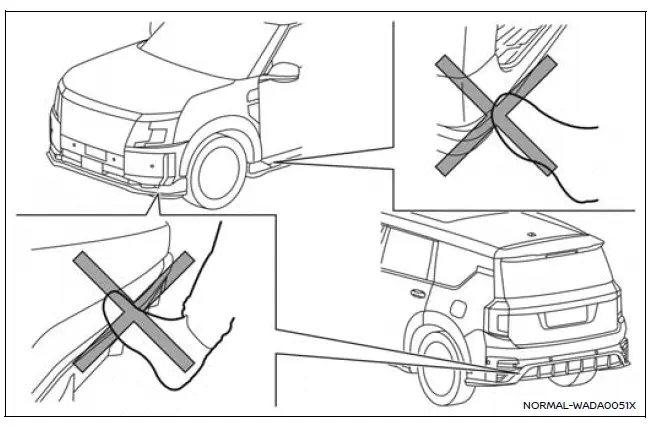
CAUTION
-
Do not step on or apply weight to the Nissan Armada front spoiler, rear bumper with aerodynamic diffuser, or side sill extensions. These components are designed for aerodynamics and styling, not for supporting weight, and may be damaged if misused.
-
When the Nissan Armada ride height changes due to the air suspension system (if equipped):
-
Take extra care to avoid contact between the aerodynamic components and road obstacles such as curbs, speed bumps, or parking barriers, as this may cause damage.
-
Reduce speed when approaching or descending steep inclines to prevent scraping or impact.
-
Other materials
Front, front central seat-mounted side-impact supplemental air bag and roof-mounted
curtain side-impact and rollover supplemental air bag systems
*: if so equipped
In the Nissan Armada, the supplemental side-impact and curtain air bag systems
are engineered to provide enhanced protection for occupants during side collisions
and rollover events. These systems work together with seat belts to form a comprehensive
safety network.
The ...
Front Automatic Air Conditioning System
Work Procedure
DESCRIPTIONThe purpose of the operation inspection is to check that the individual system operates normally. Check condition
: Engine running at normal operating temperature.
OPERATION INSPECTION (DISPLAY UNIT)CHECK MEMORY FUNCTION
Touch AUTO switch to activate air conditioning ...
Head up Display Screen Is Not Displayed
Diagnosis Procedure
CHECK HEAD UP DISPLAY MAIN SWITCH OPERATION
With CONSULT
Turn ignition switch ON.
Select "Main switch" in "Data Monitor" mode of "Head Up Display� using CONSULT.
Check "Main switch" indication as per the following condition.
Monitor item Condition Indication
Main sw ...