Exploded View
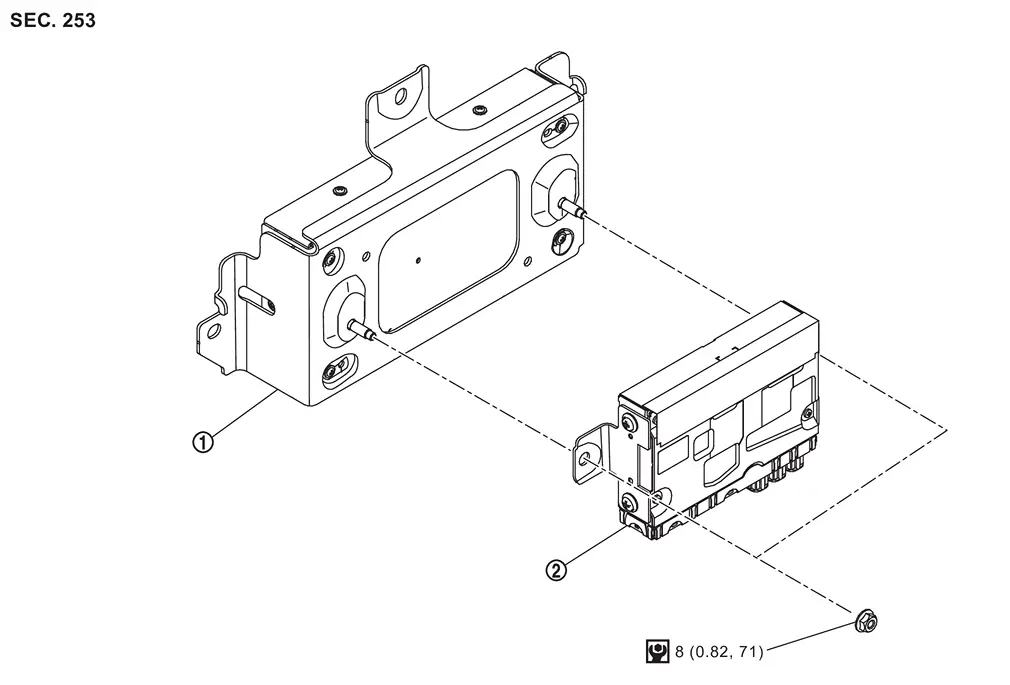
 |
Front camera unit |  |
HD map module | ||
 |
: N·m (kg-m, in-lb) | ||||
Removal and Installation
REMOVAL
Remove luggage side lower finisher LH. Refer to Removal and Installation.
Remove front camera unit. Refer to Removal and Installation.
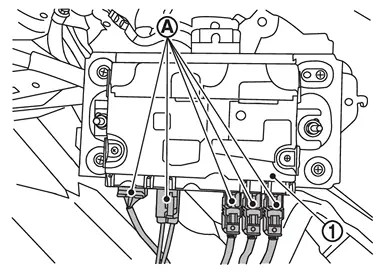
Disconnect HD map module harness connectors  from HD map module .
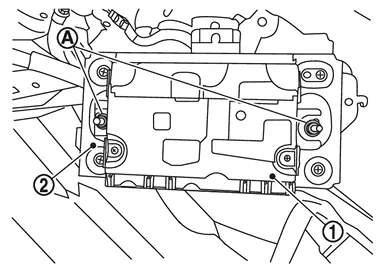
Remove mounting nuts , and remove HD map module from front camera unit .
INSTALLATION
Note the following, and install in the reverse order of removal.
CAUTION:
Be sure to perform “ADDITIONAL SERVICE WHEN REPLACING HD MAP MODULE� when replacing HD map module. Refer to Work Procedure.
Other materials
Front Propeller Shaft
Exploded View
REMOVAL
Propeller shaft assembly
: vehicle front
: N·m (kg-m, ft-lb)
: Always replace after every disassembly.
DISASSEMBLY
Snap ring
Journal bearing
Journal
Flange yoke
Propeller shaft tube
: Select with proper thickness. ...
Sonar Sensor (front)
Exploded View
CITY MODELS
Front bumper fascia
Corner sensor front LH holder
Corner sensor front LH
Center sensor front LH holder
Center sensor front LH
Center sensor front RH holder
Center sensor front RH
Corner sensor front RH
Corner sensor front RH holder
vehicle fro ...
Hd Map Module
Additional Service When Replacing Hd Map Module
Work Procedure
When the following parts are replaced or removed, be sure to perform the specified incidental work in order to operate the system normally.NOTE:
Since HD map module starts updating the map data from a position close to the own vehicle a ...