Basic information
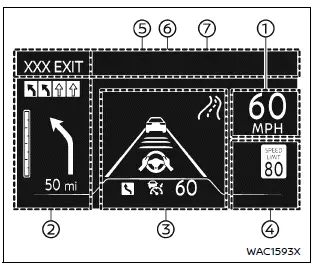
Example
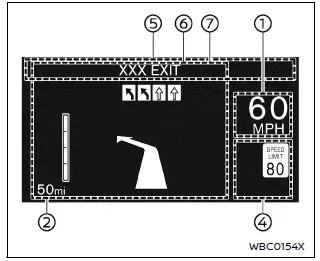
Example
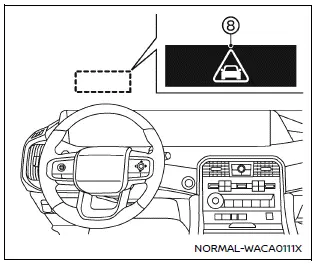
WARNING
- In the Nissan Armada, improper adjustment of the HUD brightness or position may obstruct the driver’s forward visibility through the windshield, increasing the risk of accidents that could lead to serious injury or death.
- Do not focus on the Head Up Display (HUD) in the Nissan Armada for extended periods. Always keep attention on the road, as distraction may prevent you from noticing vehicles, pedestrians, or obstacles.
The Nissan Armada Head Up Display (HUD) can present a wide range of real-time driving information directly in the driver’s line of sight, including:
- Vehicle speed
- Navigation directions
- Driving Assist system status
- Traffic Sign Recognition
- Audio information
- TEL/SMS notifications
- Driver assistance alerts
- Warning messages
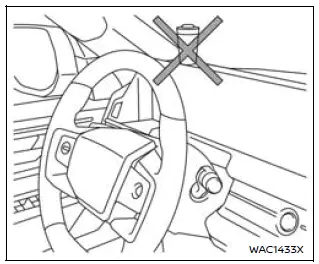
CAUTION
- Do not spill liquids near the HUD projector in the Nissan Armada, as this may cause system malfunction.
- Avoid touching internal components of the HUD projector, as this may damage the system.
- Do not place sharp objects near the projector opening to prevent scratches on the display surface.
- Ensure no objects are placed on the instrument panel that could block the HUD projection in the Nissan Armada.
- Clean the projector lens using a soft cloth with water only. Avoid using chemicals, alcohol, or abrasive materials that may damage or discolor the lens.
- Do not spray liquids directly onto the HUD lens, as this may lead to malfunction of the Nissan Armada display system.
NOTE:
- When wearing polarized sunglasses, the HUD image in the Nissan Armada may become difficult to see. Adjust brightness or remove sunglasses if necessary.
- Weather conditions such as rain, snow, or strong sunlight may affect HUD visibility.
- If the HUD image appears distorted in the Nissan Armada, have the system inspected by an authorized Nissan dealer.
- The Nissan Armada uses a specially designed windshield for HUD projection. Replacement should only be performed by a Nissan dealer.
- For cleaning, use a soft dry cloth or a slightly damp cloth, followed by a dry wipe to maintain clarity.
How to use the HUD
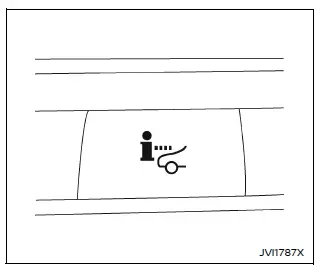
Basic information
To activate the Head Up Display in the Nissan Armada, press the HUD switch. Press it again to turn the system off.
If the HUD is turned off, it will remain disabled even after restarting the Nissan Armada, maintaining the last selected setting.
The following HUD settings in the Nissan Armada can be customized via the vehicle information display:
- Brightness
- Height
- Rotation
- Contents selection
- Navigation
- Driving Assist
- Speed Limit Sign
- Audio
- TEL/SMS
- Reset
NOTE:
- Critical alerts may still appear in the Nissan Armada HUD even if the system is turned off.
- When Driving Assist systems are active, the HUD may automatically display ProPILOT Assist information regardless of manual settings.
This Nissan Armada system incorporates multiple types of software:
(1) Panasonic Corporation software or software developed specifically for Panasonic Corporation
(2) Third-party licensed software integrated into the Nissan Armada system
(3) Open source software components
For open source software (OSS) details, refer to the official license information website.
Refer to the license web site at: http:// car.panasonic.jp/oss/j03llnna
Display brightness
The brightness of the Nissan Armada HUD can be manually adjusted through the vehicle settings menu.
Additionally, the system automatically adapts brightness based on external lighting conditions to maintain optimal visibility.
Avoid exposing the Nissan Armada HUD sensor to strong light sources, as this may interfere with proper operation.
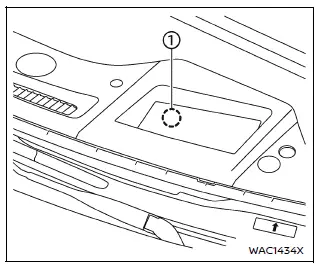
NOTE:
- The Nissan Armada HUD includes an integrated sensor 1 that automatically adjusts display brightness. Blocking this sensor may reduce visibility and make the projection harder to read.
Driver Assistance/Navigation/Traffic Sign/Audio/TEL/SMS/Message for Driver Assistance linking
In the Nissan Armada, the Head-Up Display (HUD) integrates multiple systems to present critical driving information directly within the driver’s field of view, enhancing safety and convenience.
The Driver Assistance interface in the Nissan Armada HUD provides real-time alerts and warnings for the following systems (if equipped):
- Automatic Emergency Braking (AEB) with Pedestrian Detection
- Intelligent Forward Collision Warning (I-FCW)
- Lane Departure Warning (LDW)
- Intelligent Lane Intervention (I-LI)
- Hands-free warning
- Lane Change Assist indicator (ProPILOT Assist 2.1)
The Navigation System integration in the Nissan Armada HUD delivers clear and intuitive route guidance, including:
- Intersection names
- Directional arrows for turns
- Distance to the next maneuver
- Recommended driving lane indicators
The Traffic Sign Recognition (TSR) system in the Nissan Armada HUD displays essential road sign information such as:
- Speed Limit Sign
The Audio system integration allows Nissan Armada drivers to view current media details without diverting attention from the road:
- Song titles
- Radio station information
The TEL/SMS interface displays incoming communication details directly in the Nissan Armada HUD:
- Caller name or phone number
The system message display in the Nissan Armada provides updates related to advanced assistance systems:
- ProPILOT Assist 2.1
Warning message
When critical systems are activated in the Nissan Armada, warning messages are projected onto the HUD to ensure immediate driver awareness.
- ProPILOT Assist 2.1
- Automatic Emergency Braking (AEB) with Pedestrian Detection system
Other materials
Parking Brake Does Not Operate
Description
The parking brake is not applied even when the parking brake switch is pulled.
Diagnosis Procedure
PERFORM THE SELF-DIAGNOSIS
With CONSULT
Perform self-diagnosis for “ABS�.
Is DTC detected?
YES>>
Check the DTC. Refer to DTC Index.
NO>>
GO TO 2.
CHECK PARKING BRAKE ACTUA ...
Telematics
Diagnosis and Repair Work Flow
Work Flow
OVERALL SEQUENCE
Reference 1··· Refer to Consult Function.
Reference 2··· Refer to DTC Index.
Reference 3··· Refer to Symptom Table.
DETAILED FLOWINTERVIEW AND SYMPTOM CONFIRMATION
Check the malfunction symptoms by performing the following ite ...
Diagnosis and Repair Work Flow
Work Flow
OVERALL SEQUENCEDETAILED FLOWGET INFORMATION FOR SYMPTOM
Get the detailed information about symptom from customer.
Check the drive mode indicator on the meter appeared.
Check the drive mode indicator on the meter changed when operates the drive mode selector switch.
>>
GO T ...