Diagnosis and Repair Work Flow
Work Flow
OVERALL SEQUENCE
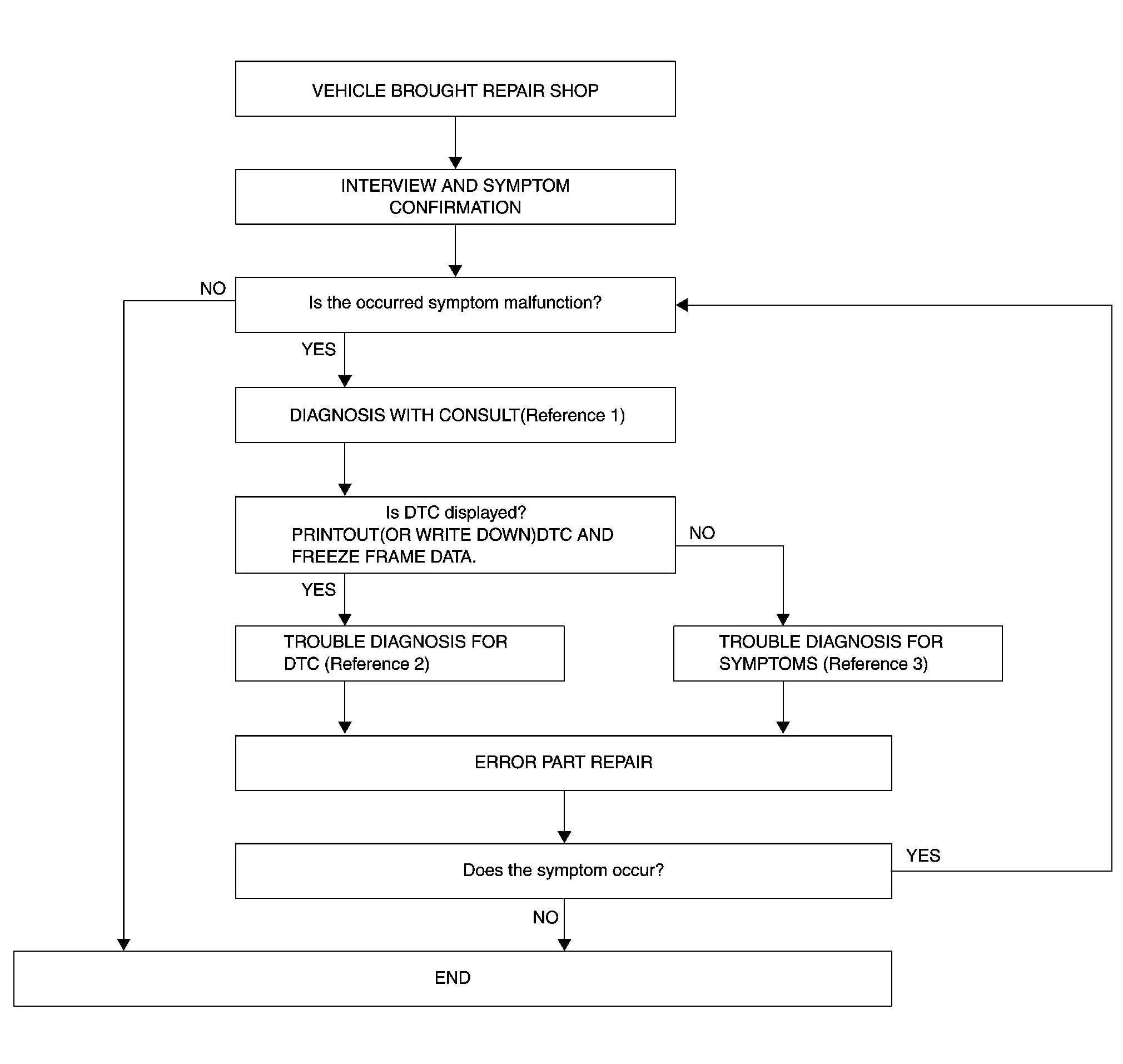
-
Reference 1··· Refer to Consult Function.
-
Reference 2··· Refer to DTC Index.
-
Reference 3··· Refer to Symptom Table.
DETAILED FLOW
INTERVIEW AND SYMPTOM CONFIRMATION
Check the malfunction symptoms by performing the following items.
-
Interview the customer to obtain the malfunction information (conditions and environment when the malfunction occurred).
-
Check the symptom.
Is the occurred symptom malfunction?
YES>>GO TO 2.
NO>>INSPECTION END
DIAGNOSIS WITH CONSULT
With CONSULT
-
Connect CONSULT and perform a self-diagnosis for “IVC�. Refer to Consult Function.
-
When DTC is detected, follow the instructions below:
-
Record DTC and Freeze Frame Data.
-
Are any DTCs displayed?
YES>>GO TO 3.
NO>>GO TO 4.
TROUBLE DIAGNOSIS FOR DTC
-
Check the DTC indicated in the self-diagnosis results.
-
Perform the relevant diagnosis referring to the DTC Index. Refer to DTC Index.
>>
GO TO 4.
PERFORM SYMPTOM DIAGNOSIS
Perform the relevant diagnosis referring to the diagnosis chart by symptom. Refer to Symptom Table.
>>
GO TO 5.
ERROR PART REPAIR
With CONSULT
-
Repair or replace the identified malfunctioning parts.
-
Perform a self-diagnosis for “IVC� with CONSULT.
-
Check that the symptom does not occur.
Does the symptom occur?
YES>>GO TO 1.
NO>>INSPECTION END
Additional Service When Replacing Tcu
Work Procedure
Description
When TCU is replaced, TCU configuration is required.
Preparation before configuration operation
-
Subscribe to telematics service.
-
Preregister user ID and password (can be performed from owner homepage).
-
Since VIN data is not included in the TCU after replacement, it is required to write VIN data with CONSULT.
Work Procedure
CAUTION:
Be sure to perform configuration before writing the VIN data after replacing the TCU.
READING OF VIN DATA
WITH CONSULT
-
Turn ignition switch ON and wait at least 5 seconds.
-
Select “Save vehicle identification number data� of “Work support� item using CONSULT.
-
Touch “Start� on “Save vehicle identification number data� screen to save the VIN data stored in replaced TCU in CONSULT.
 NOTE:
NOTE:
If it cannot be saved, writing operation must be performed manually.
>>
GO TO 2.
TCU REPLACEMENT
Replace TCU. Refer to Removal & Installation.
>>
GO TO 3.
PERFORM TCU CONFIGURATION
WITH CONSULT
Touch "Replace ECU" of CONSULT, Perform TCU configuration according to CONSULT.
Can VIN data be saved to CONSULT at 1st step?
YES>>GO TO 4.
NO>>GO TO 5.
AUTOMATIC WRITING OF VIN DATA TO TCU
CAUTION:
Perform "Self-diagnosis" and confirm that DTC is not detected in "IVC".
WITH CONSULT
-
Turn ignition switch ON and wait at least 5 seconds.
-
Select “Write vehicle identification number (saved data)� of “Work support� item using CONSULT.
-
Touch “Start� at “Write vehicle identification number (saved data)� screen to write the VIN data saved in CONSULT into new TCU.
>>
GO TO 6.
MANUAL WRITING OF VIN DATA TO TCU
CAUTION:
Perform "Self-diagnosis" and confirm that DTC is not detected in "IVC".
WITH CONSULT
-
Turn ignition switch ON and wait at least 5 seconds.
-
Select “Write vehicle identification number (manual input)� of “Work support� item using CONSULT.
-
Touch “Start� at “Write vehicle identification number (manual input)� screen to write the VIN data into new TCU.
>>
GO TO 6.
CHECK NETWORK INITIAL SETTINGS
WITH CONSULT
Select “Work Support� of “IVC� and perform “Network initial settings�.
>>
WORK END
Additional Service After Automatic Report
Work Procedure
Description
When the automatic report function of the TCU is activated, the TCU locks the automatic report function after the automatic report. Therefore, it is necessary to release the lock on the TCU after the automatic report function of the TCU is activated.
Work Procedure
AUTOMATIC REPORT PREVENTION RELEASE
CONSULT Work support
-
Turn ignition switch ON.
-
Select "Automatic report prevention release" to unlock the automatic report prevention.
>>
WORK END
Other materials
Performance Test
Inspection
INSPECTION PROCEDURE
Connect recovery/recycling/recharging equipment (for HFO-1234yf) or manifold gauge.
Start the engine, and set to the following condition.
Test condition Surrounding condition
Indoors or in the shade
(in a well-ventilated place)
vehicle condition
Door
Closed ...
Rear Pillar Finisher
Removal and Installation
CAUTION:
Never damage the body panel.REMOVALCAUTION:
When removing, always use a remover tool that is made of plastic to prevent damage to the parts.Remove luggage side lower finisher. Refer to Removal and Installation.
Apply protective tape (A) on rear pillar finisher to pr ...
Light & Rain Sensor
Exploded View
Light & rain sensor
Bracket
: Pawl
: vehicle front
: Always replace after every disassembly.
Removal and Installation
REMOVALRemove cover. Refer to Removal and Installation.
Disconnect light & rain sen ...