Example
Example
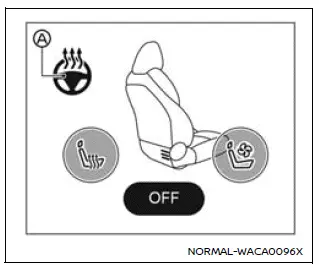
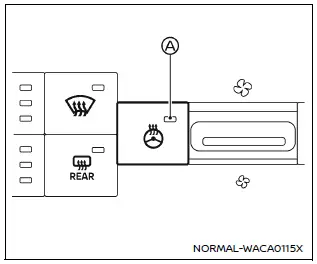
The Nissan Armada heated steering wheel can be controlled either via the touch screen display or by using the dedicated switch on the instrument panel.
1. Start the engine of the Nissan Armada.
2. Touch the
 key A or press the heated steering wheel switch to turn the function ON or OFF.
ON: the icon changes color to orange, or the indicator A illuminates, confirming activation.
OFF: the icon turns white, or the indicator light switches off.
The Nissan Armada system automatically regulates the steering wheel temperature, maintaining it within a комфортний діапазон приблизно 86–104ºF (30–40ºC) by cycling heating on and off.
The indicator remains illuminated while the system is active.
For safety and efficiency, the Nissan Armada heated steering wheel automatically switches off after approximately 30 minutes.
Other materials
Electronic Air Suspension System Symptoms
Symptom Table
WARNING:
Jacking up or lift up the vehicle may the vehicle height to go down which cause a personal injury and/or damage to the air suspension component parts. Refer to Precaution for when Jacking and Lifting Up the vehicle with Electronic Air Suspension System.
Perform self-diag ...
Rear Cooler Pipe Assembly
Removal and Installation
REMOVALCAUTION:
Perform lubricant return operation before each refrigeration system disassembly. However, if a large amount of refrigerant or lubricant leak is detected, never perform lubricant return operation. Refer to Perform Lubricant Return Operation.
When disconnec ...
Propilot Assist 1.1
Propilot Assist 1.1 System Symptoms
Symptom Table
Symptoms Inspection item/Reference page
Operation
System setting cannot be turned ON/OFF
Refer to Diagnosis Procedure
System cannot be set (ProPILOT Assist switch turns ON/OFF)
Refer to Diagnosis Procedure
CANCEL switch does not func ...