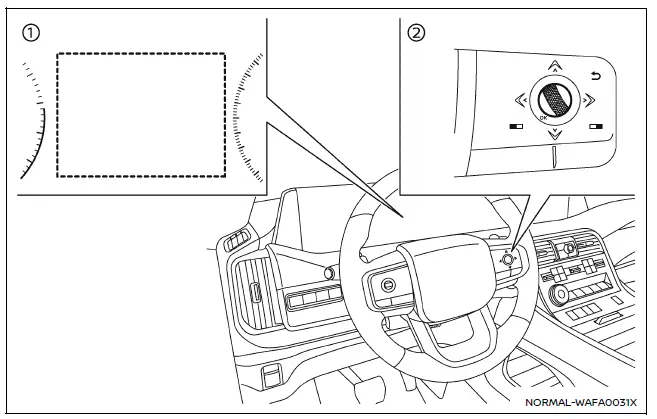
- Vehicle information display
- Steering-wheel-mounted controls (right side)
To configure the Nissan Armada BSW system, follow these steps:
1. Press the
 button until "Settings" appears in the vehicle information display, then confirm
using the scroll dial. Navigate to "Driver Assistance" and confirm.
button until "Settings" appears in the vehicle information display, then confirm
using the scroll dial. Navigate to "Driver Assistance" and confirm.
2. Select "Blind Spot Assist" and press the scroll dial.
3. Choose "Warning" and confirm to enable or disable the Nissan Armada BSW alerts.
4. To manage trailer-related functionality, select "Trailer Blind Spot" and confirm your preferred setting.
NOTE:
The Nissan Armada retains the selected BSW system settings even after the engine is turned off and restarted, ensuring consistent driver preferences across all journeys.
The Nissan Armada Blind Spot Warning system provides an additional layer of safety by monitoring areas that are difficult to see, helping drivers make more informed lane-change decisions while maintaining full control and responsibility for the vehicle.
Other materials
9at: Ge9r01a Tools and Preparation
Preparation
Special Service Tool
The actual shape of the tools may differ from those illustrated here.
Tool number
(TechMate No.)
Tool name
Description
—
(NI-52940)
Transmission jack adaptor
Removing and installing A/T assembly
—
(NI-52972–2)
OFT position change wrench
Remov ...
Door Outside Molding
Exploded View
Front door panel
Front door outside molding
Rear door outside molding
Rear door panel
: Pawl
: vehicle front
Front Door Outside Molding
Removal and Installation
REMOVALCAUTION:
Never damage the front door panel.Fully open front door gl ...
Roof Antenna
Exploded View
Roof antenna
: N·m (kg-m, in-lb)
Removal and Installation
REMOVALRemove the headlining assembly. Refer to Removal and Installation.
Disconnect the antenna feeder connector.
Remove the mounting nut.
Remove the roof antenna from the vehicle.INSTALLATIONNote the following, ...