WARNING
The following limitations apply to the Nissan Armada Blind Spot Warning (BSW) system. Ignoring these limitations or relying solely on the system may lead to serious injury or even fatal accidents.
- The Nissan Armada BSW system is not capable of detecting every vehicle or object in all driving conditions. Driver awareness and proper mirror checks are always required.
- The radar sensors of the Nissan Armada may not detect or properly respond
in certain situations, including but not limited to:
- Pedestrians, cyclists, or animals.
- Motorcycles, very low-profile vehicles, or vehicles with unusually high ground clearance.
- Oncoming traffic in opposing lanes.
- Vehicles already present in the detection zone when accelerating from a stop.
- Vehicles merging into adjacent lanes at nearly the same speed as your Nissan Armada.
- Vehicles rapidly approaching from behind.
- Vehicles that your Nissan Armada overtakes quickly.
- Vehicles that pass through the detection zone very quickly.
- Multiple vehicles traveling closely together, where only the first vehicle may be detected.
- The detection area of the Nissan Armada BSW system is calibrated for standard lane widths. On wider roads, vehicles in adjacent lanes may not be detected. On narrower roads, vehicles in farther lanes may be mistakenly detected.
- Although the Nissan Armada BSW system is designed to ignore stationary objects, items such as guardrails, walls, vegetation, or parked vehicles may occasionally trigger detection. This behavior is considered normal.
- The performance of the Nissan Armada radar sensors may be reduced under
certain environmental conditions:
- Heavy rain, snow, or fog
- Water spray from the road surface
- Accumulation of ice, dirt, or debris on the vehicle sensors
- Do not place stickers, protective films, accessories, or additional paint
near the radar sensor areas of the Nissan Armada.
Any obstruction may significantly reduce the system’s ability to detect surrounding vehicles accurately.
- Loud cabin noise, such as high audio volume or open windows, may prevent the driver from hearing the Nissan Armada BSW warning chime.
BSW driving situations
Basic information
Indicator on

Indicator off

Indicator flashing

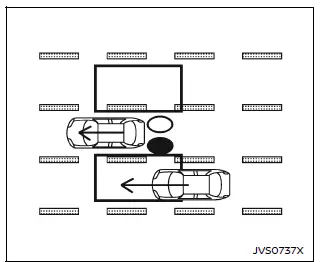
Illustration 1 - Approaching from behind
Vehicle approaching from behind
Illustration 1 demonstrates how the Nissan Armada BSW system activates when another vehicle enters the blind spot detection zone from the rear in an adjacent lane. In this case, the side indicator light illuminates to notify the driver.
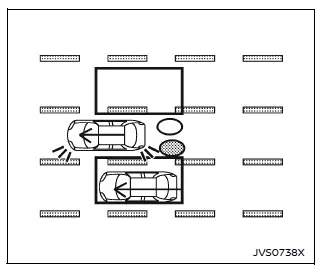
Illustration 2 - Approaching from behind
In Illustration 2, the Nissan Armada Blind Spot Warning system continues to monitor the adjacent lane as the approaching vehicle moves closer. If the driver attempts to change lanes while the vehicle remains in the detection zone, the system escalates the warning by flashing the indicator and sounding an alert.
The Nissan Armada BSW system is designed to enhance situational awareness, but it cannot replace attentive driving. Always combine system alerts with proper visual checks to ensure maximum safety during lane changes.
Illustration 2: When operating the Nissan Armada and the driver engages the turn signal while another vehicle is present within the blind spot detection zone, the Blind Spot Warning (BSW) system responds by emitting two audible chimes. At the same time, both the side indicator light and the BSW indicator begin flashing to provide a clear and immediate warning.
NOTE:
- The Nissan Armada radar sensors may have limited ability to detect vehicles approaching at very high speeds from behind, especially if they enter the detection zone suddenly.
- If the turn signal is activated before another vehicle enters the detection zone, the Nissan Armada BSW system will still flash the indicators once the vehicle is detected, but an audible warning may not be triggered.
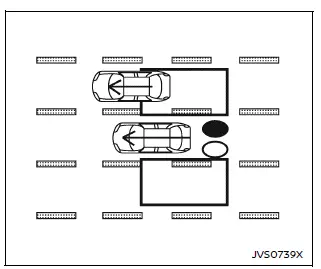
Illustration 3 - Overtaking another vehicle
Overtaking another vehicle
Illustration 3 shows how the Nissan Armada BSW system reacts when your vehicle overtakes another vehicle. If the overtaken vehicle remains within the blind spot detection zone for approximately two seconds, the side indicator light will illuminate to notify the driver.
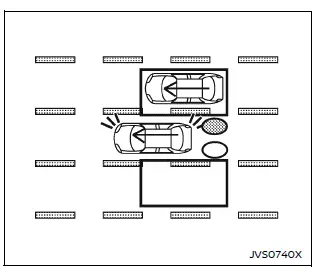
Illustration 4 - Overtaking another vehicle
Illustration 4 demonstrates that if the driver of the Nissan Armada activates the turn signal while the overtaken vehicle is still inside the detection zone, the system escalates the alert by sounding two chimes and flashing both the side indicator light and the BSW indicator.
NOTE:
- When overtaking multiple vehicles in close succession, the Nissan Armada BSW system may only detect the first vehicle, especially if the vehicles are traveling closely together.
- Vehicles moving at significantly lower speeds may not always be detected if the Nissan Armada passes them quickly.
- If the turn signal is activated before a vehicle enters the detection zone, the indicators will flash upon detection, but the audible warning may not be triggered.
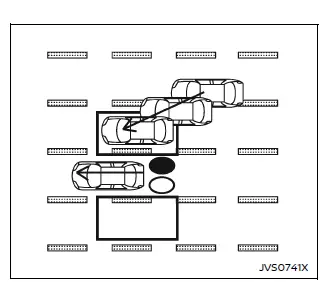
Illustration 5 - Entering from the side
Entering from the side
Illustration 5 highlights how the Nissan Armada Blind Spot Warning system detects vehicles entering the blind spot area from either side. In this case, the side indicator light illuminates to inform the driver of the nearby vehicle.
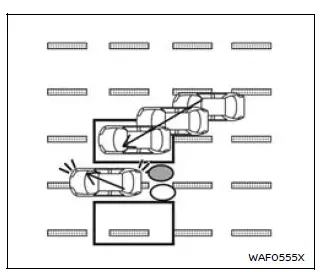
Illustration 6 - Entering from the side
Illustration 6 shows that when the driver signals a lane change while a vehicle is present in the detection zone, the Nissan Armada BSW system activates both visual and audible alerts. The system emits two warning chimes and flashes the side indicator and BSW indicator to emphasize potential danger.
NOTE:
- The Nissan Armada radar sensors may not reliably detect vehicles traveling at nearly the same speed when they enter the blind spot zone.
- If the turn signal is activated before a vehicle enters the detection zone, the system will still provide visual alerts, but an audible warning may not occur.
The Nissan Armada Blind Spot Warning system is designed to support driver awareness in complex traffic situations, especially during overtaking and merging. However, for maximum safety, drivers must always visually confirm surroundings and not rely solely on electronic assistance systems.
Other materials
Speed Adjust by Route (a feature of ProPILOT Assist 1.1 and 2.1)
Speed Adjust by Route is an intelligent feature available in the Nissan Armada
as part of the advanced ProPILOT Assist 1.1 and 2.1 systems. Designed for vehicles
equipped with an integrated map locator system, this function enhances driving comfort
by automatically adapting vehicle speed to ma ...
Road Wheels & Tires Tools and Preparation
Special Service Tool
The actual shapes of TechMate tools may differ from those of special service tools illustrated here.
Tool number
(TechMate No.)
Tool name Description
—
(J-50190)
Signal tech II
Activate and display TPMS tire pressure sensor IDs
Display tire pressure reported by th ...
Reverse Interlock Door Mirror Does Not Operate
Diagnosis Procedure
CHECK DTC
Check DTC for TCM. Refer to DTC Index.
Is the inspection result normal?
YES>>
GO TO 2.
NO>>
Repair or replace the malfunctioning parts.
CHECK DTC
Check DTC for BCM. Refer to DTC Index.
Is the inspection result normal?
YES>>
GO TO 3.
NO>>
Repa ...