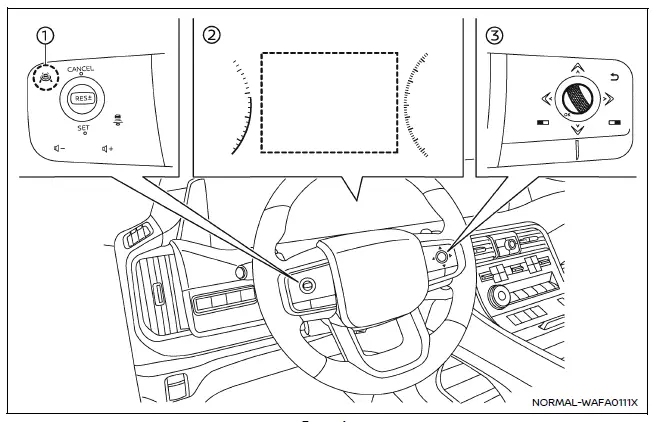
Example
- ProPILOT Assist switch (design may vary depending on the Nissan Armada model)
- Vehicle information display
- Steering-wheel-mounted control (right side)
To configure the Nissan Armada Intelligent Blind Spot Intervention (I-BSI) system, follow these steps:
1. Press the
 button repeatedly until "Settings" appears in the vehicle information display, then
confirm using the scroll dial.
button repeatedly until "Settings" appears in the vehicle information display, then
confirm using the scroll dial.
Use the scroll dial to navigate to "Driver Assistance" and confirm your selection.
2. Select "Blind Spot Assist" and press the scroll dial.
3. Choose "Intervention" and confirm to access I-BSI settings.
4. Press the ProPILOT Assist switch to activate or deactivate the Nissan Armada I-BSI system as needed.
NOTE:
- Activating ProPILOT Assist in the Nissan Armada automatically enables both the I-BSI and Intelligent Lane Intervention (I-LI) systems simultaneously.
- The Nissan Armada retains the selected system settings even after the engine is turned off and restarted, ensuring consistent driver preferences.
Other materials
Push-button ignition switch operation
CAUTION
Avoid leaving your Nissan Armada with the ignition switch in the ON position
while the engine is not running for extended periods, as this can drain the
battery.
Use electrical accessories in your Nissan Armada primarily when the engine
is running. If accessories must be used ...
Seat Lifting
Diagnosis Procedure
CHECK LIFTING MECHANISM
Check for the following.
Mechanism deformation or pinched foreign materials.
Interference with other parts because of poor installation.
Is the inspection result normal?
YES>>
GO TO 2.
NO>>
Repair or replace the malfunctioning parts.
CH ...
Rear Power Window Switch
Removal and Installation
CAUTION:
Never bend the fixing pawl of rear armrest.REMOVALRemove rear door finisher. Refer to Removal and Installation.
Disconnect rear power window switch harness connector.
Remove rear armrest fixing screws , and then remove rear armrest from rear door finisher .
: Pa ...