
Nissan Armada 2025-2026 Owner's Manual: How to enable/disable the LDW system
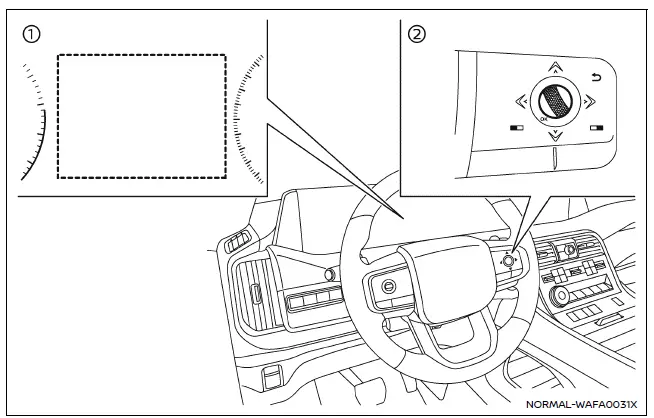
- Vehicle information display
- Steering-wheel-mounted controls (right side)
Basic information
To activate or deactivate the Nissan Armada LDW system, follow these steps:
1. Press the
 button until "Settings" appears in the vehicle information display, then press the
scroll dial.
button until "Settings" appears in the vehicle information display, then press the
scroll dial.
2. Navigate to "Driver Assistance" using the scroll dial and confirm your selection.
3. Select "Lane Assist", then choose "Warning" and confirm to enable or disable the LDW system.
NOTE:
If the Nissan Armada LDW system is turned off, it will remain disabled even after restarting the engine until it is manually reactivated.
I-LI system operation
The Nissan Armada Intelligent Lane Intervention (I-LI) system must be activated using the ProPILOT Assist switch each time the ignition is turned ON.
Similar to LDW, the Nissan Armada I-LI system operates at speeds above approximately 37 MPH (60 km/h) and requires clearly visible lane markings to function correctly.
When the vehicle drifts toward the lane boundary, the system first issues a warning via steering wheel vibration and a blinking orange indicator. It then provides subtle steering input to assist the driver in returning the Nissan Armada to the center of the lane.
To activate the I-LI system in the Nissan Armada, press the ProPILOT Assist switch on the steering wheel after starting the engine. The I-LI ON indicator will illuminate on the vehicle information display. Press the switch again to deactivate the system.
When the system is turned off, the I-LI ON indicator will also turn off.
The Nissan Armada lane assistance technologies provide an additional layer of confidence during highway driving, especially on long journeys, but they are most effective when combined with attentive and responsible driving habits. :contentReference[oaicite:0]{index=0}
 LDW system operation
The Nissan Armada LDW and I-LI systems utilize a forward-facing camera mounted
behind the windshield to continuously monitor lane markings and road boundaries.
Example
I-LI ON indicator ...
 How to enable/disable the I-LI system
Example
ProPILOT Assist switch
Vehicle information display
Steering-wheel-mounted control (right side)
Basic information
In the Nissan Armada, the Intelligent Lane Intervention (I-LI) ...
Other materials:
Rear Door Alert
In the Nissan Armada, the Rear Door Alert system is designed as a helpful reminder
feature that alerts the driver when there may be an item or passenger left in the
rear seats. Always check the rear seating area before exiting the Nissan Armada
to ensure safety.
The Rear Door Alert system in ...
Basic information
Example
Example
WARNING
In the Nissan Armada, improper adjustment of the HUD brightness or position
may obstruct the driver’s forward visibility through the windshield, increasing
the risk of accidents that could lead to serious injury or death.
Do not focus on the Head U ...
Basic information
WARNING
Improper loading or exceeding the recommended trailer capacity for your Nissan
Armada can significantly affect handling, braking efficiency, and overall performance,
potentially leading to dangerous driving conditions or accidents.
CAUTION
Avoid towing a trailer or carrying heavy l ...

0.0036