SRT Set Driving Pattern
CAUTION:
Always drive the vehicle in safe manner according to traffic conditions and obey all traffic laws.
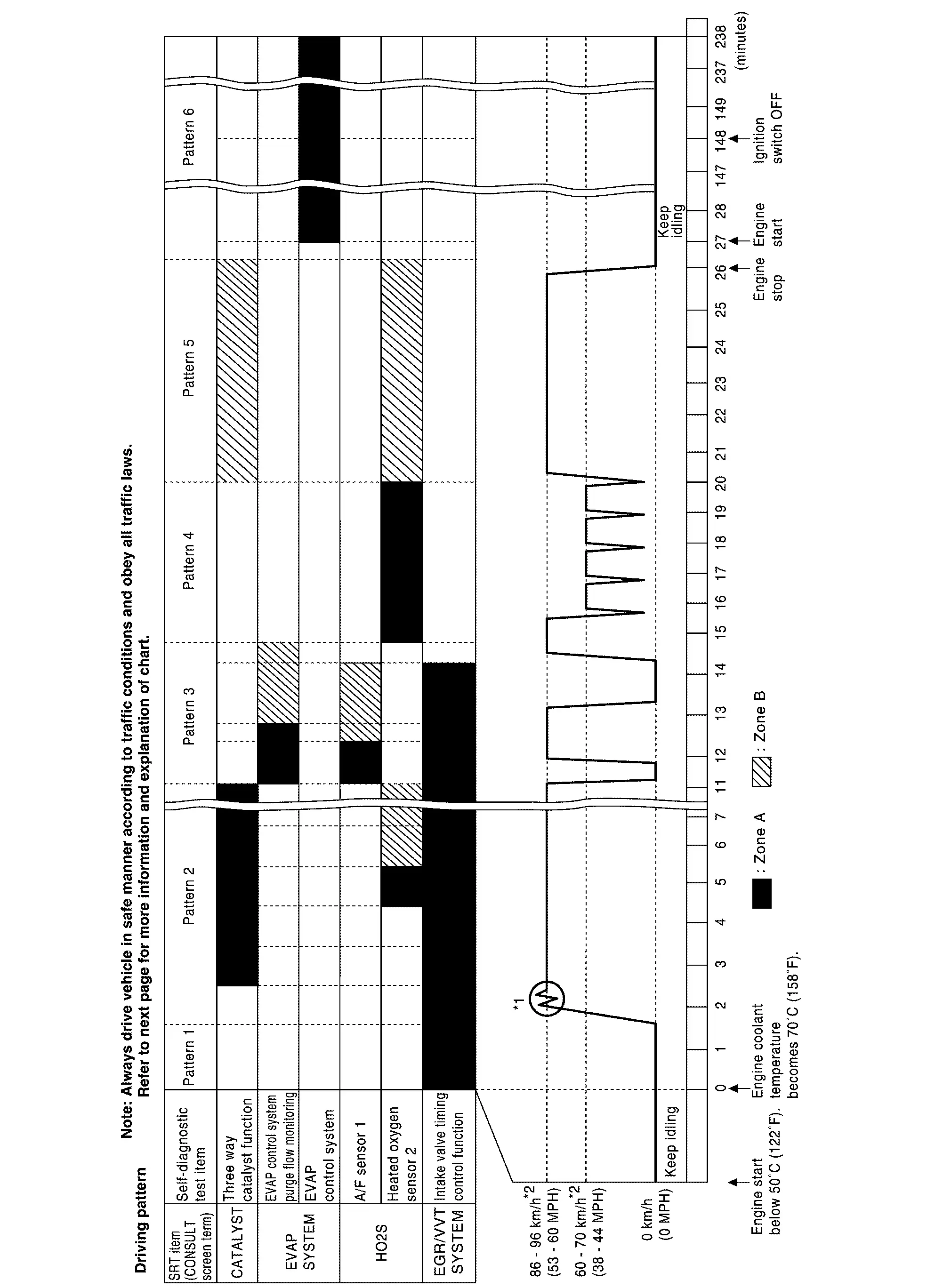
*1: Depress the accelerator pedal until vehicle speed is 90 km/h (56 MPH), then release the accelerator pedal and keep it released for more than 10 seconds. Depress the accelerator pedal until vehicle speed is 90 km/h (56 MPH) again.
*2: Checking the vehicle speed with GST is advised.
-
The time required for each diagnosis varies with road surface conditions, weather, altitude, individual driving habits, etc.
Zone A refers to the range where the time, required for the diagnosis under normal conditions*, is the shortest.
Zone B refers to the range where the diagnosis can still be performed if the diagnosis is not completed within zone A.
*: Normal conditions refer to the following:
-
Sea level
-
Flat road
-
Ambient air temperature: 20 – 30°C (68 – 86°F)
 NOTE:
NOTE:
Diagnosis is performed as quickly as possible under normal conditions. However, under other conditions, diagnosis may also be performed. [For example: ambient air temperature other than 20 – 30°C (68 – 86°F)]
Description
OUTLINE
In order to set all SRTs, the self-diagnoses as in the “SRT ITEM” table must have been performed at least once. Each diagnosis may require actual driving for a long period of time under various conditions.
SRT ITEM
The table below shows required self-diagnostic items to set the SRT to “CMPLT”.
|
SRT item* (CONSULT indication) | Required self-diagnostic items to set the SRT to “CMPLT” | Corresponding DTC No. |
|---|---|---|
| CATALYST | Three way catalyst function | P0420, P0430 |
| EVAP SYSTEM | EVAP control system purge flow monitoring | P0441 |
| EVAP control system | P00FE, P0456 | |
| HO2S | Air fuel ratio (A/F) sensor 1 | P0030, P0031, P0032, P0050, P0051, P0052, P0053, P0059, P0130, P0131, P0132, P014C, P014D, P014E, P014F, P0150, P0151, P0152, P015A, P015B, P015C, P015D, P064D, P064E, P2096, P2097, P2098, P2099, P219A, P219B, P219C, P219D, P219E, P219F, P21A0, P21A1, P2237, P2238, P2239, P2240, P2241, P2242, P2243, P2247, P2251, P2254, P2297, P2298 |
| Heated oxygen sensor 2 | P0036, P0037, P0038, P0056, P0057, P0058, P00D2, P00D4, P0136, P0137, P0138, P0139, P0156, P0157, P0158, P2270, P2271, P2272, P2273, P2A01, P2A04 | |
| EGR/VVT SYSTEM | Intake valve timing control function | P0011, P0012, P0021, P0022, P052A, P052B, P052C, P052D |
| Exhaust valve timing control function | P0014, P0015, P0024, P0025, P054A, P054B, P054C, P054D |
*: Though displayed on the CONSULT screen, “HO2S HTR” is not SRT item.
SRT SERVICE PROCEDURE
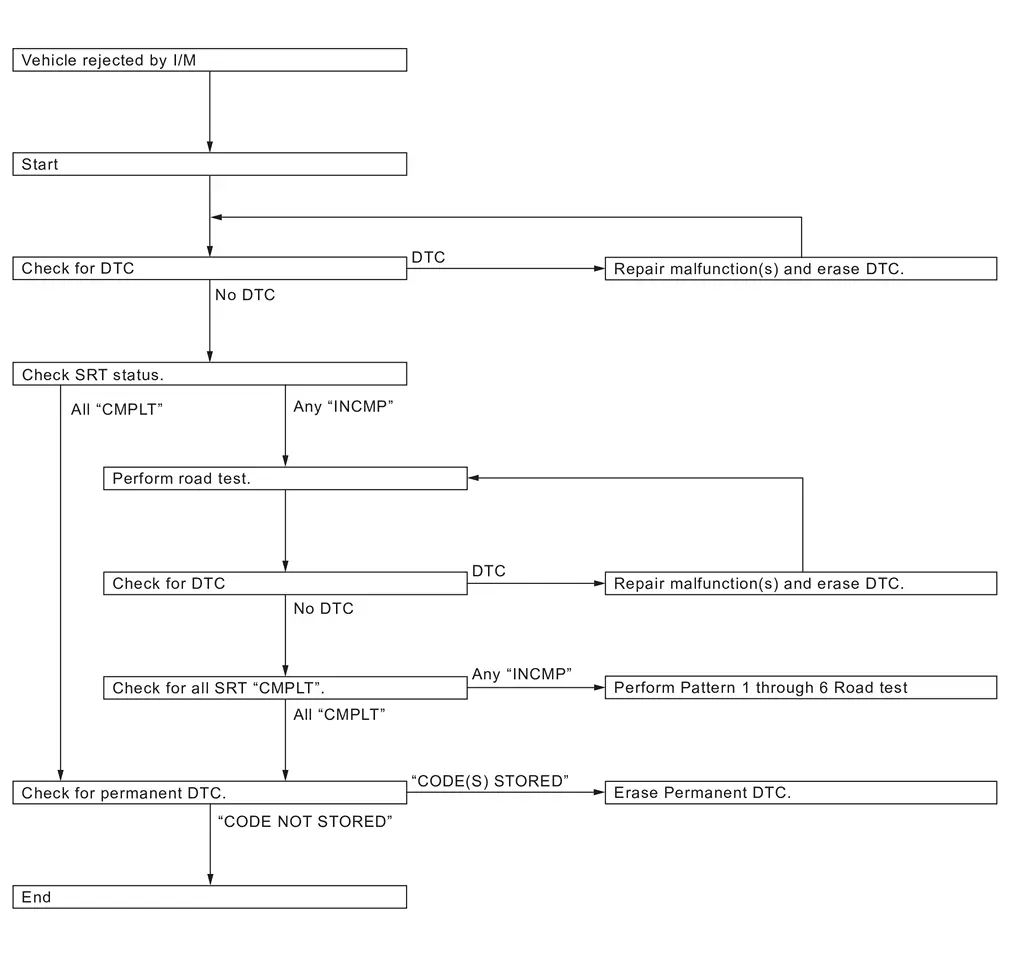
If a vehicle has failed the state emissions inspection due to one or more SRT items indicating “INCMP”, review the flowchart diagnostic sequence, referring to the following flowchart.
Work Procedure
CHECK DTC
Check DTC.
Is any DTC detected?
YES>>Repair malfunction(s) and erase DTC. Refer to DTC Index.
NO>>GO TO 2.
CHECK SRT STATUS
With CONSULT
On CONSULT screen, select “SRT & P-DTC”>>“SRT Status”.
 Without CONSULT
Perform “SRT status” mode with Refer to On Board Diagnosis Function.
 With GST
Select Service $01 with GST.
Is SRT code(s) set?
YES>>GO TO 12.
NO-1>>With CONSULT: GO TO 3.
NO-2>>Without CONSULT: GO TO 4.
DTC CONFIRMATION PROCEDURE
With CONSULT
-
On CONSULT screen, select “SRT & P-DTC”>>“SRT Status”.
-
For SRT(s) that is not set, perform the corresponding “DTC CONFIRMATION PROCEDURE” according to the “Performance Priority” in the “SRT ITEM” table. Refer to Description.
-
Check DTC.
Is any DTC detected?
YES>>Repair malfunction(s) and erase DTC. Refer to DTC Index.
NO>>GO TO 11.
PERFORM ROAD TEST
Without CONSULT
-
Check the “Performance Priority” in the “SRT ITEM” table. Refer to Description.
-
Perform the most efficient SRT set driving pattern to set the SRT properly. Refer to SRT Set Driving Pattern.
In order to set all SRTs, the SRT set driving pattern must be performed at least once.
>>
GO TO 5.
PATTERN 1
-
Check the vehicle condition;
-
Engine coolant temperature is −10 to 35°C (14 to 95°F).
-
Fuel tank temperature is more than 0°C (32°F).
-
-
Start the engine.
-
Keep engine idling until the engine coolant temperature is greater than 70°C (158°F)
NOTE:
ECM terminal voltage is follows;
-
Engine coolant temperature
-
−10 to 35°C (14 to 95°F): 3.0 – 4.3 V
-
70°(158°F): Less than 1.4 V
-
-
Fuel tank temperature: Less than 4.1 V
Refer to Physical Values.
>>
GO TO 6.
PATTERN 2
-
Drive the vehicle. And depress the accelerator pedal until vehicle speed is 90 km/h (56 MPH), then release the accelerator pedal and keep it released for more than 10 seconds.
-
Depress the accelerator pedal until vehicle speed is 90 km/h (56 MPH) again
NOTE:
-
Checking the vehicle speed with GST is advised.
-
When steady-state driving is performed again even after it is interrupted, each diagnosis can be conducted. In this case, the time required for diagnosis may be extended.
>>
GO TO 7.
PATTERN 3
-
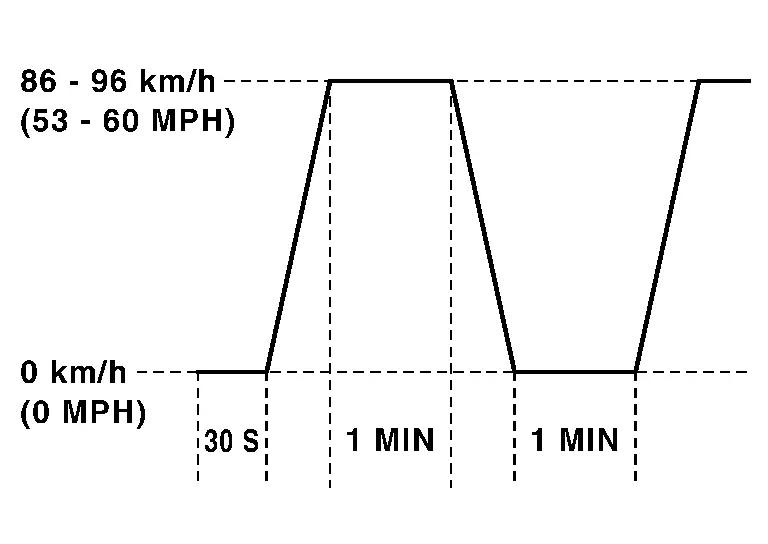
Operate vehicle following the driving pattern shown in the figure.
-
Release the accelerator pedal during deceleration of vehicle speed from 90 km/h (56 MPH) to 0 km/h (0 MPH).
>>
GO TO 8.
PATTERN 4
-
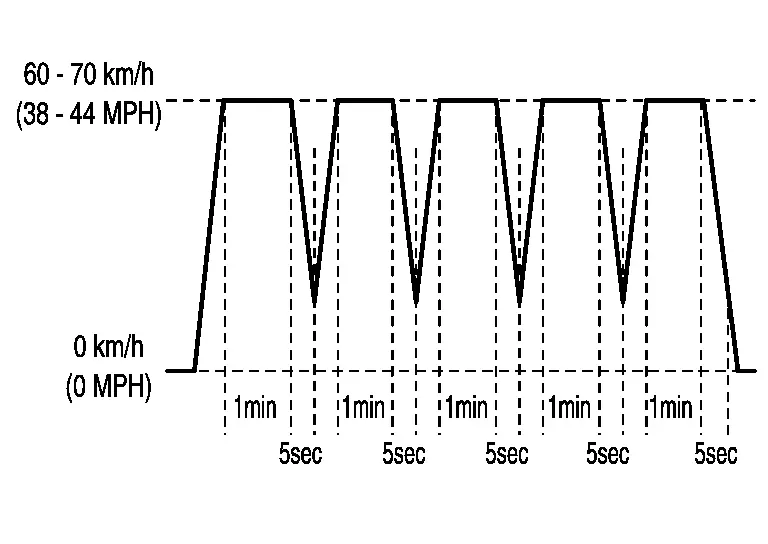
Operate vehicle following the driving pattern shown in the figure.
-
Drive the vehicle in a proper gear at 60 km/h (38 MPH) and maintain the speed.
-
Release the accelerator pedal fully at least 5 seconds.
-
Repeat the above two steps at least 5 times.
-
>>
GO TO 9.
PATTERN 5
-
The accelerator pedal must be held very steady during steady-state driving.
-
If the accelerator pedal is moved, the test must be conducted again.
>>
GO TO 10.
PATTERN 6
Start engine and wait at least 2 hours. Then ignition switch OFF and wait at least 90 minutes.
>>
GO TO 11.
CHECK SRT STATUS
With CONSULT
On CONSULT screen, select “SRT & P-DTC”>>“SRT Status”.
Without CONSULT
Perform “SRT status” mode with Refer to On Board Diagnosis Function.
With GST
Select Service $01 with GST.
Is SRT(s) set?
YES>>GO TO 12.
NO>>Perform Pattern 1 through 6 Road Test.
CHECK PERMANENT DTC
NOTE:
Permanent DTC cannot be checked with a tool other than CONSULT or GST.
With CONSULT
On CONSULT screen, select “SRT & P-DTC”>>“Permanent DTC Status”.
With GST
Select Service $0A with GST.
Is permanent DTC(s) detected?
YES>>Refer to Work Procedure (Group A), Work Procedure (Group B)
NO>>END
How to Erase Permanent Dtc
Description
When a DTC is stored in ECM
When a DTC is stored in ECM and MIL is ON, a permanent DTC is erased with MIL shutoff if the same malfunction is not detected after performing the driving pattern for MIL shutoff three times in a raw.
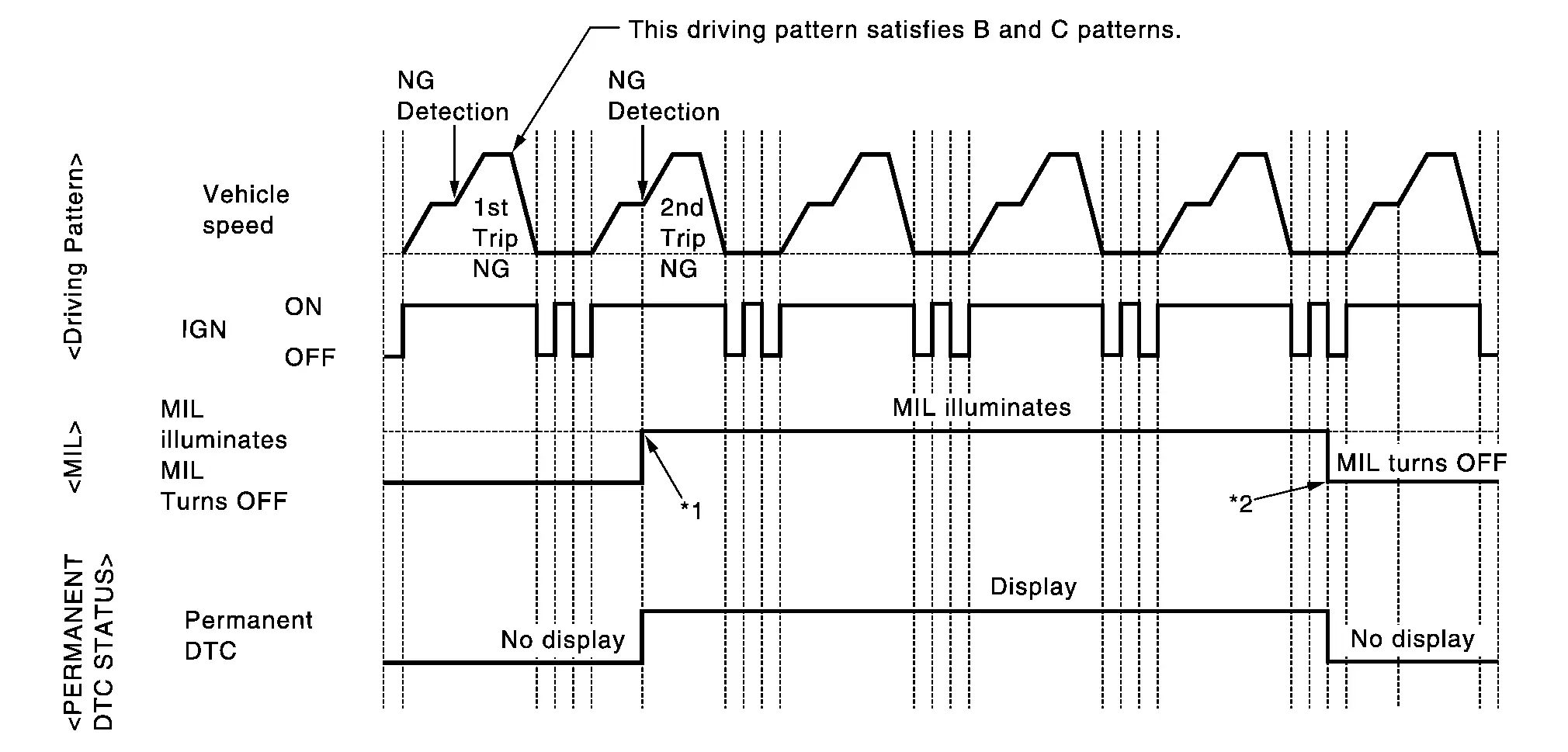
| *1: | When the same malfunction is detected in two consecutive trips, MIL will illuminate. | *2: | MIL will turn off after vehicle is driven 3 times (pattern B) without any malfunctions. |
When a DTC is not stored in ECM
The erasing method depends on a permanent DTC stored in ECM. Refer to the following table.
NOTE:
If the applicable permanent DTC includes multiple groups, perform the procedure of Group B first. If the permanent DTC is not erased, perform the procedure of Group A.
×: Applicable —: Not applicable
| Group * | Perform “DTC CONFIRMATION PROCEDURE” for applicable DTCs. | Driving pattern | |
|---|---|---|---|
| B | D | ||
| A | × | — | — |
| B | — | × | × |
*: For group, Refer to DTC Index.
Permanent DTC item
For permanent DTC items, MIL turns ON. Refer to DTC Index.
Permanent DTC service procedure
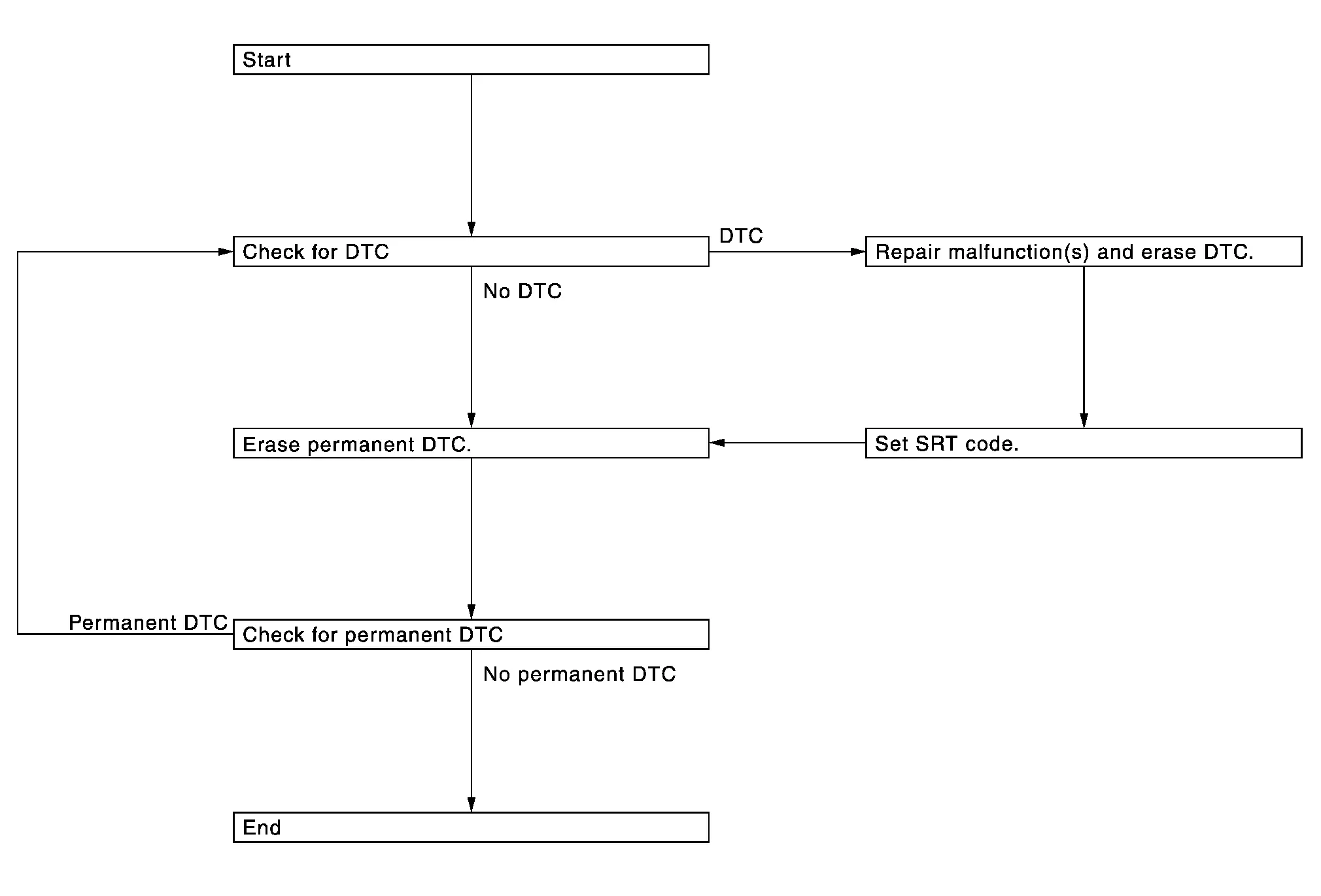
Work Procedure (Group A)
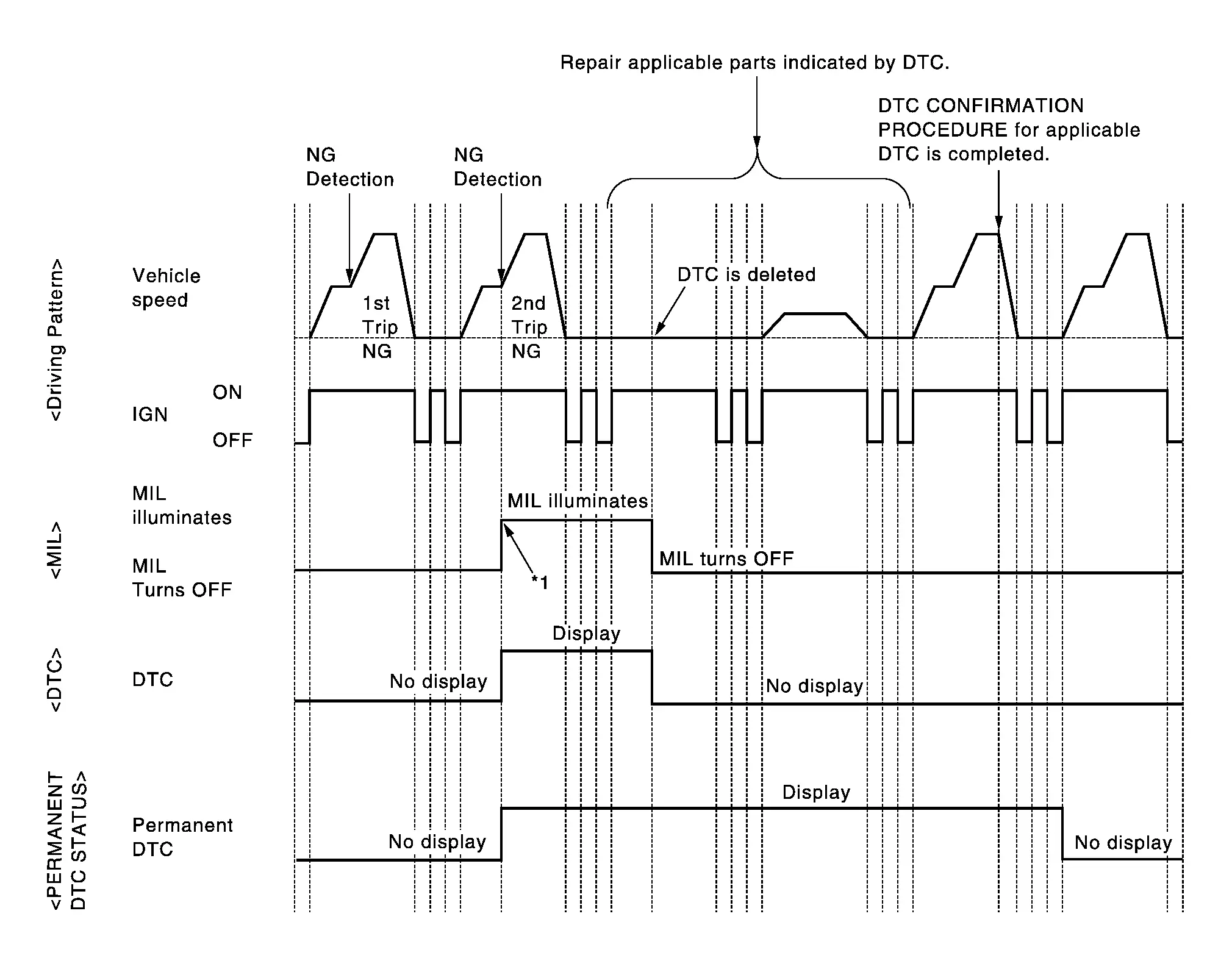
| *1: | When the same malfunction is detected in two consecutive trips, MIL will illuminate. |
CHECK DTC
Check DTC.
Is any DTC detected?
YES>>Repair malfunction(s) and erase DTC.
NO>>GO TO 2 .
CHECK PERMANENT DTC
With CONSULT
-
Ignition switch OFF and wait at least 10 seconds.
-
Ignition switch ON.
-
Ignition switch OFF and wait at least 10 seconds.
-
Ignition switch ON.
-
On CONSULT screen, select “SRT & P-DTC”>>“Permanent DTC Status”.
With GST
-
Ignition switch OFF and wait at least 10 seconds.
-
Ignition switch ON.
-
Ignition switch OFF and wait at least 10 seconds.
-
Ignition switch ON.
-
Select Service $0A with GST.
Is any permanent DTC detected?
YES>>GO TO 3 .
NO>>END
PERFORM DTC CONFIRMATION PROCEDURE
Perform “DTC CONFIRMATION PROCEDURE” for DTCs which are the same as permanent DTCs stored in ECM. Refer to DTC Index.
>>
GO TO 4 .
CHECK PERMANENT DTC
With CONSULT
-
Ignition switch OFF and wait at least 10 seconds.
-
Ignition switch ON.
-
Ignition switch OFF and wait at least 10 seconds.
-
Ignition switch ON.
-
On CONSULT screen, select “SRT & P-DTC”>>“Permanent DTC Status”.
With GST
-
Ignition switch OFF and wait at least 10 seconds.
-
Ignition switch ON.
-
Ignition switch OFF and wait at least 10 seconds.
-
Ignition switch ON.
-
Select Service $0A with GST.
Is any permanent DTC detected?
YES>>GO TO 1 .
NO>>END
Work Procedure (Group B)
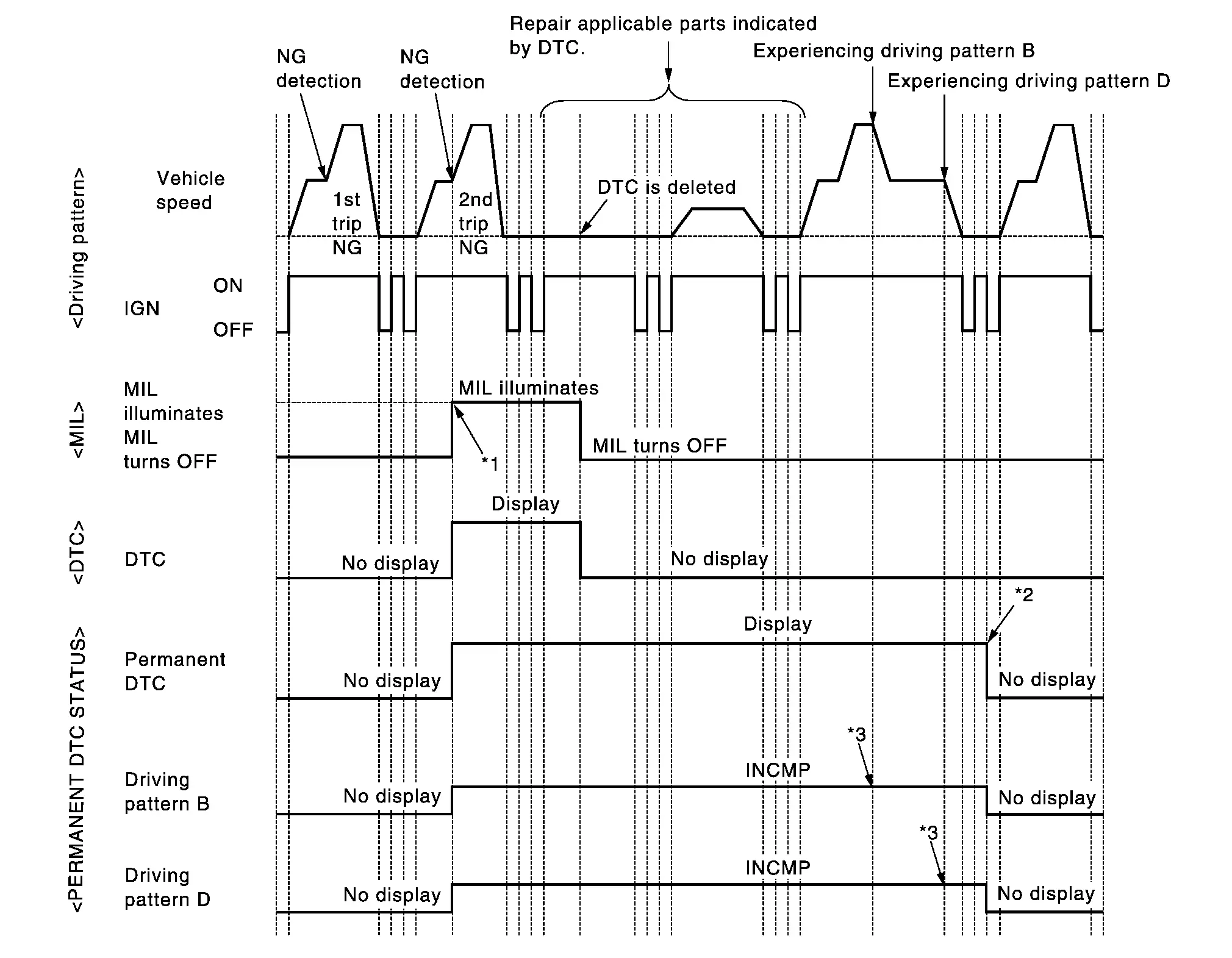
| *1: | When the same malfunction is detected in two consecutive trips, MIL will illuminate. | *2: | After experiencing driving pattern B and D, permanent DTC is erased. | *3: | Indication does not change unless the ignition switch is turned from ON to OFF twice even after experiencing driving pattern B or D. |
NOTE:
Drive the vehicle according to only driving patterns indicating “INCMP” in driving patterns B and D on the “PERMANENT DTC STATUS” screen.
CHECK DTC
Check DTC.
Is any DTC detected?
YES>>Repair malfunction(s) and erase DTC.
NO>>GO TO 2 .
CHECK PERMANENT DTC
With CONSULT
-
Ignition switch OFF and wait at least 10 seconds.
-
Ignition switch ON.
-
Ignition switch OFF and wait at least 10 seconds.
-
Ignition switch ON.
-
On CONSULT screen, select “SRT & P-DTC”>>“Permanent DTC Status”.
With GST
-
Ignition switch OFF and wait at least 10 seconds.
-
Ignition switch ON.
-
Ignition switch OFF and wait at least 10 seconds.
-
Ignition switch ON.
-
Select Service $0A with GST.
Is any permanent DTC detected?
YES>>GO TO 3 .
NO>>END
DRIVE DRIVING PATTERN B
CAUTION:
-
Always drive at a safe speed.
-
Never erase self-diagnosis results.
-
If self-diagnosis results are erased during the trip of driving pattern B or D, the counter of driving pattern B and D is reset.
With CONSULT
-
Start engine and warm it up to normal operating temperature.
-
Use “PERMANENT DTC WORK SUPPORT” mode with CONSULT to drive the vehicle according to driving pattern B. Refer to CONSULT Function. , Refer to Driving Pattern.
With GST
-
Start engine and warm it up to normal operating temperature.
-
Drive the vehicle according to driving pattern B. Refer to Driving Pattern.
>>
GO TO 4 .
CHECK PERMANENT DTC
With CONSULT
-
Ignition switch OFF and wait at least 10 seconds.
-
Ignition switch ON.
-
Ignition switch OFF and wait at least 10 seconds.
-
Ignition switch ON.
-
On CONSULT screen, select “SRT & P-DTC”>>“Permanent DTC Status”.
With GST
-
Ignition switch OFF and wait at least 10 seconds.
-
Ignition switch ON.
-
Ignition switch OFF and wait at least 10 seconds.
-
Ignition switch ON.
-
Select Service $0A with GST.
Is any permanent DTC detected?
YES>>GO TO 5 .
NO>>END
DRIVE DRIVING PATTERN D
CAUTION:
-
Always drive at a safe speed.
-
Never erase self-diagnosis results.
-
If self-diagnosis results are erased during the trip of driving pattern B or D, the counter of driving pattern B and D is reset.
-
Drive the vehicle according to driving pattern D. Refer to Driving Pattern.
>>
GO TO 6 .
CHECK PERMANENT DTC
With CONSULT
-
Ignition switch OFF and wait at least 10 seconds.
-
Ignition switch ON.
-
Ignition switch OFF and wait at least 10 seconds.
-
Ignition switch ON.
-
On CONSULT screen, select “SRT & P-DTC”>>“Permanent DTC Status”.
With GST
-
Ignition switch OFF and wait at least 10 seconds.
-
Ignition switch ON.
-
Ignition switch OFF and wait at least 10 seconds.
-
Ignition switch ON.
-
Select Service $0A with GST.
Is any permanent DTC detected?
YES>>GO TO 1 .
NO>>END
Other materials
Accelerator Pedal Released Position Learning
Description
Accelerator Pedal Released Position Learning is a function of ECM to learn the fully released position of the accelerator pedal by monitoring the accelerator pedal position sensor output signal. It must be performed each time the harness connector of the accelerator pedal position sensor ...
Without Tail Lamp
Exploded View
Emblem A
Emblem B
Emblem C
Removal and Installation
REMOVALRemove emblem from the panel while warming using an industrial dryer. CAUTION:
Never damage the painted surface of the panel when removing.INSTALLATIONNote the following items, and then install in the reverse order o ...
Additional Service When Replacing Combination Meter
Work Procedure
DESCRIPTIONWhen replacing the Combination meter, perform the procedures before and after replacement.Before ReplacementTake note the odometer mileage of the combination meter. When replacing the combination meter, check that DTC’s are not detected at "self-diagnostic result" of ABS. ...