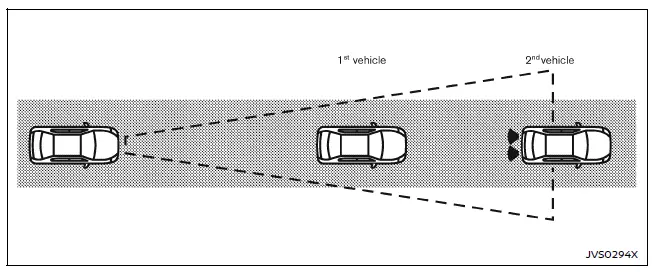
The Nissan Armada I-FCW system becomes active at speeds above approximately 3 MPH (5 km/h), ensuring functionality during most driving scenarios.
When a potential forward collision risk is detected, the Nissan Armada system immediately alerts the driver by flashing the vehicle-ahead detection indicator and emitting a clear audible warning signal, prompting timely driver response.
Turning the I-FCW system ON/OFF
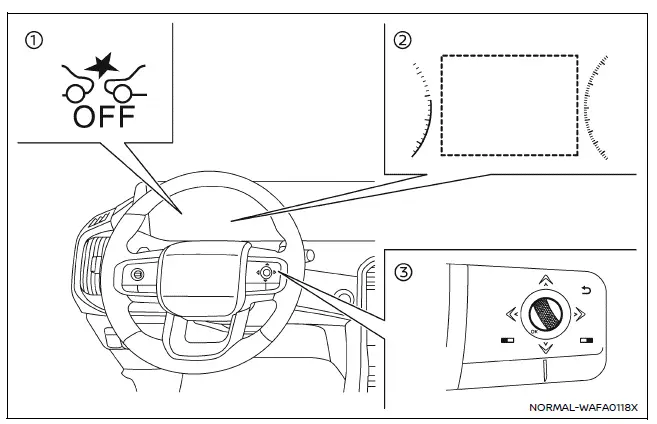
- AEB system OFF warning light (instrument panel)
- Vehicle information display
- Steering-wheel-mounted controls (right side)
Follow these steps to enable or disable the I-FCW system in the Nissan Armada:
1. Press the
 button until "Settings" appears on the vehicle information display, then confirm
using the scroll dial.
button until "Settings" appears on the vehicle information display, then confirm
using the scroll dial.
Use the scroll dial to navigate to "Driver Assistance," then press to confirm your selection.
2. Select "Emergency Brake" and press the scroll dial to turn the system ON or OFF according to your preference.
When the I-FCW system is disabled, the Nissan Armada AEB system OFF warning light (orange) will illuminate to inform the driver.
NOTE:
- The I-FCW system in the Nissan Armada automatically reactivates each time the engine is restarted.
- The I-FCW system is fully integrated with the AEB system and cannot
be controlled independently.
Disabling the AEB system will also disable the I-FCW functionality.
- The I-FCW system cannot be switched ON or OFF while the Nissan Armada is in motion.
Other materials
Electric Ivt Control Actuator Position Learning
Description
Electric intake valve timing control (IVT) module requires the learning of camshaft reference position. This learning must be performed where the following operations are performed:
Replacement of electric IVT control module
Replacement of intake/Exhaust camshaft position sensor
Rep ...
Parking Brake Does Not Release
Description
When the electric parking brake cannot be released by the parking brake switch or automatically releasing, following procedure can be released.CAUTION:
Never reuse the parking brake actuator.
When replacing parking brake actuator, replace rear brake caliper assembly.
Diagnosis Proc ...
Precautions
Precaution for Supplemental Restraint System (SRS) "AIR BAG" and "SEAT BELT PRE-TENSIONER"
The Supplemental Restraint System such as “AIR BAG� and “SEAT BELT PRE-TENSIONER�, used along with a front seat belt, helps to reduce the risk or severity of injury to the driver and front passenger fo ...