Maximum trailer loads
Never exceed the maximum allowable trailer load specified in the "Towing load/specification" section. The total trailer load includes both the trailer itself and any cargo it carries.
- When towing loads of 3,500 lbs (1,587 kg) or more with your Nissan Armada, the trailer must be equipped with an independent braking system.
The Gross Combined Weight Rating (GCWR) represents the total allowable weight of your Nissan Armada, including passengers, cargo, and the fully loaded trailer, and must not exceed the specified limit.
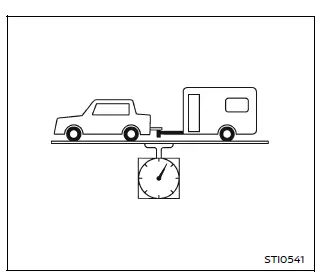
The GCWR is calculated as the combined weight of the Nissan Armada (with occupants and cargo) plus the total trailer weight.
Exceeding these limits or using incorrect towing equipment can negatively impact handling, braking performance, and overall driving safety.
Your Nissan Armada’s towing capability is influenced not only by maximum load limits but also by terrain and driving conditions.
While towing on flat highways may allow for maximum capacity, steep inclines, uneven terrain, or low-traction surfaces (such as wet ramps) may require reduced towing loads.
Environmental factors, such as high ambient temperatures, can also affect towing performance. For example, towing a heavy trailer uphill in hot weather may cause engine overheating or increased transmission temperatures.
In such cases, the vehicle’s protection systems may activate, reducing engine power and vehicle speed to prevent damage. This may result in slower driving speeds than surrounding traffic.
Plan your trip carefully, taking into account the total load, weather conditions, road gradients, and traffic situations to ensure safe towing with your Nissan Armada.
WARNING
Engine overheating can reduce both power and vehicle speed, potentially creating hazardous driving conditions. If your Nissan Armada cannot maintain a safe speed, safely pull over, allow the engine to cool, and resume driving once normal operation is restored.
CAUTION
Damage caused by improper towing procedures or exceeding recommended limits is not covered under NISSAN warranties.
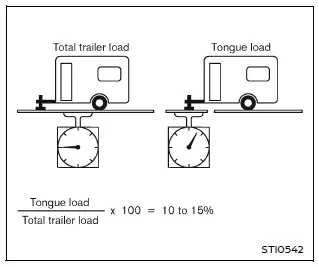
Tongue load
When using either a weight-carrying or weight-distributing hitch with your Nissan Armada, the tongue load should typically be maintained between 10% and 15% of the total trailer weight, unless otherwise specified by the trailer manufacturer.
The tongue load must always remain within the maximum allowable limits indicated in the "Towing Load/Specification" chart.
If the tongue weight exceeds recommended limits, redistribute the cargo within the trailer to achieve proper balance and ensure safe towing performance for your Nissan Armada.
Other materials
Front, front central seat-mounted side-impact supplemental air bag and roof-mounted
curtain side-impact and rollover supplemental air bag systems
*: if so equipped
In the Nissan Armada, the supplemental side-impact and curtain air bag systems
are engineered to provide enhanced protection for occupants during side collisions
and rollover events. These systems work together with seat belts to form a comprehensive
safety network.
The ...
Precautions for Removing Battery Terminal
PRECAUTIONS FOR REMOVING BATTERY TERMINAL : Precautions
When disconnecting the 12V battery terminal, turn off the ACC power before disconnecting the 12V battery terminal, observing “How to disconnect 12V battery terminal� described below.
NOTE:
Some ECUs operate for a certain fixed time ev ...
Diagnosis and Repair Work Flow
Work Flow
OVERALL SEQUENCEDETAILED FLOWGET INFORMATION FOR SYMPTOM
Get detailed information from the customer about the symptom (the condition and the environment when the incident/malfunction occurs).
Check operation condition of the function that is malfunctioning.
>>
GO TO 2.
CHECK ...