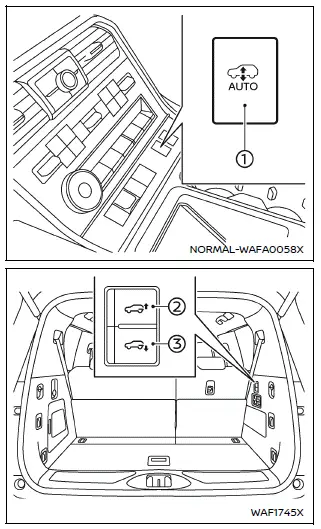
- AUTO switch
- Height level control up switch
- Height level control down switch
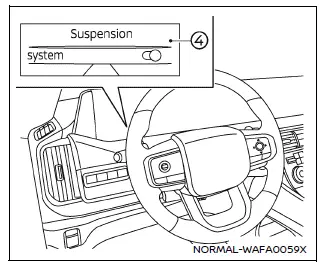
- Vehicle information display menu
The air suspension system in the Nissan Armada operates only when specific conditions are met to ensure safe and precise height adjustment.
- The engine of the Nissan Armada must be running.
- All vehicle doors must be securely closed.
- The air suspension system must be activated via the vehicle information display settings.
Switches
The Nissan Armada provides dedicated controls that allow the driver to adjust suspension modes and vehicle height based on driving needs and terrain conditions.
CAUTION
Before operating the AUTO switch or the height adjustment controls in the Nissan Armada, always check the surroundings carefully to ensure there are no obstacles, people, or objects near the vehicle that could be affected by height changes.
AUTO switch
When the AUTO mode is activated by pressing and holding the switch for approximately one second, the Nissan Armada automatically adjusts its ride height based on vehicle speed, transmission position, and selected 4WD mode. This intelligent adjustment improves comfort, stability, and efficiency.
- At speeds above approximately 56 MPH (90 km/h), the Nissan Armada lowers its height to the "AERO" position to reduce aerodynamic drag and improve fuel efficiency. When speed decreases below approximately 43 MPH (70 km/h), the vehicle automatically returns to the "NORMAL" height.
- When the transmission is placed in the P (Park) position and the 4WD mode is set to AUTO (if equipped), the Nissan Armada lowers to the "ACCESS" height, making entry, exit, and cargo loading easier. If the 4WD mode is set to 4H or 4L, the vehicle maintains the "NORMAL" height.
- When SNOW, ROCK, SAND, or MUD/RUT modes (if equipped) are selected along with 4WD modes 4H or 4L, the Nissan Armada will automatically maintain the "NORMAL" height at speeds above approximately 12 MPH (20 km/h). At very low speeds, the system raises the vehicle to the "HIGH" position for improved ground clearance.
- When STANDARD mode is selected and the Nissan Armada is operating in 4L, the system behaves similarly—maintaining "NORMAL" height at higher speeds and raising to "HIGH" at very low speeds to enhance off-road capability.
Height level control up/down switches
When the Nissan Armada transmission is in the P (Park) position, the driver can manually adjust vehicle height using the control switches.
Pressing the height level control down switch will lower the Nissan Armada to the "ACCESS" position, improving convenience for passengers and cargo handling.
Pressing the height level control up switch will raise the Nissan Armada to the "NORMAL" ride height, preparing the vehicle for standard driving conditions.
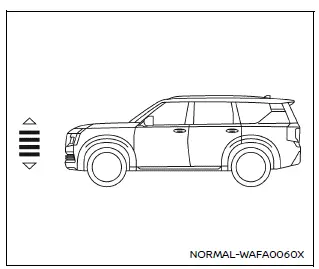
HIGH level
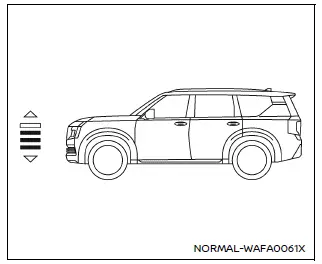
NORMAL level
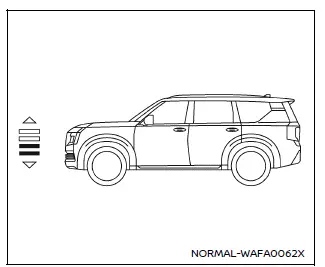
AERO level
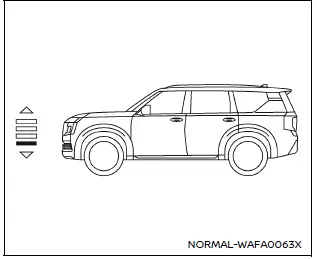
ACCESS level
Vehicle height level
Refer to the "Height Control display (if so equipped)" section in the Nissan Armada vehicle information display to monitor and confirm the currently selected suspension level. This allows the driver to easily track system status and ensure optimal ride height for any situation.
Modes and display indicators
AUTO mode

This indicator appears when the AUTO mode is activated in the Nissan Armada air suspension system, confirming that the vehicle height will be automatically adjusted based on driving conditions and system inputs.
Keep normal mode

This indicator is shown when no specific height adjustment mode is selected, and the Nissan Armada remains in its standard "NORMAL" ride height.
If the air suspension system in the Nissan Armada is turned off through the vehicle information display, no indicator will be shown, signaling that automatic height adjustment is inactive.
Turning OFF the air suspension system
The air suspension system in the Nissan Armada can be manually disabled using the vehicle information display settings.
When the system is turned OFF, the Nissan Armada will no longer automatically adjust its ride height, and the vehicle will remain at its current position regardless of speed or driving mode.
However, once the Nissan Armada begins moving again, the system will automatically reactivate and resume normal operation to maintain optimal driving performance.
Air suspension system temporarily unavailable
If the Nissan Armada air suspension system becomes temporarily unavailable, various warning messages may appear in the vehicle information display. These messages provide guidance on how to restore normal operation. Examples include:
- "Vehicle height too high Reduce speed"
- "Vehicle height too low Reduce speed"
- "Height control suspended Close doors to resume"
- "Selected height unavailable, payload capacity exceeded"
- "Height control suspended Please wait for system to cool"
- "Height control suspended Close vehicle hood to resume"
- "Height control suspended Temporarily unavailable"
These alerts indicate that the Nissan Armada system has detected conditions that temporarily prevent safe height adjustment, such as excessive load, open doors, or system temperature limits.
NOTE:
- If frequent height adjustments are performed in a short period, the
Nissan Armada may display the message "Height control suspended Please wait
for system to cool." This typically occurs when:
- The air suspension controls are repeatedly activated.
- The transmission is frequently shifted between P (Park) and R (Reverse), N (Neutral), or D (Drive)/M (Manual mode).
- Drive modes and 4WD modes are selected that frequently trigger height changes during urban driving.
This is a normal protective function and does not indicate a malfunction in the Nissan Armada.
- The air suspension system may also be temporarily disabled due to low battery voltage or when the engine is turned off. In such cases, the message "Height control suspended Temporarily unavailable" will be displayed. Starting the engine or recharging the battery will restore system functionality.
- If warning messages continue to appear, the Nissan Armada air suspension system should be inspected. It is recommended to visit an authorized NISSAN dealer for proper diagnosis and service.
Air suspension system malfunction
If a malfunction is detected in the Nissan Armada air suspension system, it will automatically deactivate to prevent unsafe operation. The message "Suspension malfunction Please steer carefully Visit dealer" will be displayed in the vehicle information screen.
In the event of a malfunction, the Nissan Armada will maintain its ride height at the "NORMAL" position or at the height set at the time the issue occurred, ensuring basic drivability until the problem is resolved.
Action to take:
If this warning appears, safely pull over and stop the Nissan Armada. Turn off the engine, then restart it to check if the issue resolves. If the warning message persists, the system requires professional inspection. It is strongly recommended to have the Nissan Armada checked by an authorized NISSAN dealer to ensure proper operation and safety.
Other materials
Fuel Pump Control Module (fpcm)
Exploded View
Fuel pump control module
Bracket
: N·m (kg-m, in-lb)
Removal & Installation
REMOVAL
Remove the luggage side finisher LH. Refer to Exploded View.
Disconnect fuel pump control module (FPCM) harness connector and remove the FPCM from the vehicle.
Re ...
4wd Mode Does Not Change
Description
Vehicle does not enter 4-wheel drive mode even though 4WD warning turned to OFF.
Diagnosis Procedure
CHECK DTC OF TRANSFER CONTROL UNIT
With CONSULT
Ignition switch ON.
Perform self-diagnosis for “AWD/4WD�.
Is any DTC detected?
YES >>
Check DTC detected item. Refer to DT ...
Third Seat Belt
Exploded View
Anchor bolt
Seat belt pre-tensioner retractor RH
Seat belt pre-tensioner retractor LH
Retaining washer
Spacer
Shoulder anchor LH
Shoulder anchor RH
Bush
Seat belt finisher LH
Seat belt finisher RH
Anchor plate LH
Anchor plate RH
Anchor nut
S ...