Description
When the electric parking brake cannot be released by the parking brake switch or automatically releasing, following procedure can be released.
CAUTION:
-
Never reuse the parking brake actuator.
-
When replacing parking brake actuator, replace rear brake caliper assembly.
Diagnosis Procedure
PERFORM THE SELF-DIAGNOSIS
With CONSULT
Perform self-diagnosis for “ABS�.
Is DTC detected?
YES>>Check the DTC. Refer to DTC Index.
NO>>GO TO 2.
CHECK REAR DISC BRAKE DRAG
Check if the rear disc brake is dragging. Refer to Inspection and Adjustment.
Is the rear disc brake dragging?
YES>>Check the rear disc brake system. Refer to Inspection.
NO>>GO TO 3.
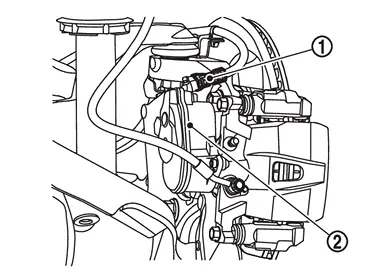
DISCONNECT PARKING BRAKE ACTUATOR HARNESS CONNECTOR
-
Disconnecting the 12V battery negative terminal.
-
Disconnect parking brake actuator harness connector
 from rear brake caliper assembly
  .
.
>>
GO TO 4.
REMOVE PARKING BRAKE ACTUATOR
Remove parking brake actuator from rear brake caliper assembly .
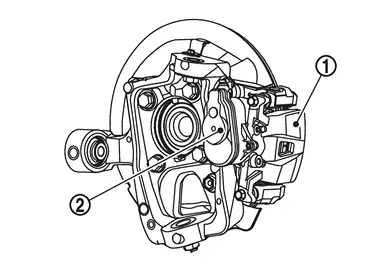
>>
GO TO 5.
RELEASE OF PARKING BRAKE
Rotate the rear brake caliper assembly spindle part  clockwise.
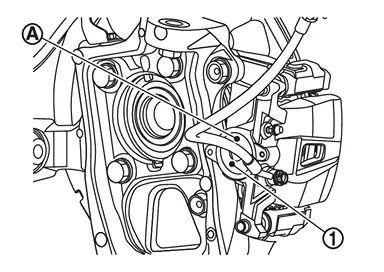
Is the parking brake released?
YES>>GO TO 6.
NO>>Check the rear brake caliper assembly. Refer to Inspection.
REPLACE REAR BRAKE CALIPER ASSEMBLY
Replace the rear brake caliper assembly. Refer to Removal and Installation.
CAUTION:
Never reuse the parking brake actuator.
>>
End of work.
Other materials
Noise, Vibration and Harshness (nvh) Troubleshooting
NVH Troubleshooting Chart
NVH Troubleshooting chartUse the Chart Below to Help You Find the Cause of the Symptom
Locate the area where noise occurs.
Confirm the type of noise.
Specify the operating condition of the engine.
Check specified noise source.
If necessary, ...
Third Seat Belt
Exploded View
Anchor bolt
Seat belt pre-tensioner retractor RH
Seat belt pre-tensioner retractor LH
Retaining washer
Spacer
Shoulder anchor LH
Shoulder anchor RH
Bush
Seat belt finisher LH
Seat belt finisher RH
Anchor plate LH
Anchor plate RH
Anchor nut
S ...
Third Seatback
Disassembly and Assembly
DISASSEMBLYCAUTION:
When disassemble, always use a remover tool that is made of plastic to prevent damage.Disengage fixing pawls using a remover tool (A), and then remove tether anchor finisher.
: Pawl
Disengage seatback trim fixing dual lock fastener .
LH seat
R ...