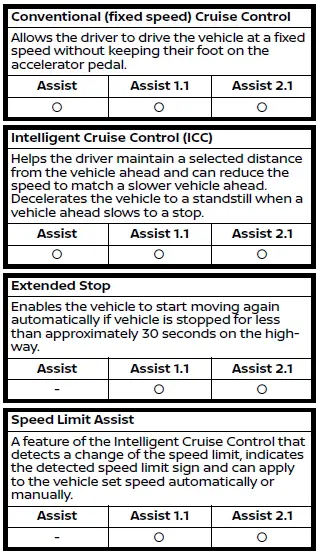
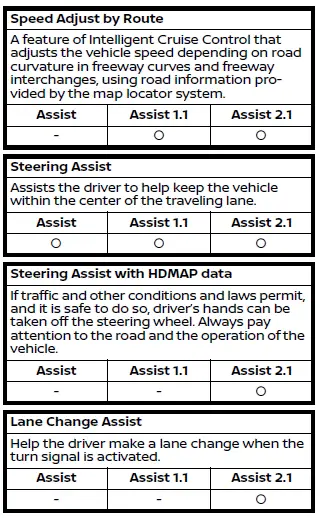
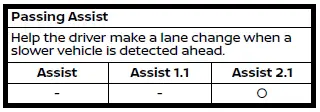
The Nissan Armada ProPILOT Assist suite is engineered to provide advanced driver support by combining multiple intelligent technologies that enhance safety, comfort, and driving confidence. Each feature within the Nissan Armada ProPILOT Assist system is specifically designed to assist the driver in different driving scenarios, helping to reduce fatigue and improve overall vehicle control during long journeys.
This section offers a clear and structured overview of the available Nissan Armada ProPILOT Assist features. For more in-depth explanations and operational details, please refer to the corresponding sections within this manual. Each feature is optimized for specific driving conditions and works together to deliver a more intuitive driving experience.
It is important to note that the availability and functionality of each feature may vary depending on the version of the Nissan Armada ProPILOT Assist system installed in your vehicle. The system may be equipped as standard ProPILOT Assist, ProPILOT Assist 1.1, or the more advanced ProPILOT Assist 2.1, each offering progressively enhanced capabilities and intelligent driving assistance technologies.
For optimal performance, the Nissan Armada ProPILOT Assist system relies on a combination of sensors, cameras, radar units, and navigation data (if equipped). Understanding how each feature operates will help you make the most of the system while maintaining full control and awareness at all times.
Other materials
Air Breather
Exploded View
Clip A
Air breather tube
Clip B
Air breather hose A
Clip C
Clip D
Hose connector
Air breather hose B
Bracket
Clip E
Hose clamp
Air breather
Rear final drive assembly
: vehicle front
: N·m (kg-m, in-lb)
: Alway ...
Sunload Sensor
Exploded View
Sunload sensor
Front speaker grille
: Pawl
: vehicle front
Removal and Installation
REMOVALRemove front speaker grille. Refer to Removal and Installation.
Disengage fixing pawls, and then push down sunload sensor and remove it.
: Pawl
INSTALLATIONIn ...
Parameter Writing
Work Procedure
DescriptionWhen replace each camera, it is necessary to write the camera parameters using CONSULT.Write to around view monitor control unit according to "Parameter writing" procedure of "CONSULT Operation Manual".Work ProcedurePARAMETER WRITING
CONSULT
Ignition switch ON.
Select " ...