Removal and Installation
CAUTION:
Never damage the body panel.
REMOVAL
CAUTION:
When removing, always use a remover tool that is made of plastic to prevent damage to the parts.
Remove luggage side lower finisher. Refer to Removal and Installation.
Apply protective tape (A) on rear pillar finisher to protect it from damage.
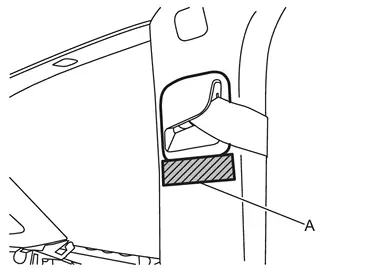
Disengage seat belt finisher fixing pawls using a remover tool (A).
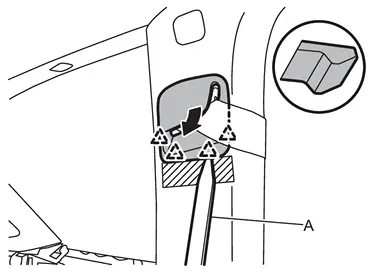
 |
: Pawl |
Apply protective tape (A) on rear pillar finisher to protect it from damage.
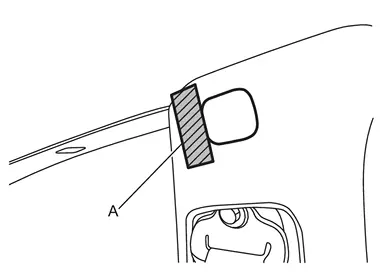
Disengage bolt cap fixing pawls using a remover tool (A), and then remove bolt cap.
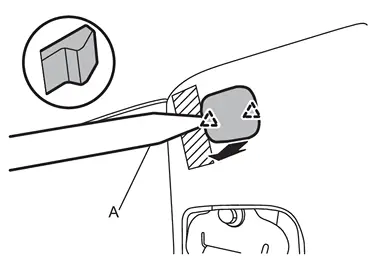
|
: Pawl |
Remove rear pillar finisher mounting bolt.
Disengage rear pillar finisher fixing clip and pawl using a remover tool (A), and then remove rear pillar finisher.
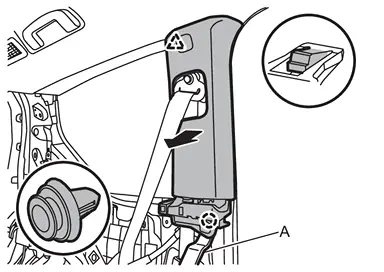
 |
: Clip |
|
: Pawl |
INSTALLATION
Note the following items, and then install in the reverse order of removal.
CAUTION:
-
Visually check clip for deformation and damage during installation. Replace with new ones if necessary.
-
Check in advance that clips are accurately aligned with the portions on body panel, and then install by pressing in.
-
After installation, check that the lip of body side welt covers. Refer to Inspection.
Other materials
Suspension Arm
Exploded View
Frame
Stopper rubber
Suspension arm
Axle housing
: Always replace after every disassembly.
: N·m (kg-m, ft-lb)
Removal and Installation
REMOVALWithout Dynamic Digital Suspension and Electronic Air SuspensionRemove tires. Refer to ROAD WHEEL TIRE : Removal &a ...
Electronic Air Suspension Safety Precautions
Precaution
Precautions for Removing Battery Terminal
When disconnecting the 12V battery terminal, turn off the ACC power before disconnecting the 12V battery terminal, observing “How to disconnect 12V battery terminal� described below.
NOTE:
Some ECUs operate for a certain fixed time even ...
Driving Video Recorder System System Symptoms
Symptom Table
Symptom Possible cause Inspection item/Work item
��is displayed
Front camera (driving video recorder) abnormality
Rear camera (driving video recorder) abnormality
Inside camera (driving video recorder) abnormality
Perform diagnosis procedure
�� is displayed ...