Exploded View
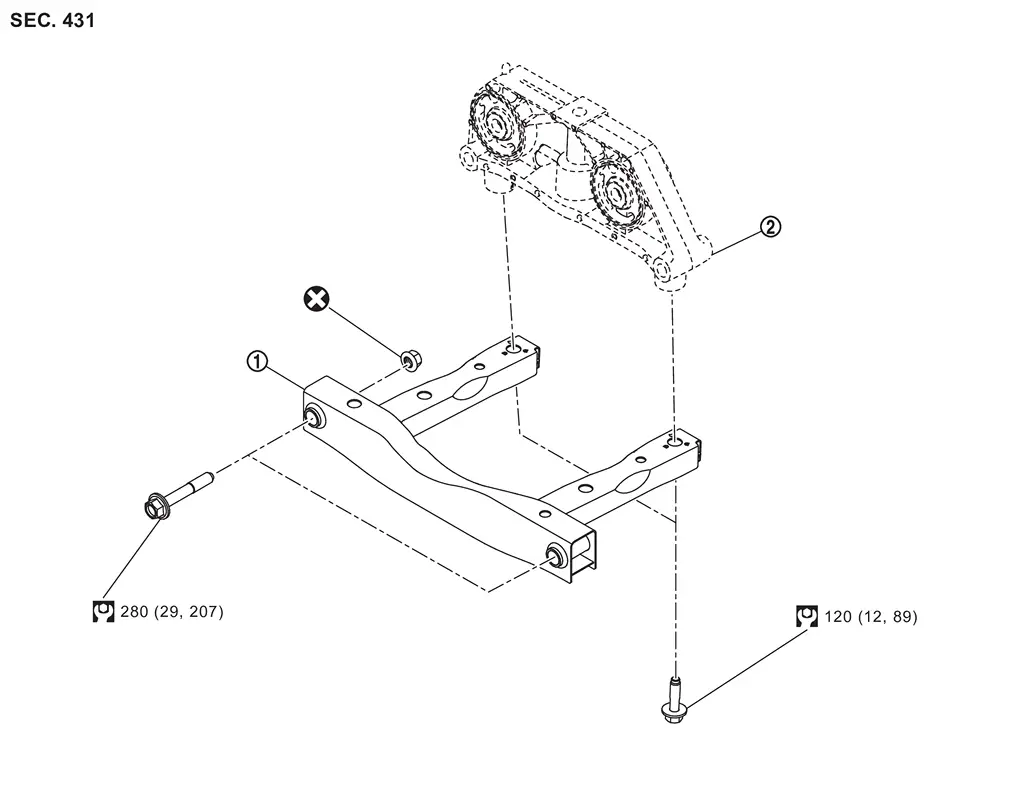
 |
Rear suspension member stay |  |
Final drive mounting bracket | ||
 |
: Always replace after every disassembly. | ||||
 |
: N·m (kg-m, ft-lb) | ||||
Removal and Installation
WARNING:
-
Jacking up or lift up the vehicle may the vehicle height to go down which cause a personal injury and/or damage to the air suspension component parts. Refer to Precaution for when Jacking and Lifting Up the vehicle with Electronic Air Suspension System.
REMOVAL
Remove rear suspension member stay mounting bolts and nuts.
Remove rear suspension member stay from vehicle.
Perform inspection after removal. Refer to Inspection.
INSTALLATION
Note the following and, install in the reverse order of removal.
CAUTION:
Never reuse rear suspension member stay mounting nut.
Inspection
INSPECTION AFTER REMOVAL
Check rear suspension member stay for deformation, cracks or damage. Replace it if necessary.
Other materials
Safety information
WARNING
Always stop the Nissan Armada in a safe place and engage the parking
brake before operating the system. Using the system while driving can distract
the driver and increase the risk of accidents.
Maintain full attention on driving at all times. If the Nissan Armada
system respo ...
How to enable/disable the I-LI system
Example
ProPILOT Assist switch
Vehicle information display
Steering-wheel-mounted control (right side)
Basic information
In the Nissan Armada, the Intelligent Lane Intervention (I-LI) system can be
configured through the vehicle information display and steering wheel controls,
pr ...
Diagnosis and Repair Work Flow
Work Flow
DETAILED FLOWINTERVIEW FROM THE CUSTOMER
Clarify customer complaints before inspection. First of all, perform an interview utilizing Diagnostic Work Sheet and reproduce symptoms as well as fully understand it. Ask customer about his/her complaints carefully. Check symptoms by driving vehic ...