Example
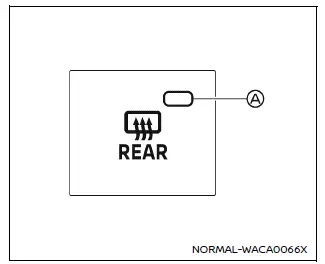
In the Nissan Armada, the rear window and outside mirror defroster switch is conveniently located on the front climate control panel for quick and easy access.
To clear fog or frost from the rear window and outside mirrors in the Nissan Armada, start the engine and press the defroster switch. Once activated, the indicator light A will illuminate, confirming that the system is operating.
Press the switch again to manually deactivate the defroster. Otherwise, the Nissan Armada system will automatically turn off after approximately 20 minutes to conserve energy.
This feature ensures improved rear visibility and safer driving in cold or humid weather conditions.
CAUTION
When cleaning the interior surface of the rear window in the Nissan Armada, handle it carefully to avoid scratching or damaging the embedded defroster lines, as this may affect performance.
Other materials
Rear-facing child restraint installation using the seat belts
WARNING
When installing a rear-facing child restraint in the Nissan Armada, the
three-point seat belt must be switched to Automatic Locking Retractor (ALR)
mode.
Failure to activate ALR mode may result in the child restraint not being
securely fixed. This could cause the seat to sh ...
Moonroof Unit Assembly
Exploded View
REMOVAL
Glass lid
Wind deflector
Front drain hose RH
Front drain connector RH
Map lamp assembly
Harness connector assembly
Moonroof motor assembly
Moonroof unit assembly
Sunshade motor assembly
Front drain connector LH
Front drain hose LH
Front moon ...
Additional Service When Replacing Around View Monitor Control Unit
Description
CAUTION:
When replacing the around view monitor control unit, always replace it with a new one. Around view monitor system does not operate properly in case of reuse of the around view monitor control unit from another vehicle.
When before writing the around view monitor control unit ...