Basic information
WARNING
In the Nissan Armada, using the washer system in freezing temperatures may cause the fluid to freeze on the windshield, significantly reducing visibility. Always warm the glass using the defroster before activating the washer system to ensure safe driving conditions.
CAUTION
- Do not operate the washer continuously for more than 30 seconds in the Nissan Armada to prevent system damage.
- Never use the washer system if the reservoir is empty, as this may damage the pump.
- Avoid filling the Nissan Armada washer reservoir with concentrated fluid
without dilution.
Some alcohol-based washer fluids may stain exterior components if spilled during refilling.
- Always pre-mix washer fluid with water according to manufacturer recommendations before adding it to the Nissan Armada reservoir. Do not mix directly inside the tank.
If the Nissan Armada windshield wipers stop due to snow or ice buildup, this is a protective feature to prevent motor damage. Turn the wiper switch OFF, clear the obstruction, and after approximately one minute, reactivate the system.
Windshield wiper and washer operation
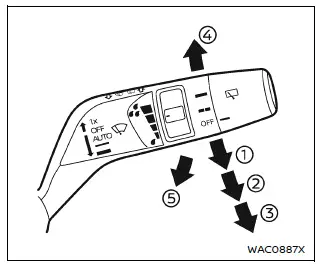
The Nissan Armada windshield wiper and washer system operates when the ignition switch is in the ON position, ensuring full functionality during vehicle operation.
Move the control lever downward to select the desired wiping mode in the Nissan Armada:
- AUTO - activates the rain-sensing automatic wiper system.
- Low - continuous operation at low speed.
- High - continuous operation at high speed.
- Mist - a single wipe for quick cleaning.
To activate the washer in the Nissan Armada, pull the lever toward you until sufficient washer fluid is sprayed onto the windshield. The wipers will automatically perform several cycles.
Wiper drip wipe system:
The Nissan Armada includes a drip wipe function, which performs an additional wipe approximately 3 seconds after washer use to remove residual fluid and improve visibility.
Rain-sensing auto wiper system
Basic information
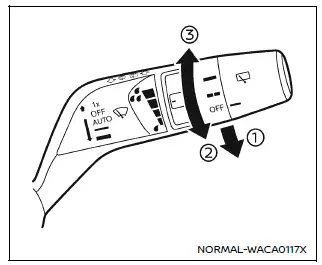
The Nissan Armada rain-sensing wiper system automatically adjusts wiping speed based on detected rainfall and vehicle speed using a sensor mounted at the top of the windshield.
To activate AUTO mode in the Nissan Armada, move the lever to position 1. The wipers will perform an initial sweep.
Sensitivity can be adjusted using the control knob:
- High - increased sensitivity for light rain detection
- Low - reduced sensitivity for heavier rainfall conditions
To deactivate AUTO mode in the Nissan Armada, move the lever to OFF or select Low/High manual operation.
CAUTION
Do not touch the rain sensor area when the Nissan Armada wiper system is set to AUTO and the ignition is ON. Unexpected activation may occur, potentially causing injury or damage.
- The Nissan Armada rain sensor may trigger unintentionally if dirt, oil, insects, or moisture accumulate on the windshield.
- The system may not activate if rain does not directly reach the sensor area.
- Water-repellent coatings may alter sensor response, causing faster wiper speeds.
- Always disable AUTO mode before entering a car wash.
- At low speeds (below approximately 5 MPH / 8 km/h) and in Neutral, the system may not operate.
- Using genuine Nissan Armada wiper blades is recommended for optimal performance.
How to enable/disable the rain-sensing auto wiper system
The Nissan Armada allows activation or deactivation of the rain-sensing system through the vehicle information display settings.
Rear window wiper and washer operation
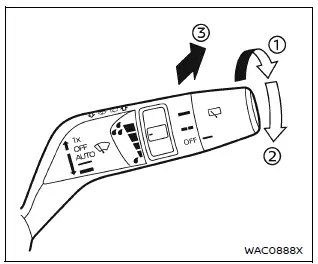
If the rear wiper in the Nissan Armada stops due to snow or debris, switch it OFF, clear the obstruction, and restart the system after approximately one minute.
The Nissan Armada rear wiper operates when the ignition is ON.
Rotate the control switch clockwise from OFF to select operation mode:
- Intermittent - automatic periodic wiping.
- Low - continuous low-speed operation.
Push the switch forward to activate the washer; the Nissan Armada rear wiper will perform several cycles automatically.
Rear window wiper service position:
With the engine OFF (Auto ACC active), quickly push the switch forward twice within 0.75 seconds to move the Nissan Armada rear wiper into service position.
To return it to normal, rotate the switch or push it forward again.
Reverse Link feature:
When the front wipers are active and the Nissan Armada is shifted into Reverse (R), the rear wiper automatically engages to improve rear visibility.
NOTE:
The Reverse Link feature in the Nissan Armada can be disabled through system settings if desired.
Other materials
Battery
Basic information
On the Nissan Armada, batteries labeled "do not open" are fully maintenance-free,
meaning the internal electrolyte level does not require inspection. For accurate
diagnostics and performance checks, it is strongly recommended to consult an
authorized NISS ...
Noise, Vibration and Harshness (nvh) Troubleshooting
NVH Troubleshooting Chart
Use the chart below to find the cause of the symptom. The numbers indicate the order of the inspection. If necessary, repair or replace these parts.
SUSPECTED PARTS
(Possible cause) Symptom Reference
Transfer fluid leakage Noise
TRANSFER FLUID (Level low)
1 ...
Oil Filter
Removal and Installation
WARNING:
Jacking up or lift up the vehicle may the vehicle height to go down which cause a personal injury and/or damage to the air suspension component parts. Refer to Precaution for when Jacking and Lifting Up the vehicle with Electronic Air Suspension System.
REMOVA ...