Driver Seat
Removal and Installation
Refer to Removal and Installation.
Passenger Seat
Removal and Installation
REMOVAL
Disconnect passenger seat control unit connector.
Remove passenger seat control unit fixing screws  .
.
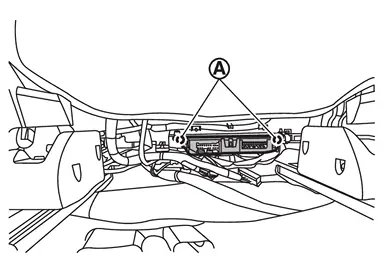
Remove passenger seat control unit.
INSTALLATION
Note the following items, and then install in the reverse order of removal.
Third Seat
Removal and Installation
REMOVAL
Folding the seatback of third seat.
 NOTE:
NOTE:
If seatback of third seat cannot be folded, access the third seat control unit from the front side of third seat.
Remove third seat control unit fixing screws and then remove third seat control unit.
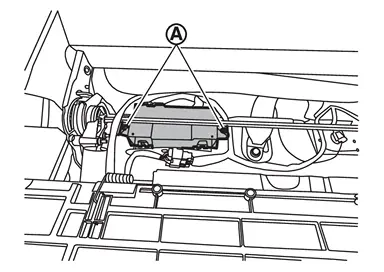
Disconnect third seat control unit connector and then remove third seat control unit from the third seat.
INSTALLATION
Note the following item, and then install in the reverse order of removal.
CAUTION:
- Be sure to perform ADDITIONAL SERVICE WHEN REPLACING THIRD SEAT CONTROL UNIT RH when replacing third seat control unit RH. Or not doing so, third seat control unit RH control function does not operate normally. Refer to Description.
- Be sure to perform ADDITIONAL SERVICE WHEN REPLACING THIRD SEAT CONTROL UNIT LH when replacing third seat control unit LH. Or not doing so, third seat control unit LH control function does not operate normally. Refer to Description.
Other materials
System operation
The Nissan Armada sonar system provides both visual and audible alerts under
the following conditions:
Detection of front obstacles when the transmission is in D (Drive)
Detection of both front and rear obstacles when the transmission is in R
(Reverse)
How the system alerts of obstacle ...
Precautions
Precautions for Removing Battery Terminal
When disconnecting the 12V battery terminal, turn off the ACC power before disconnecting the 12V battery terminal, observing “How to disconnect 12V battery terminal� described below.
NOTE:
Some ECUs operate for a certain fixed time even after ignit ...
Brake Pedal
Inspection and Adjustment
INSPECTIONBrake Pedal HeightCheck the height (H1) between the floor panel and the brake pedal upper surface. H1
: Refer to Brake Pedal.
CAUTION:
Remove the front floor carpet.Stop Lamp SwitchCheck the clearance (A) among the brake pedal lever and the stop lamp switch ...