
Nissan Armada 2025-2026 Owner's Manual: Seat adjustment using touch screen display
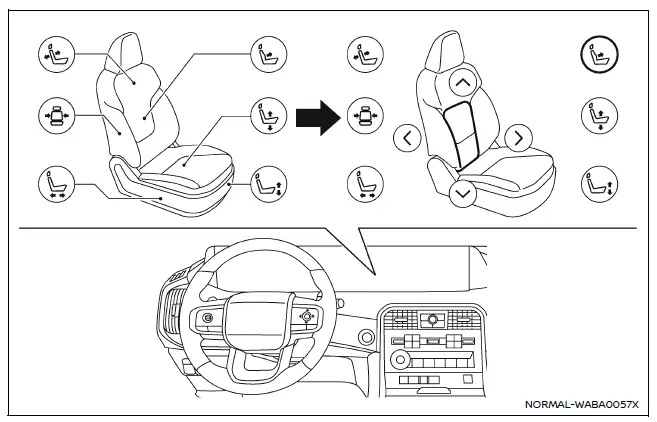
Example
The Nissan Armada offers an advanced and intuitive way to control seat adjustments through its integrated touch screen display. This system enhances convenience by allowing the driver to manage multiple seating functions quickly and efficiently without relying solely on physical controls.
Refer to the "Touch screen display" section or the separate NissanConnect Owner’s Manual for detailed instructions on operating the display system in the Nissan Armada.
The driver’s seat and 3rd row seats (if so equipped) in the Nissan Armada can be adjusted directly via the touch screen interface, providing a modern and user-friendly experience.
Touch
 on the display, then select the "Vehicle" menu.
Next, tap the "Seat" option and choose the desired function to control seat settings in the Nissan Armada.
The following features may be available depending on the vehicle configuration:
- Massage Settings
- Driver's Seat Pop-up
- Passenger's Seat Pop-up
- Front Power Seat Adjustment
- Power Folding Rear Seats
This touchscreen-based control system in the Nissan Armada allows for seamless customization of seat comfort and positioning, enhancing both driver and passenger experience.
NOTE:
- If the physical adjustment switch of a seat is being used, the same seat cannot be controlled via the touch screen display simultaneously.
- For safety reasons, seat adjustments for the driver via the touch screen display are disabled while the Nissan Armada is in motion.
 Flexible seating
Basic information
The flexible seating system in the Nissan Armada is designed to deliver exceptional
versatility, allowing you to quickly adapt the interior layout for passengers or
cargo. Wheth ...
 Resetting the seat positions
Basic information
The Nissan Armada is equipped with a memory system for 3rd row power seats, allowing
them to retain their original positions. However, under certain conditions such
as power int ...
Other materials:
Garage mode system
The Nissan Armada liftgate height can be customized to suit specific environments,
such as garages with limited clearance.
1. Open the Nissan Armada liftgate fully.
2. Manually adjust the liftgate to the desired height and hold it in position.
3. Press and hold the liftgate close and lock switc ...
Hill Start Assist system
WARNING
Never depend solely on the Hill Start Assist system in the Nissan Armada
to prevent rollback when starting on an incline. Always remain attentive and
keep full control of the vehicle. When stopped on a steep hill, firmly press
the brake pedal. Extra caution is required on icy, m ...
I-FCW system limitations
Illustration A
Illustration B
Illustration C
Illustration D
WARNING
The following limitations apply to the Nissan Armada I-FCW system. Ignoring
these limitations may result in serious injury or fatal accidents.
The Nissan Armada I-FCW system cannot detect every object or v ...

0.0034