WARNING
The following limitations apply to the Nissan Armada sonar system. Failure to understand and follow these limitations may result in serious injury or even fatal accidents.
- Carefully review all limitations of the Nissan Armada sonar system. Environmental
conditions such as heavy rain, snow, or fog may reduce detection performance
or cause false alerts.
Always rely on visual confirmation in addition to system alerts.
- The sonar system in the Nissan Armada is automatically disabled at speeds above approximately 6 MPH (10 km/h) and reactivates at lower speeds.
- External ultrasonic interference from sources such as car washes, air brake systems, or construction equipment may disrupt sonar accuracy.
- The system is not designed to detect small, moving, or low-positioned objects. Items below the bumper or on the ground may go undetected.
- Soft materials (snow, cloth), thin objects (wires, ropes), or complex shapes may not reflect sound waves effectively and may not be detected by the Nissan Armada sensors.
- Objects moving faster than approximately 3 MPH (5 km/h), or positioned at certain angles, may not be properly detected.
- The Nissan Armada sonar system may fail to detect pedestrians, small children, or animals in certain conditions.
- The system may not function properly when:
- Sensors are covered with dirt, snow, ice, or debris.
- There is excessive ambient noise around the vehicle.
- Obstacle surfaces are angled relative to the vehicle.
- Sensors are exposed to extreme temperatures.
- The Nissan Armada sonar system may trigger unintentionally in situations
such as:
- Driving through tall grass or vegetation.
- Passing over uneven surfaces, bumps, or manhole covers.
- Contact with hanging objects such as flags or curtains.
- Accumulated snow or ice near the sensors.
- Driving on steep inclines.
- On Nissan Armada models equipped with air suspension, changes in vehicle height may affect sonar detection performance.
System temporarily unavailable
If the Nissan Armada sonar sensors are obstructed, the system will automatically deactivate to prevent incorrect readings.
The system will remain inactive until the obstruction is cleared and normal operating conditions are restored.
Temporary blockage may occur due to water spray, fog, snow, ice, or dirt accumulation on the sensors.
Additionally, the rear sonar system in the Nissan Armada may be disabled when the Rear Automatic Braking (RAB) system is temporarily turned off, when trailer BSW is active, or when TOW mode is selected (if equipped).
Action to take:
Once the obstructing conditions are resolved, the Nissan Armada sonar system will automatically resume operation.
If the rear sonar system was disabled due to temporary RAB cancellation, it will reactivate after the engine is turned off and restarted. However, if disabled manually or due to trailer BSW or TOW mode, it will not automatically turn back on.
System maintenance
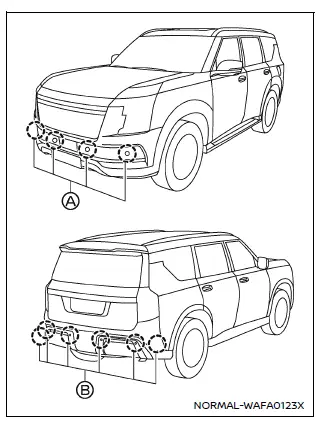
Example
The Nissan Armada sonar sensors A and B are positioned in the front and rear bumpers to monitor surrounding obstacles.
- Keep the sensor areas clean at all times to maintain accurate detection.
- If sensors become dirty, clean them gently with a soft cloth to avoid damage.
- Remove any obstructions such as ice, mud, or debris that may block the sensors.
- Avoid strong impacts to the sensor area and never attempt to disassemble the sensors.
- If damage occurs, have the Nissan Armada inspected by an authorized NISSAN dealer.
- Do not apply stickers, accessories, or additional paint near the sensors, as this may interfere with system operation.
- When using a high-pressure washer, avoid directing water jets directly at the sonar sensors to prevent malfunction.
Other materials
Stroke Sensor Calibration
Description
CAUTION:
Always perform stroke sensor calibration before driving after any of the following operations is performed.×: Necessary, -: Not necessary Procedure Stroke sensor calibration
Removing/installing electrical brake control unit
×
Replacing electrical brake control unit
à ...
Location of Plastic Parts
Precautions for Plastics
Abbreviation Material name Heat resisting temperature °C (°F)
Resistance to gasoline and
solvents Other cautions
PE
Polyethylene
60 (140)
Gasoline and most solvents are harmless if applied for a very short time (wipe out quickly).
Flammable
ABS
Acrylon ...
Front Camera Unit
Without Propilot Assist 2.1
Exploded View
Bracket
Front camera unit
Cover
Removal and Installation
REMOVALUsing a suitable tool, release clips , and remove cover .
Disconnect front camera unit harness connector.
Release pawls of bracket, and remove front camera unit from bracket.
I ...