Speed Limit Assist in the Nissan Armada is an advanced functionality integrated within the ProPILOT Assist 1.1 and 2.1 systems. This feature works in conjunction with the built-in map locator and Traffic Sign Recognition (TSR) system to help drivers maintain compliance with posted speed limits. For safe and effective use in the Nissan Armada, it is strongly recommended to review both the ProPILOT Assist and Traffic Sign Recognition sections thoroughly before activating this feature.
When ProPILOT Assist 1.1 or 2.1 is active in the Nissan Armada and a change in the speed limit is detected, the updated limit is clearly displayed in the instrument cluster. The system allows the driver to either apply this new speed automatically or confirm it manually, depending on the selected mode. Speed Limit Assist operates under the following conditions:
- When the detected speed limit is 20 MPH (30 km/h) or higher.
- When the "Speed Limit Assist" feature is enabled through the Nissan Armada vehicle information display settings.
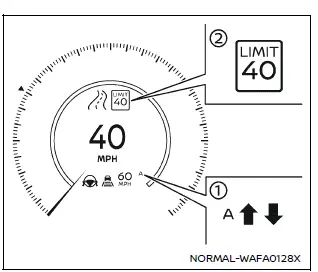
In the Nissan Armada, Speed Limit Assist offers two operational modes, both of which are indicated in display 1 for clear driver awareness.
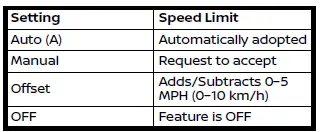
The Auto mode may not be available in certain regions or when driving on roads other than limited-access freeways. In such cases, the Nissan Armada system will default to Manual mode operation.
NOTE:
- Auto mode may not function in regions such as Hawaii or other U.S. island territories.
- Auto mode in the Nissan Armada is primarily designed for use on limited-access highways identified by the integrated map system.
When the Traffic Sign Recognition system detects a new speed limit, the updated value is shown in display 2, ensuring the Nissan Armada driver remains informed in real time.
When in Manual mode (factory default setting):
- To accept the newly displayed speed limit in the Nissan Armada, push up the RES+- switch to increase speed or push down to decrease it.
- The suggested speed can be rejected by pressing the opposite direction on the RES+- switch.
- If no input is provided, the previously set speed will remain unchanged.
- If a speed limit offset is configured, the Nissan Armada will apply this adjustment automatically to the detected limit.
When in Auto mode:
- The Nissan Armada automatically adjusts the vehicle’s set speed according to the detected speed limit.
- If a speed limit offset is enabled, it will be applied to the new speed value.
- If ProPILOT Assist is active but not yet set, the Nissan Armada will automatically update the preset speed when a new limit is detected.
How to adjust Speed Limit Offset:
Vehicle information display
Settings → Driver Assistance → Intelligent Cruise → Speed Limit Offset → -5 MPH (-10 km/h) to + 5 MPH (+10 km/h)
Additional recommendation: Using Speed Limit Assist in the Nissan Armada can significantly improve driving comfort on long trips, but drivers should always remain attentive and verify speed limits independently to ensure maximum safety.
How to enable/disable/change Speed Limit Assist:
The Speed Limit Assist function in the Nissan Armada can be easily configured through the vehicle information display, allowing drivers to tailor the system behavior to their driving preferences and road conditions.
Vehicle information display
Settings → Driver Assistance → Intelligent Cruise → Spd.Limit Assist → Auto/Manual/ OFF
Within the Nissan Armada, drivers can choose between three modes: Auto mode for automatic speed adjustment, Manual mode for driver confirmation, or OFF to deactivate the feature entirely. This flexibility ensures that the Nissan Armada adapts to both driver preferences and varying driving environments.
NOTE:
- When Auto mode is selected in the Nissan Armada and the accelerator pedal is being pressed, Speed Limit Assist will automatically adjust the vehicle set speed only if the newly detected speed limit is higher than the current set speed.
- In certain situations, the Nissan Armada Speed Limit Assist system will
not intervene or adjust speed automatically:
- If a higher speed limit is detected but the current vehicle set speed already exceeds that limit.
- If a lower speed limit is detected but the vehicle is already traveling below that limit.
WARNING
The following outlines important system limitations of Speed Limit Assist in the Nissan Armada. Failure to understand and follow these limitations may result in serious injury or even fatal accidents. The driver remains fully responsible for maintaining appropriate speed, complying with traffic laws, and staying aware of surrounding road users at all times.
- The Nissan Armada Speed Limit Assist system may not function correctly
in all driving conditions, and the detected speed limit may not always be accurately
applied to the vehicle’s set speed.
The driver must always monitor and manually control vehicle speed when necessary.
Examples of such situations include:
- When the Traffic Sign Recognition (TSR) system is malfunctioning, disabled, or unable to clearly read speed limit signs due to fading, dirt, or distortion.
- When operating the Nissan Armada in regions not supported by the map locator system.
- When crossing international borders where mapping data may differ.
- When exiting limited-access highways identified by the navigation system.
- When traveling on roads with parallel lanes, such as highways alongside service roads, which may confuse system detection.
- When different lanes display different speed limits, making interpretation more complex.
- When driving through construction zones where temporary signage may not be accurately recognized.
- When map data is outdated, unavailable, or not synchronized with current road conditions.
- When the map locator system cannot establish a connection to retrieve updated navigation data.
- When the map system license has expired, limiting access to current speed limit information.
Additional recommendation: While the Nissan Armada Speed Limit Assist feature enhances convenience and driving awareness, it should always be used as a support tool rather than a replacement for attentive driving and real-time decision-making.
Other materials
Tire labeling
Example
Basic information
In the Nissan Armada, all tires are required by federal regulations to display
standardized information directly on the sidewall.
This labeling provides essential data about the tire’s construction, performance
capabilities, and specifications, allowing Nissan ...
Shipping Mode Cancel Operation
Work Procedure
SHIPPING MODE CANCEL OPERATION
Ignition switch OFF.
Push in (switch on) the extended storage fuse switch. Refer to How To Check.
Ignition switch ON.
Ignition switch OFF and wait at least 2 seconds.
>>
GO TO 2.
SHIPPING MODE CANCEL CHECK
Ignition switch ON.
Check ...
Bcm
Removal and Installation
CAUTION:
When replacing the BCM, always replace it with a new one. The functions controlled by the BCM does not operate properly in case of reuse of the BCM from another vehicle.
Be sure to perform the following items must be performed when replacing BCM.
Writing vehic ...