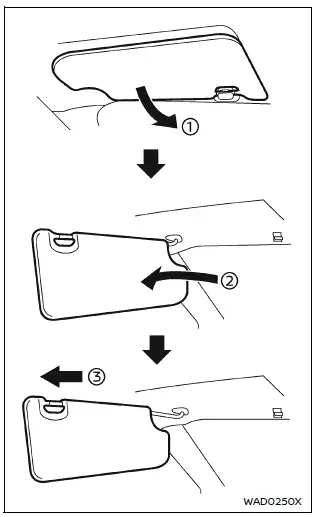
- To reduce glare from the front, pull down the main Nissan Armada sun visor 1.
- To block sunlight from the side, detach the sun visor from the center mount and rotate it sideways 2.
- Extend or retract the Nissan Armada sun visor extension 3 as needed for additional coverage.
CAUTION
- Always return the extension portion of the Nissan Armada sun visor to its original position before storing it.
- Avoid pulling the sun visor extension downward forcefully, as this may damage the mechanism.
Other materials
Inside Key Antenna
Console
Removal and Installation
REMOVALRemove front center console bracket. Refer to Removal and Installation.
Disconnect inside key antenna (console) harness connector.
Remove inside key antenna (console) fixing TORX bolts , and then remove inside key antenna (console) .
INSTALLATIONInstall in t ...
Automatic Back Door Close Switch
Description
Automatic back door open/close function does not operate using automatic back door close switch.
Diagnosis Procedure
CHECK AUTO OPEN/CLOSE FUNCTION
Check auto open/close function using automatic back door switch.
Is the inspection result normal?
YES>>
GO TO 2.
NO>>
Refer to ...
Intelligent Key System Symptoms
Diagnosis Procedure
NOTE:
Perform the self-diagnosis with CONSULT before the symptom diagnosis. Perform the trouble diagnosis if any DTC is detected.SYMPTOM TABLE 1 (BOTH INTELLIGENT KEYS HAVE THE SAME SYMPTOMS) No. Door lock operation (remote keyless entry) Door lock operation (request switch of ...