Condition A:
In the Nissan Armada, the LDW and I-LI warning and assist features may be temporarily unavailable under specific operating conditions. These systems are designed to function only when appropriate driving parameters are met.
- When the turn signal is activated and the Nissan Armada changes lanes in the indicated direction. (The systems will remain inactive for approximately 2 seconds after the turn signal is switched off.)
- When the vehicle speed drops below the required activation threshold.
Action to take:
Once normal driving conditions are restored and all activation requirements are met, the Nissan Armada LDW/I-LI systems will automatically resume operation.
Condition B:
If the Nissan Armada is exposed to high interior temperatures (approximately above 104ºF / 40ºC), such as when parked in direct sunlight, the LDW/I-LI systems may automatically deactivate to protect internal components. A chime will sound, and the following message may appear:
- "Unavailable Camera Temperature High"
Action to take:
Allow the cabin temperature of the Nissan Armada to decrease. The LDW system will resume automatically. For the I-LI system, turn the system off and then reactivate it by pressing the ProPILOT Assist switch.
Condition C:
The Nissan Armada I-LI assist function may be temporarily disabled (while warning functions remain active) under the following driving conditions:
- When the brake pedal is pressed or the vehicle decelerates sharply.
- When the steering wheel is turned sufficiently to perform a lane change.
- When the vehicle accelerates aggressively during I-LI operation.
- When the Intelligent Cruise Control (ICC) approach warning is triggered.
- When hazard warning flashers are activated.
- When driving through curves at higher speeds.
Action to take:
After these conditions end and normal driving parameters return, the Nissan Armada I-LI assist function will automatically resume.
Condition D:
If certain driving conditions affect system availability, the Nissan Armada will display warning messages, emit a chime, and temporarily disable the I-LI system.
- "Unavailable Slippery Road":
- Occurs when the VDC system (excluding Traction Control System function) or ABS is actively engaged.
- "Currently Unavailable due to Drive Mode or High Suspension Setting":
- When the VDC system is manually turned off.
- When SNOW, SAND, ROCK, or MUD/RUT drive modes are selected (if equipped).
- "Driving Aids Limited Towing Assist Activated":
- When Trailer Blind Spot Warning (BSW) is active.
- When TOW mode is selected (if equipped).
Action to take:
Once these conditions are no longer present, turn the Nissan Armada I-LI system off and then reactivate it using the ProPILOT Assist switch.
System malfunction
If a malfunction is detected in the Nissan Armada LDW/I-LI systems, they will automatically deactivate. The LDW/I-LI indicator (orange) will illuminate, a warning chime will sound, and the message "Malfunction See Owner's Manual" will appear in the vehicle information display.
Action to take:
If this occurs, safely pull the Nissan Armada over to a secure location, turn off the engine, and restart it. If the warning persists, the system should be inspected by an authorized Nissan dealer.
System maintenance
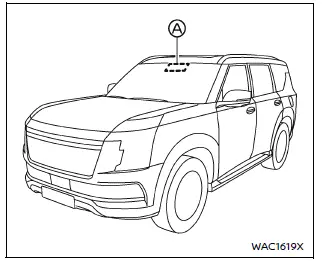
The Nissan Armada LDW/I-LI systems rely on a forward-facing lane camera unit located above the interior rearview mirror. Proper maintenance of this component is essential for reliable operation.
- Always keep the Nissan Armada windshield clean and free of dirt, ice, or condensation.
- Avoid placing stickers, films, or accessories near the camera area.
- Do not position reflective objects such as paper or mirrors on the dashboard, as reflected sunlight may interfere with camera detection.
- Prevent physical damage to the camera housing and surrounding area. Do not touch the lens or attempt to remove any components.
- If the Nissan Armada camera unit is damaged due to an impact or accident, have it inspected and repaired by an authorized dealer.
The Nissan Armada advanced lane assistance systems are highly dependent on sensor clarity and operating conditions, making proper maintenance and attentive driving essential for optimal performance. :contentReference[oaicite:0]{index=0}
Other materials
Sun visors
To reduce glare from the front, pull down the main Nissan Armada sun visor
1.
To block sunlight from the side, detach the sun visor from the center mount
and rotate it sideways 2.
Extend or retract the Nissan Armada sun visor extension 3 as needed for
additional coverage.
CAUT ...
Vtc
Exploded View
Valve timing control cover (bank 1)
Seal ring
Electric intake valve timing control actuator (bank 1)
Valve timing oil control solenoid valve (bank 1)
O-ring
Valve timing oil control solenoid valve (bank 2)
Valve timing control cover (bank 2)
Electric intake val ...
Wireless Charger Unit
Removal and Installation
REMOVALRemove the front center console cup holder assembly. Refer to Removal and Installation.
Remove the center console pocket mat. Refer to Exploded View.
Press the wireless charger unit pawl from the back of the front center console cup holder assembly to remove the wirel ...