Removal and Installation
REMOVAL
Remove the front center console cup holder assembly. Refer to Removal and Installation.
Remove the center console pocket mat. Refer to Exploded View.
Press the wireless charger unit pawl from the back of the front center console cup holder assembly to remove the wireless charger unit  .
.
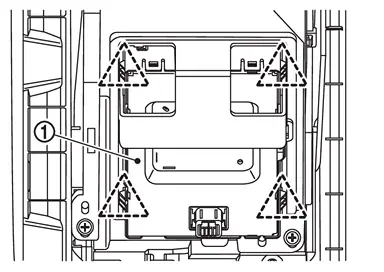
 |
: Pawl |
INSTALLATION
Note the following, and install in the reverse order of removal.
Align the cut outs of wireless charger unit and front center console cup holder assembly  .
.
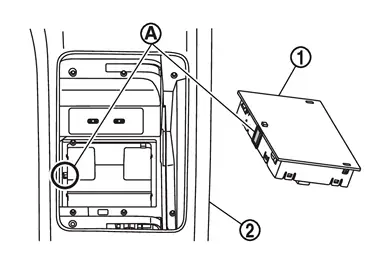
 |
: Cut out |
Other materials
Fuel Efficient Driving Tips
To get the best fuel economy from your Nissan Armada, follow these practical
and easy-to-apply driving tips. These recommendations not only improve efficiency
but also contribute to smoother and safer driving.
1. Use smooth accelerator and brake pedal application.
Avoid sudden acceleration ...
Event Data Recorders (EDR)
Basic information
Your Nissan Armada is equipped with an Event Data Recorder (EDR), a system designed
to capture critical vehicle data during specific crash or near-crash situations.
These events may include airbag deployment or impact with road obstacles. The
primary function of the EDR is to ...
Drive Mode Select Switch
Exploded View
Select switch unit
Drive mode select switch
Removal and Installation
Remove select switch unit. Refer to VDC OFF SWITCH : Removal & Installation.
Unhook the pawls () to remove the drive mode select switch from the select switch unit .
INSTALLATIONInstall in ...