Basic information
Before operating a loaded Nissan Armada, always verify that the total vehicle weight does not exceed the specified Gross Vehicle Weight Rating (GVWR) or the Gross Axle Weight Rating (GAWR). These critical limits are clearly indicated on the F.M.V.S.S./C.M.V.S.S. certification label and must be respected to ensure safe driving and proper vehicle performance.
In addition, never exceed the load limit defined as "The combined weight of occupants and cargo" shown on the Tire and Loading Information label of your Nissan Armada. It is equally important not to exceed the designated "Seating Capacity," as overloading passengers can compromise safety and vehicle stability.
To calculate the allowable load for your Nissan Armada, first determine "the combined weight of occupants and cargo" by adding together the total weight of all passengers and any luggage or cargo. The example below illustrates this calculation process.
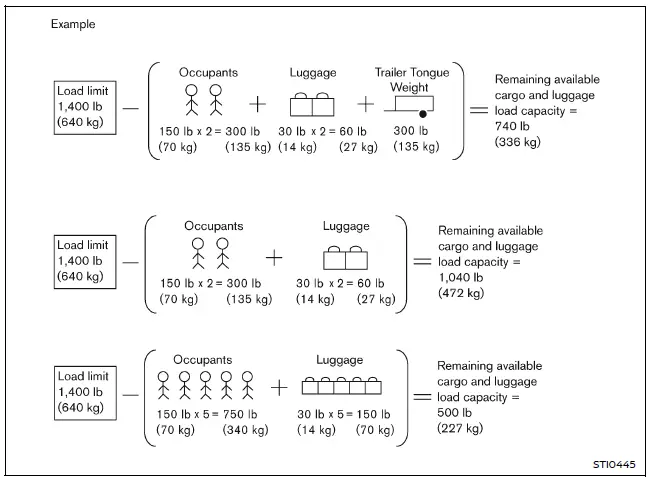
1. Locate the statement on your Nissan Armada’s placard that reads: "The combined weight of occupants and cargo should never exceed XXX kg or XXX lbs."
2. Calculate the total weight of the driver and all passengers who will be traveling in the Nissan Armada.
3. Subtract this combined passenger weight from the specified maximum value (XXX kg or XXX lbs).
4. The remaining value represents the available cargo capacity. For example, if the limit is 1400 lbs and five passengers each weigh 150 lbs, the available cargo capacity is 650 lbs (1400 − 750 = 650 lbs).
5. Determine the total weight of all cargo and luggage to be loaded into the Nissan Armada. This value must not exceed the calculated available capacity.
6. If towing a trailer, remember that part of the trailer load (tongue weight) is transferred to the Nissan Armada and must be included in the total load calculation.
Refer to this manual for detailed guidance on how towing affects the cargo capacity of your Nissan Armada.
Steps For Determining Correct Load Limit
Before driving your Nissan Armada with a load, always confirm that GVWR and GAWR limits are not exceeded.
Additionally, check that all tires are properly inflated according to the specifications listed on the Tire and Loading Information label, as correct tire pressure is essential for handling and load support.
Securing the load
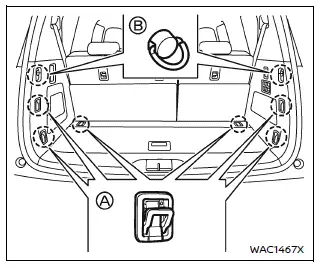
The Nissan Armada is equipped with tie-down hooks located in the cargo area, as illustrated. These hooks are designed to help secure cargo using ropes, straps, or other fastening devices to prevent movement during driving.
Do not exceed a load of 22 lb (10 kg) on a single hook A or 7 lb (3 kg) on a single hook B when securing cargo in your Nissan Armada.
WARNING
- Always secure all cargo properly using appropriate straps or ropes to prevent shifting during driving. Never stack cargo higher than the seatbacks in your Nissan Armada, as this may increase the risk of injury in the event of sudden braking or a collision.
In the event of sudden braking or a collision, any unsecured cargo inside the Nissan Armada can become a dangerous projectile and may cause serious injury to occupants.
Always secure all cargo properly. If the tether strap is compromised, a child restraint system may not function correctly, significantly increasing the risk of serious injury or fatal consequences during a collision.
Exceeding these limits may lead to mechanical failure, tire damage, and altered handling characteristics, which can result in loss of vehicle control and potential personal injury.
This can lead to premature tire failure, creating a high risk of serious accidents. Any damage caused by overloading is not covered under the Nissan vehicle warranty.
Loading tips
- The total Gross Vehicle Weight (GVW) of your Nissan Armada must never exceed the GVWR or GAWR values specified on the F.M.V.S.S./C.M.V.S.S. certification label.
- Avoid loading the front and rear axles to their individual GAWR limits simultaneously, as this may result in exceeding the overall GVWR of the Nissan Armada.
WARNING
- Always secure all cargo in your Nissan Armada using appropriate restraints
to prevent shifting during driving.
In emergency braking situations or collisions, unsecured cargo can cause severe injuries to occupants.
- Do not exceed the GVWR or GAWR limits of your Nissan Armada. Overloading can damage vehicle components, negatively affect handling, and increase the risk of losing control.
- Overloading your Nissan Armada can significantly shorten the lifespan
of both the vehicle and its tires, while also increasing braking distances and
reducing overall safety.
This may lead to tire failure and serious accidents. Such damage is not covered under the vehicle warranty.
Measurement of weights
To maintain proper balance and safe operation of your Nissan Armada, always secure loose items to prevent weight shifts during driving.
When the vehicle is fully loaded, it is recommended to visit a certified weighing station to measure both front and rear axle loads separately.
Ensure that the load on each axle does not exceed the specified Gross Axle Weight Rating (GAWR), and that the combined weight does not surpass the Gross Vehicle Weight Rating (GVWR) indicated on the certification label of your Nissan Armada.
If any of these limits are exceeded, redistribute or remove cargo until all weights fall within safe operating limits to maintain vehicle stability and safety.
Other materials
Engine Assembly
Exploded View
Engine mounting bracket (RH)
Engine mounting insulator (RH)
Stopper bracket (RH)
Engine mounting bracket (LH)
Engine mounting insulator (LH)
Stopper bracket (LH)
Engine mounting insulator (rear)
Comply with the assembly procedure wh ...
High-Pressure Flexible Hose
Removal and Installation
REMOVALCAUTION:
Perform lubricant return operation before each refrigeration system disassembly. However, if a large amount of refrigerant or lubricant leak is detected, never perform lubricant return operation. Refer to Perform Lubricant Return Operation.
When disconnec ...
Normal Operating Condition
Description
Symptom Possible cause
Unstable object detection
The vehicle is on a rough surface, such as stone or gravel.
When used in poor weather conditions, such as heavy snow/rain or strong wind.
When subjected to an ultrasonic noise generated from exhaust muffler or brakes.
When le ...