Basic information
CAUTION
- In the Nissan Armada, avoid using the ventilated seat system for long periods when the seat is unoccupied to prevent unnecessary wear and energy consumption.
- Do not place heavy, sharp, or pointed objects on the Nissan Armada seats, as this may damage the internal ventilation components.
- If any liquid is spilled on the seat, immediately wipe it off using a clean, dry cloth to prevent system damage.
- Never clean the Nissan Armada seats with gasoline, thinner, or similar harsh chemicals, as these may degrade materials and internal components.
- If the ventilated seat system in the Nissan Armada does not operate correctly, switch it off and have it inspected by an authorized Nissan dealer.
The Nissan Armada ventilated seat system enhances comfort by circulating air through the seat surface, helping to cool occupants during warm weather conditions.
Control keys are available via the touch screen display, while physical switches are located on the instrument panel. Each seat in the Nissan Armada can be controlled independently for personalized comfort.
Operation with touch screen display
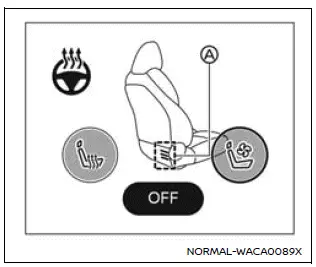
Example
1. Start the Nissan Armada engine.
2. Touch the
 or
or
 key to select the desired ventilation level.
Each press cycles through intensity levels (low, medium, high), and the indicator A illuminates in blue according to the selected setting.
3. To turn off the ventilated seats in the Nissan Armada, press the
 key repeatedly until the indicator A turns off.
Before leaving the Nissan Armada, always ensure the ventilated seat system is turned off.
For proper maintenance, including inspection of air filters for the Nissan Armada ventilated seats, it is recommended to visit an authorized Nissan dealer.
Operation with switch
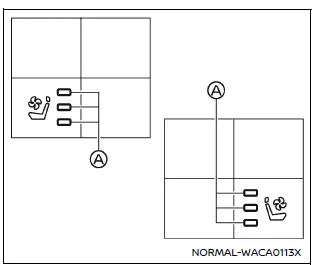
For front seats
1. Start the Nissan Armada engine.
2. Press the
 or
or
 switch to adjust ventilation intensity.
Each press increases the level, and the indicator A will glow blue depending on the selected airflow intensity.
3. To turn off the system, press the
 switch repeatedly until the indicator turns off.
Always turn off the ventilated seats before exiting the Nissan Armada to preserve system longevity.
Routine inspection of the Nissan Armada ventilated seat filters should be performed by a qualified Nissan technician.
Other materials
Passing Assist (ProPILOT Assist 2.1)
Basic information
Passing Assist in the Nissan Armada is an advanced feature of ProPILOT Assist
2.1, engineered to support safer and more efficient overtaking maneuvers on highways.
Before using this function, it is strongly recommended to review the full ProPILOT
Assist section to fully unde ...
Cylinder Block
Exploded View
Sub harness
Knock sensor
Cylinder block
Oil gallery cover
Gasket
Plug
O-ring
Rear oil seal
Oil jet
Main bearing (upper)
Crankshaft
Thrust bearing
Main bearing (lower)
Plug
Gasket
Lower cylinder block
Baffle plate
Top ring
Se ...
Precautions
Precaution for Supplemental Restraint System (SRS) "AIR BAG" and "SEAT BELT PRE-TENSIONER"
The Supplemental Restraint System such as “AIR BAG� and “SEAT BELT PRE-TENSIONER�, used along with a front seat belt, helps to reduce the risk or severity of injury to the driver and front passenger fo ...