
Nissan Armada 2025-2026 Service and Repair Manual: Work Procedure
TPMS REGISTRATION WITH TIRE PRESSURE SENSOR ACTIVATION TOOL [KV48105501 (J-45295-A)]
 With CONSULT
CAUTION:
Always use CONSULT when tire pressure sensor ID registration. (It cannot be ID registration other than with CONSULT.)
Ignition switch ON.
Select “WORK SUPPORT� in AIR PRESSURE MONITOR. Then, select “ID registration.�
Touch “Start� on “ID REGIST� screen.
Hold the tire pressure sensor activation tool [KV48105501 (J-45295-A)] (A) against the side of the left front tire, near the valve.
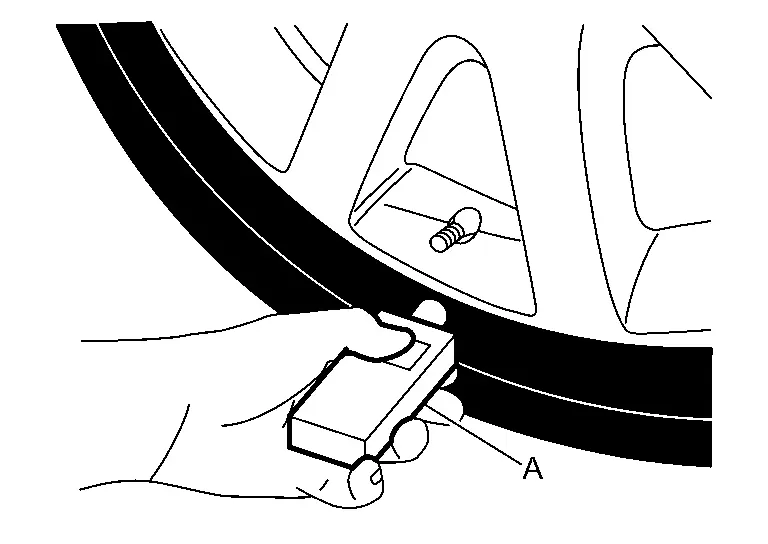
With the tool held at a 0 to 15 degree angle to the tire, press and hold the tire pressure sensor activation tool button until the indicator lamp turns OFF (approximately 5 seconds).
Repeat steps 4 and 5 for the remaining tires in this order: right front, right rear and left rear.
When ID registration is complete, check the following pattern at each wheel.
Sequence ID registration position Turn signal lamp CONSULT 1 Front LH 2 blinks “Yet (red)�
↓
“Done (green)�2 Front RH 3 Rear RH 4 Rear LH After the ID registration procedure for all wheels is complete, press “End� on the CONSULT to finish ID registration.
TPMS REGISTRATION WITH SIGNAL TECH II TOOL (J-50190)
 NOTE:
NOTE:
The Signal Tech II must be updated with software version 1.1.48 or newer in order to perform the below procedures. The Signal Tech II software updates can only be downloaded from a CONSULT unit with ASIST. Other versions of ASIST will not show the updates.
With CONSULT
Adjust the tire pressure for all tires to the recommended value. Refer to TIRE AIR PRESSURE : Service Data.
Ignition switch ON.
Using CONSULT, select “WORK SUPPORT� in AIR PRESSURE MONITOR. Then, select “ID registration.�
Select “Start� on “ID REGIST� screen.
Turn on the Signal Tech II tool (J-50190).
Hold the Signal Tech II against the side of the left front tire, near the valve.
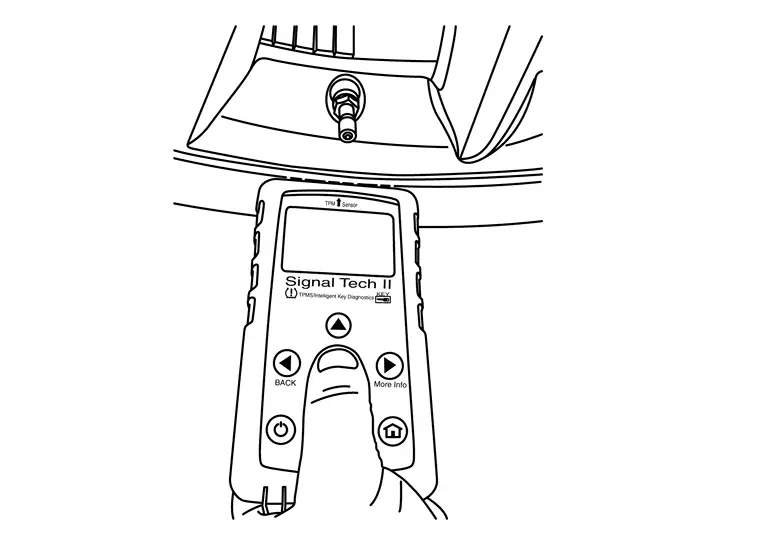
With the tool held at a 0 to 15 degree angle to the tire, select “Activate Sensor� from the main menu, then press and release the “OK� button to activate the sensor. Once the sensor is activated, the vehicle parking lamps will flash and the sensor ID will appear on the CONSULT screen.
Repeat steps 6 and 7 for the remaining tires in this order: right front, right rear and left rear.
When ID registration is complete, check the following pattern at each wheel.
Sequence ID registration position Turn signal lamp CONSULT 1 Front LH 2 blinks “Yet (red)�
↓
“Done (green)�2 Front RH 3 Rear RH 4 Rear LH Once all sensors have been activated, select “End� on the CONSULT to finish ID registration.
 Tire Pressure Sensor Id Registration
This procedure must be performed.
After replacement of a tire pressure sensor or BCM.
After replacement of tire or road wheel.
NOTE:
ID registration is unnecessary if there are no change in the posit ...

Other materials:
Engine Does Not Start When Intelligent Key Is Inside of Vehicle (one Key)
Engine does not start when push-button ignition switch is pressed. (One Intelligent Key has the symptom, other keys operate normally.)
Door lock operation (remote keyless entry) Door lock operation (request switch of front/rear door) or trunk/back door open operation (opener switch of trunk/back d ...
Hydraulic Layout
EVAP canister purge volume control solenoid valve EVAP resonator EVAP line Fuel line Fuel tank Fuel filler neck EVAP canister ...
Basic information
Example
The vehicle information display in the Nissan Armada is centrally positioned
within the instrument cluster and serves as a key interface for driver information
and system notifications. It provides real-time data and customizable settings for
enhanced driving awareness.
The Nissa ...

0.0071