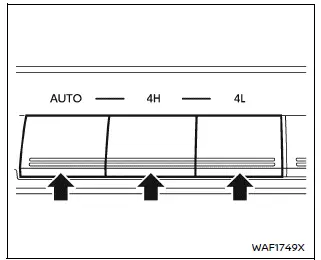
Example
- Select the appropriate 4WD mode in the Nissan Armada by shifting the 4WD switch to AUTO, 4H, or 4L (if equipped), depending on current road and driving conditions. This flexibility allows the Nissan Armada to adapt to both on-road and off-road environments.
- When AUTO mode is selected in the Nissan Armada, the system automatically distributes torque between the front and rear wheels based on traction needs. The torque split can vary dynamically from 0:100 (rear-wheel drive) up to 50:50 (full 4WD), providing enhanced stability and improved control in changing conditions.
- After completing a turn and bringing the Nissan Armada to a stop,
you may notice a slight jolt when shifting into N (Neutral) or P (Park).
This is a normal characteristic caused by the release of the transfer clutch and should not be considered a malfunction.
CAUTION
- When driving straight, switch the Nissan Armada 4WD system between AUTO and 4H as needed. Avoid operating the 4WD selector while turning or reversing, as this may negatively affect vehicle balance and drivetrain components.
- Do not change 4WD modes while descending steep slopes in the Nissan Armada. Instead, rely on engine braking and lower transmission gears for better control and safety.
- If the 4WD switch is operated during turning, acceleration, deceleration,
or when the ignition is turned OFF in AUTO, 4H, or 4L (if equipped), a slight
jolt may be felt.
This is normal system behavior and does not indicate a malfunction in the Nissan Armada.
- Do not operate the Nissan Armada 4WD shift switch while the rear wheels are spinning, as this may cause drivetrain damage.
- Before switching from AUTO to 4H, ensure that the Nissan Armada speed
is below 62 MPH (100 km/h).
Exceeding this speed during the shift may result in damage to the 4WD system.
- Never shift between 4L (if equipped) and 4H/AUTO while the Nissan Armada is moving.
- During engine warm-up, idle speed may be higher than normal. Exercise extra caution when starting or driving the Nissan Armada on slippery surfaces while in AUTO mode.
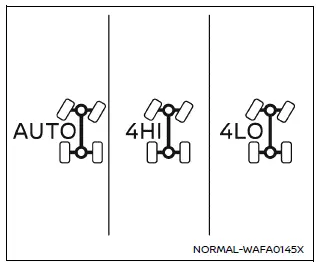
4WD shift indicator
4WD shift indicator (example)
The 4WD shift indicator in the Nissan Armada is displayed within the vehicle information screen and provides real-time feedback on the currently selected drive mode.
While the engine is running, the Nissan Armada indicator will illuminate the selected 4WD mode corresponding to the position of the 4WD switch.
- The 4WD indicator may blink while the Nissan Armada transitions between drive modes. Once the shift is complete, the indicator will remain steadily illuminated. If the indicator does not immediately stabilize, ensure the surrounding area is safe and drive the vehicle straight, accelerate, decelerate, or briefly reverse before attempting to shift again.
- If a 4WD warning message is displayed, the indicator may turn off, signaling a potential system issue or temporary limitation.
4WD warning message
Under certain driving or system conditions, the Nissan Armada may display a 4WD warning message in the vehicle information display. These messages are designed to alert the driver to potential issues or system limitations.
CAUTION
- If any 4WD warning message continues to be displayed, have the Nissan Armada inspected by an authorized NISSAN dealer as soon as possible to prevent further damage.
- Avoid switching between 4H/AUTO and 4L (if equipped) when a 4WD warning message is active, as this may worsen the issue.
- When a warning message is present, the Nissan Armada may default to 2WD operation even if AUTO or 4H is selected. Drive carefully, as full 4WD capability may not be available. In case of system malfunction, 4WD engagement may be completely disabled.
- Do not operate the Nissan Armada in 4H or 4L (if equipped) on dry, paved
roads, as this may result in excessive tire wear, noise, and increased fuel
consumption.
If a 4WD warning message appears while driving on dry surfaces:
- When in 4H mode, switch the Nissan Armada to AUTO. In fail-safe conditions, the system may remain in 4H even on paved roads.
- When in 4L mode (if equipped), stop the Nissan Armada, shift to N (Neutral) while pressing the brake pedal, and then switch to AUTO. In fail-safe mode, the system may remain locked in 4L.
- If the warning message persists after performing these actions, have the Nissan Armada checked immediately by a qualified technician. Continued driving may damage the transfer case.
4WD mode of Intelligent Around View Monitor
When the Nissan Armada transmission is not in the R (Reverse) position and either 4H or 4L (if equipped) is selected, the Intelligent Around View Monitor automatically activates the Invisible Hood View. This feature enhances visibility of the terrain beneath the front of the vehicle, improving confidence and safety during off-road driving or when navigating obstacles.
Other materials
Transfer Fluid
Inspection
WARNING:
Jacking up or lift up the vehicle may the vehicle height to go down which cause a personal injury and/or damage to the air suspension component parts. Refer to Precaution for when Jacking and Lifting Up the vehicle with Electronic Air Suspension System.
FLUID LEAKAGECheck t ...
Fillet Molding
Exploded View
Front fillet molding
Rear fillet molding front
Rear fillet molding rear
Grommet
Double-sided tape
[t: 1.2 mm (0.047 in)]
: Clip
: Pawl
: vehicle front
: Always replace after every disassembly.
Front Fillet Molding
Removal and Installation ...
Alternator. Vr35ddtt
Vr35ddtt
Exploded View
Engine assembly
Alternator
“B� terminal harness
Alternator harness connector
: vehicle front
: N·m (kg-m, ft-lb)
, , , : Indicates that the part is connected at points with same symbol in actual vehicle.
Removal and In ...