WARNING
- Ensure that the Nissan Armada liftgate is fully closed and securely latched before driving to prevent it from opening unexpectedly.
- Never drive the Nissan Armada with the liftgate open, as harmful exhaust gases may enter the cabin.
- To reduce the risk of injury or fatal incidents in the Nissan Armada,
do not leave children, pets, or individuals requiring assistance unattended
inside the vehicle.
The interior temperature can increase rapidly, especially in warm weather conditions.
- Keep hands, fingers, and feet clear of the Nissan Armada liftgate area when opening or closing to prevent injury.
CAUTION
Do not install accessories or carriers directly onto the Nissan Armada liftgate, as this may damage the vehicle structure.
Operating manual liftgate
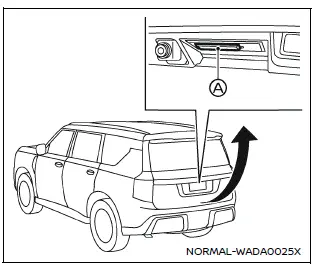
Example
To open the Nissan Armada liftgate manually, unlock it and press the liftgate opener switch A. Then lift the liftgate upward.
The Nissan Armada liftgate can be unlocked in several ways:
- Using the liftgate request switch (if equipped) while carrying the Intelligent Key.
- Pressing the UNLOCK
 button on the Intelligent Key.
 - Using the power door lock switch to the UNLOCK position.
To close the Nissan Armada liftgate, pull it downward firmly until it locks securely.
Operating power liftgate
The Nissan Armada power liftgate operates only when the vehicle is in the P (Park) position.
If the battery voltage is low, the Nissan Armada power liftgate may not function properly.
If the liftgate is positioned within approximately 5.9 in (150 mm) of the fully closed position, the power function will not activate. In this case, close the liftgate manually before using the power feature again.
The Nissan Armada power liftgate system can be enabled or disabled via the vehicle information display settings.
NOTE:
- When washing or servicing the Nissan Armada, or when placing a cover over the vehicle, disable the power liftgate to prevent unintended activation.
- If repeated open/close commands are issued, the Nissan Armada safety system may temporarily disable operation. Wait briefly before retrying.
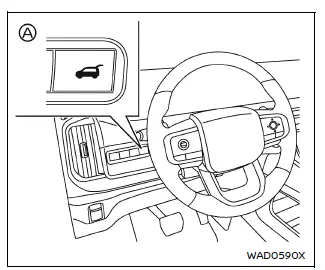
Power liftgate switch - Instrument panel
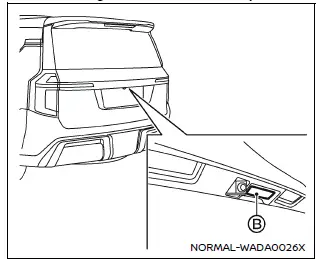
Liftgate opener switch
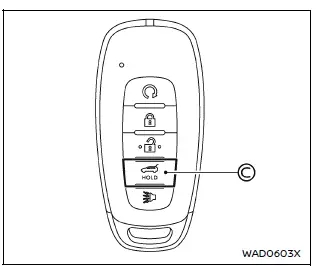
Power liftgate button - Key
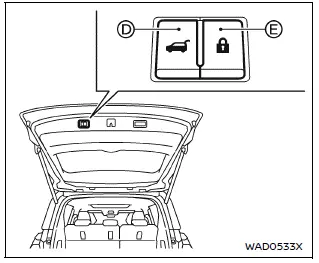
Power liftgate close and lock switches - Liftgate
Power open (using switches)
When the Nissan Armada liftgate is fully closed, it can be opened automatically by:
- Pressing the power liftgate switch on the instrument panel for more than 1 second
- Pressing the liftgate opener switch
- Pressing the power liftgate button on the Intelligent Key for more than 1 second
The Nissan Armada emits an external chime when the liftgate begins to open.
NOTE:
The Nissan Armada liftgate can be opened using the power liftgate switch A or the Intelligent Key button C even when locked. It can also operate independently of other doors. However, to use the liftgate opener switch B, the liftgate must be unlocked or the Intelligent Key must be within range.
Power close (using switches)
When fully open, the Nissan Armada liftgate can be closed automatically by:
- Pressing the power liftgate switch A on the instrument panel for more than 1 second
- Pressing the power liftgate button C on the Intelligent Key
- Pressing the liftgate close switch D located on the liftgate
The Nissan Armada emits an audible chime when the liftgate begins closing.
Power close and lock
When the liftgate is open and the Nissan Armada Intelligent Key is nearby, pressing the liftgate lock switch E will automatically close and lock all doors and the liftgate.
The Nissan Armada will emit an external chime during this operation.
Stop and reverse function
The Nissan Armada power liftgate will stop immediately if any of the following actions occur during operation:
- Pressing the power liftgate switch A
- Pressing the liftgate opener switch B
- Pressing the liftgate close switch D
- Pressing the Intelligent Key liftgate button C
If the action is repeated, the Nissan Armada liftgate will reverse its direction.
An audible chime confirms the reversal operation.
Auto reverse function
The Nissan Armada liftgate includes an auto-reverse safety feature that detects obstacles during opening or closing.
If an obstruction is detected, the liftgate will reverse direction and stop automatically.
If a second obstruction is detected, movement will stop completely.
Pinch sensors located on both sides of the Nissan Armada liftgate further enhance safety by reversing motion when resistance is detected.
NOTE:
If the pinch sensors are damaged or removed, the Nissan Armada power closing function may not operate correctly.
WARNING
There is a small area near the fully closed position that may not be detected by sensors. Always ensure that hands and objects are clear before closing the Nissan Armada liftgate.
Manual mode
If the Nissan Armada power liftgate system is unavailable due to low battery voltage or positioning, the liftgate can be operated manually.
Manual operation may also be required if the liftgate is nearly closed (within 5.9 in / 150 mm).
If a power operation is interrupted, the Nissan Armada liftgate can be switched to manual mode and then returned to normal automatic operation afterward.
This flexibility ensures that the Nissan Armada liftgate remains functional under various conditions while maintaining convenience and safety.
Other materials
Electric Ivt Control Actuator Position Learning
Description
Electric intake valve timing control (IVT) module requires the learning of camshaft reference position. This learning must be performed where the following operations are performed:
Replacement of electric IVT control module
Replacement of intake/Exhaust camshaft position sensor
Rep ...
Additional Service When Replacing Intelligent Key Unit
Description
CAUTION:
When replacing the Intelligent Key unit, always replace it with a new one. The functions controlled by the Intelligent Key unit does not operate properly in case of reuse of the Intelligent Key unit from another vehicle.Perform the following operations when replacing Intelligent ...
Diagnosis and Repair Work Flow
Work Flow
DETAILED FLOWINTERVIEW FROM THE CUSTOMER
CAUTION:
Customers are not professional. Never guess easily like “maybe the customer means that...,� or “ maybe the customer mentions this symptom�.
>>
GO TO 2.
CHECK SYMPTOM
Reproduce the symptom that is indicated by the customer, ...