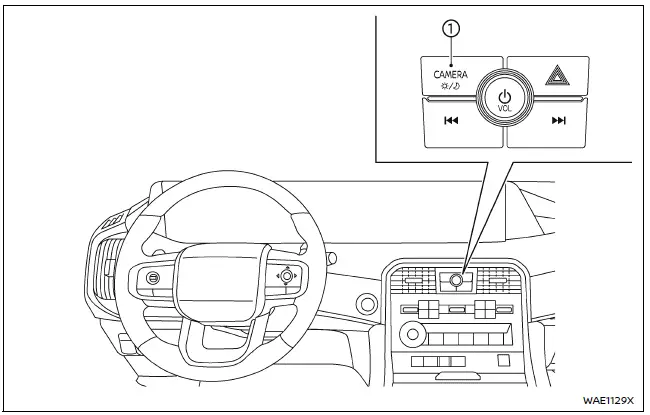
- CAMERA/
 button
WARNING
- Improper use of the Nissan Armada Intelligent Around View Monitor system may result in serious injury or even fatal accidents. Always follow all safety instructions carefully.
- The Nissan Armada Intelligent Around View Monitor is intended as a driver
assistance feature only and must never replace attentive driving. Certain areas
around the vehicle, especially near the four corners, may not be fully visible
in Bird’s-eye, front, rear, 3D, Invisible Hood, Ultra Wide, or rear zoom views.
Always visually confirm surroundings before moving the Nissan Armada and operate the vehicle slowly and cautiously.
- The driver of the Nissan Armada is solely responsible for ensuring safety during parking, maneuvering, and low-speed driving situations.
CAUTION
When cleaning the Nissan Armada camera lenses, avoid scratching or applying excessive force, especially when removing dirt, ice, or snow from the front camera.
The Nissan Armada Intelligent Around View Monitor system is engineered to provide enhanced visibility and support during parking maneuvers such as parallel parking, tight-space navigation, and low-speed positioning.
This advanced Nissan Armada system displays multiple camera angles simultaneously using a split-screen layout, allowing the driver to better understand the vehicle’s surroundings in real time.
Depending on driving conditions, gear position, and system settings, not all Nissan Armada camera views may be available at the same time.
Available views:
- Front view
A forward-facing view from the Nissan Armada front camera, helping detect obstacles directly ahead. - Rear view
A rear-facing perspective for reversing, displayed automatically when shifting into reverse. - Bird's-eye view
A simulated top-down view of the Nissan Armada, combining multiple camera feeds to show the surrounding area. - Front-side view
A detailed view around the front wheels of the Nissan Armada, useful for avoiding curbs or tight obstacles. - Front-wide view
An extended wide-angle front view that provides a broader field of vision compared to the standard front camera. - Rear-wide view
A wider rear perspective for improved awareness when backing up in complex environments. - 3D view
A fully interactive 360-degree visualization of the Nissan Armada, offering enhanced spatial awareness around the vehicle. - Invisible Hood View
A specialized Nissan Armada feature that simulates transparency of the hood, allowing drivers to better judge obstacles directly in front of the vehicle. - Ultra Wide view
A panoramic Nissan Armada display combining front-wide and Invisible Hood views across both the instrument display and touchscreen for maximum visibility. - Rear zoom view
A magnified rear camera image for precise positioning when parking or approaching objects closely.
The Nissan Armada Intelligent Around View Monitor significantly enhances driver confidence by providing multiple visual perspectives, making parking and maneuvering safer and more intuitive.
However, even with these advanced technologies, the Nissan Armada driver should always remain attentive and use mirrors and direct observation to ensure complete safety in all driving situations.
Other materials
Wind Deflector
Exploded View
Refer to Exploded View.
Removal and Installation
REMOVALFully open the glass lid.
Disengage wind deflector fixing points using a remover tool (A) from moonroof unit assembly.
Remove wind deflector.
INSTALLATIONInstall in the reverse order of removal. ...
Display
Diagnosis and Repair Work Flow
Work Flow
DETAILED FLOWINTERVIEW FOR MALFUNCTION
It is also important to clarify the customer concerns before starting the inspection. Interview the customer about the concerns carefully and understand the symptoms fully.
NOTE:
The customers are not professionals. Nev ...
Additional Service When Replacing Driving Video Recorder Control Module
Work Procedure
DRIVING VIDEO RECORDER CONTROL MODULE REPLACEMENT
Replace driving video recorder control module. Refer to Removal and Installation.
>>
GO TO 2.
WRITING OF VIN DATA TO DRIVING VIDEO RECORDER CONTROL MODULE
With CONSULT
Ignition switch ON and wait at least 5 seconds.
Select ...