WARNING
Failure to carefully follow all warnings and operating instructions related to the I-FCW system in the Nissan Armada may lead to serious injury or even fatal accidents.
- The Intelligent Forward Collision Warning system in the Nissan Armada is designed to provide early alerts before a potential collision occurs. However, it does not actively prevent collisions. The driver must remain attentive, maintain full control of the vehicle, and drive responsibly at all times.
The I-FCW system in the Nissan Armada enhances driver awareness by monitoring traffic conditions ahead. It is capable of detecting sudden braking behavior not only from the vehicle directly in front, but also from a second vehicle further ahead within the same lane, helping the driver react more quickly to unexpected situations.
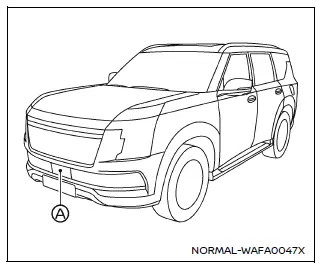
Example
The Nissan Armada I-FCW system utilizes a front-mounted radar sensor (A), positioned at the front of the vehicle, to continuously measure distance and relative speed of vehicles ahead. This advanced detection capability contributes to improved anticipation of potential hazards.
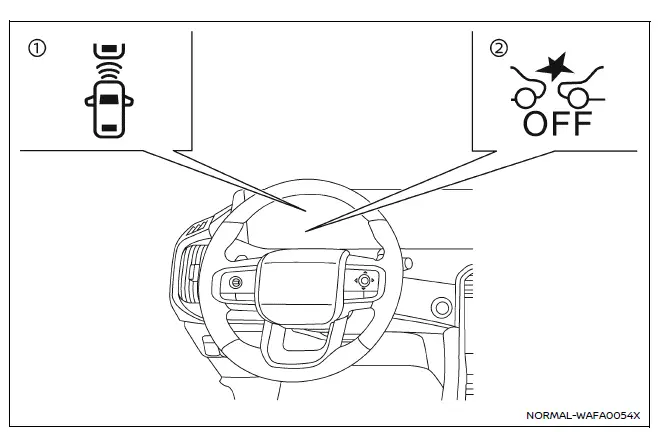
- Vehicle ahead detection indicator (displayed in the Nissan Armada vehicle information screen)
- Automatic Emergency Braking (AEB) system OFF warning light (located on the instrument panel)
Other materials
Tire Pressure Sensor Id Registration
Description
This procedure must be performed.
After replacement of a tire pressure sensor or BCM.
After replacement of tire or road wheel.
NOTE:
ID registration is unnecessary if there are no change in the positions of each wheels (tire pressure sensors) before wheel removal and after wheel inst ...
Brake System Tools and Preparation
Commercial Service Tool
Tool name
Description
Flare nut torque wrench
a: 10 mm (0.39 in), 11 mm (0.43 in), 12 mm (0.47 in)
Installing brake piping
Brake caliper wrench
Return the piston (Front brake caliper)
Brake caliper wrench
Return the piston (Rear brake caliper)
Lu ...
Front Camera
Removal and Installation
REMOVALRemove the front grille. Refer to Removal and Installation.
Remove the front camera mounting screws , then remove the front camera .
INSTALLATIONInstall in the reverse order of removal.
Perform parameter writing. (With ProPILOT Assist 2.1) Refer to Work Procedure.
Pe ...