Description
This procedure must be performed.
-
After replacement of a tire pressure sensor or BCM.
-
After replacement of tire or road wheel.
 NOTE:
NOTE:
ID registration is unnecessary if there are no change in the positions of each wheels (tire pressure sensors) before wheel removal and after wheel installation.
-
After performing tire rotation.
Work Procedure
TPMS REGISTRATION WITH TIRE PRESSURE SENSOR ACTIVATION TOOL [KV48105501 (J-45295-A)]
With CONSULT
CAUTION:
Always use CONSULT when tire pressure sensor ID registration. (It cannot be ID registration other than with CONSULT.)
-
Ignition switch ON.
-
Select “WORK SUPPORT� in AIR PRESSURE MONITOR. Then, select “ID registration.�
-
Touch “Start� on “ID REGIST� screen.
-
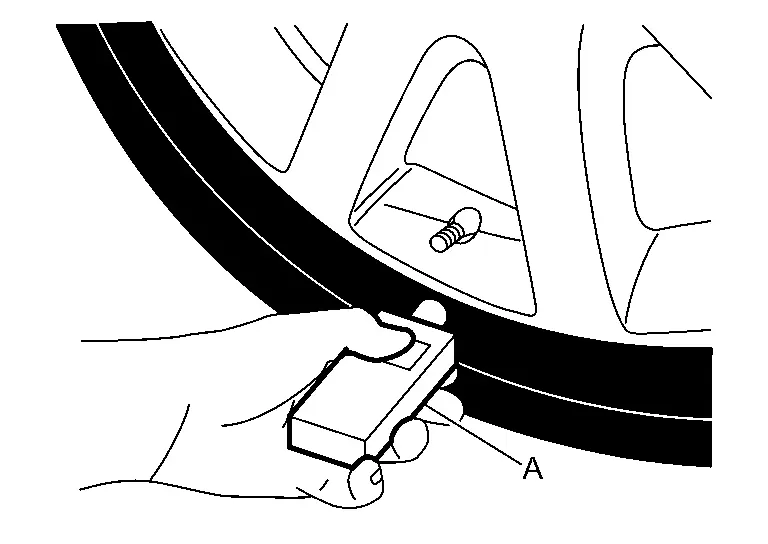
Hold the tire pressure sensor activation tool [KV48105501 (J-45295-A)] (A) against the side of the left front tire, near the valve.
-
With the tool held at a 0 to 15 degree angle to the tire, press and hold the tire pressure sensor activation tool button until the indicator lamp turns OFF (approximately 5 seconds).
-
Repeat steps 4 and 5 for the remaining tires in this order: right front, right rear and left rear.
-
When ID registration is complete, check the following pattern at each wheel.
Sequence ID registration position Turn signal lamp CONSULT 1 Front LH 2 blinks “Yet (red)�
↓
“Done (green)�2 Front RH 3 Rear RH 4 Rear LH -
After the ID registration procedure for all wheels is complete, press “End� on the CONSULT to finish ID registration.
TPMS REGISTRATION WITH SIGNAL TECH II TOOL (J-50190)
NOTE:
The Signal Tech II must be updated with software version 1.1.48 or newer in order to perform the below procedures. The Signal Tech II software updates can only be downloaded from a CONSULT unit with ASIST. Other versions of ASIST will not show the updates.
With CONSULT
-
Adjust the tire pressure for all tires to the recommended value. Refer to TIRE AIR PRESSURE : Service Data.
-
Ignition switch ON.
-
Using CONSULT, select “WORK SUPPORT� in AIR PRESSURE MONITOR. Then, select “ID registration.�
-
Select “Start� on “ID REGIST� screen.
-
Turn on the Signal Tech II tool (J-50190).
-
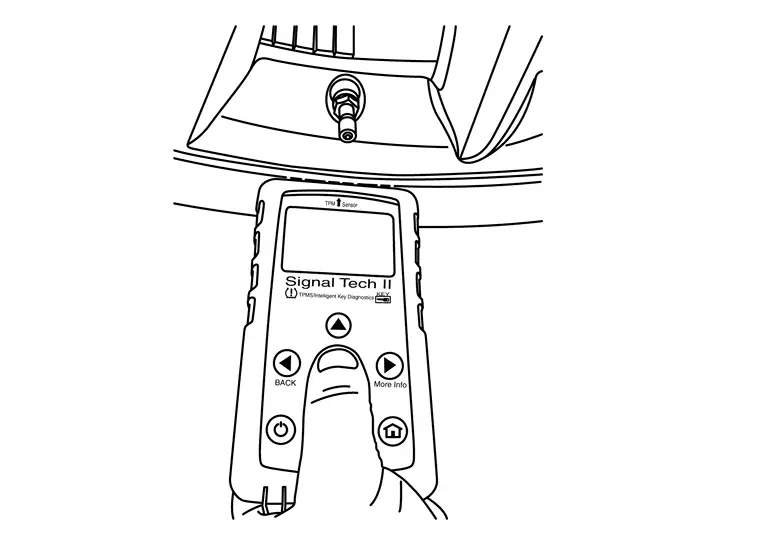
Hold the Signal Tech II against the side of the left front tire, near the valve.
-
With the tool held at a 0 to 15 degree angle to the tire, select “Activate Sensor� from the main menu, then press and release the “OK� button to activate the sensor. Once the sensor is activated, the vehicle parking lamps will flash and the sensor ID will appear on the CONSULT screen.
-
Repeat steps 6 and 7 for the remaining tires in this order: right front, right rear and left rear.
-
When ID registration is complete, check the following pattern at each wheel.
Sequence ID registration position Turn signal lamp CONSULT 1 Front LH 2 blinks “Yet (red)�
↓
“Done (green)�2 Front RH 3 Rear RH 4 Rear LH -
Once all sensors have been activated, select “End� on the CONSULT to finish ID registration.
Other materials
Clock and outside air temperature
In the Nissan Armada, both the clock 1 and the outside air temperature 2 are
conveniently displayed at the top section of the vehicle information display, allowing
the driver to quickly access essential information while driving.
Clock
The clock in the Nissan Armada can be adjusted through ...
Spare Tire and Wheel Assembly
Exploded View
Handle rod guide
Spare wheel carrier assembly
Spare tire and wheel assembly
: vehicle front
: N·m (kg-m, ft-lb)
Removal & Installation
WARNING:
Jacking up or lift up the vehicle may the vehicle height to go down which cause a personal injury and/or damage to t ...
Wiper and Washer System Symptoms
Symptom Table
NOTE:
Perform the self-diagnosis with CONSULT before the symptom diagnosis. Perform the trouble diagnosis if any DTC is detected. Symptom Possible cause Inspection item
Front wiper (HI, LO) does not operate normally
BCM
Combination switch
Harness between combination switch ...