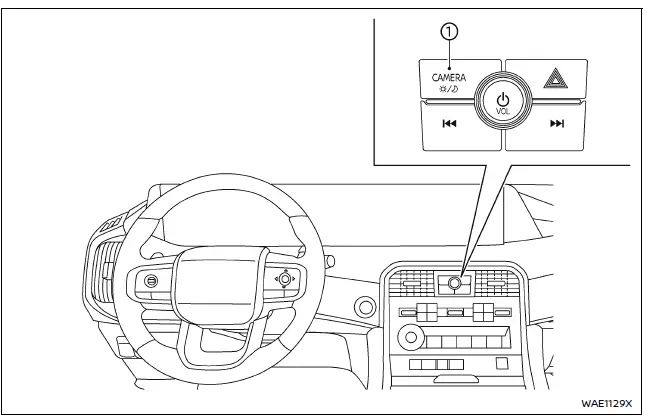
- CAMERA/
 button
WARNING
- Improper use of the Nissan Armada Moving Object Detection (MOD) system may lead to serious injury or fatal accidents. Always follow all safety instructions carefully.
- The Nissan Armada MOD system is designed as a driver assistance feature only and must not replace proper driving practices. Always check mirrors, surroundings, and blind spots before maneuvering the vehicle.
- The Nissan Armada MOD system automatically deactivates at speeds above 5 MPH (8 km/h) and will reactivate when the speed decreases.
- The Nissan Armada MOD system is not intended to detect stationary objects and should not be relied upon for obstacle avoidance.
The Nissan Armada Moving Object Detection system enhances driver awareness by identifying moving objects near the vehicle during low-speed maneuvers.
This Nissan Armada system is especially useful when exiting parking spaces, navigating garages, or driving in crowded parking areas.
Using advanced image processing technology, the Nissan Armada MOD system analyzes camera images in real time to detect movement around the vehicle.
Other materials
Center Pillar Upper Garnish
Removal and Installation
CAUTION:
Never damage the body panel.REMOVALCAUTION:
When removing, always use a remover tool that is made of plastic to prevent damage to the parts.Remove center pillar lower garnish. Refer to Removal and Installation.
Pull out tongue of seat belt pre-tensioner retractor fr ...
Interior Lighting System Service Data and Specifications
Bulb Specifications
Item Type Wattage (W)
Map lamp
LED
—
Vanity mirror lamp
LED
—
Front foot lamp
LED
—
Glove box lamp
LED
—
Center console tray lamp
LED
—
Console box lamp
LED
—
Personal lamp
LED
—
Rear room lamp
LED
—
Luggage ...
Rear Camera (driving Video Recorder)
Removal and Installation
REMOVALRemove back door lower finisher. Refer to Removal and Installation.
Disconnect rear camera (driving video recorder) harness connector .
Remove mounting bolts , and remove rear camera (driving video recorder) from vehicle.
INSTALLATIONInstall in the reverse order of ...