WARNING
Never allow children to handle or play with the microSD card used in your Nissan Armada. Due to its small size, accidental swallowing may occur, which can lead to choking, serious injury, or even life-threatening situations.
NOTE:
If the microSD card is removed from the Nissan Armada driving recorder during recording or playback, stored data may become corrupted or permanently lost.
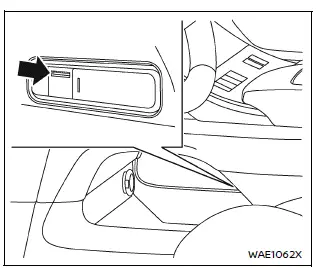
In the Nissan Armada, the microSD card slot is conveniently located in the lower console tray beneath the center console, allowing easy access for installation, removal, and maintenance.
- All videos and still images captured by the Nissan Armada driving recorder are stored directly on the microSD card inserted into this slot.
- Data may not be saved correctly in the following situations:
- If the microSD card is initialized using a device other than the Nissan Armada system
- If files from external devices are mixed with files recorded by the Nissan Armada
- If recorded file names are modified manually
- If a non-compatible or unsupported microSD card is used instead of the recommended one
- If the microSD card is not inserted properly into the slot
About copyright
- Unauthorized copying, distribution, public performance, or rental of copyrighted content recorded by the Nissan Armada driving recorder is strictly prohibited by law.
- Except for personal use, any recorded videos or images must not be used without obtaining permission from the respective rights holders. In some cases, even personal use may be subject to legal restrictions.
- Avoid recording or sharing images of individuals without their consent, as this may violate privacy or portrait rights.
- Improper or malicious use of the Nissan Armada driving recorder that causes public disturbance may result in legal consequences under applicable regulations.
Other materials
How to enable/disable the LDW system
Vehicle information display
Steering-wheel-mounted controls (right side)
Basic information
To activate or deactivate the Nissan Armada LDW system, follow these steps:
1. Press the
button until "Settings" appears in the vehicle information display, then press the
scroll ...
Display Unit
Removal and Installation
REMOVALDisconnect the battery cable from the negative terminal.
Remove display unit display unit finisher RH and LH. Refer to Removal and Installation.
Remove display unit cover. Refer to Removal and Installation.
Remove the mounting screws of the display unit .
Pull the ...
Hd Map Module
Additional Service When Replacing Hd Map Module
Work Procedure
When the following parts are replaced or removed, be sure to perform the specified incidental work in order to operate the system normally.NOTE:
Since HD map module starts updating the map data from a position close to the own vehicle a ...