Removal and Installation
CAUTION:
-
When replacing the combination meter, always replace it with a new one. The functions controlled by the combination meter does not operate properly in case of reuse of the combination meter from another vehicle.
-
Be sure to perform the configuration when replacing combination meter. Refer to Work Procedure.
REMOVAL
Disconnect the battery cable from the negative terminal.
Remove display unit. Refer to Removal and Installation.
Remove the mounting screws  of the combination meter
  .
.
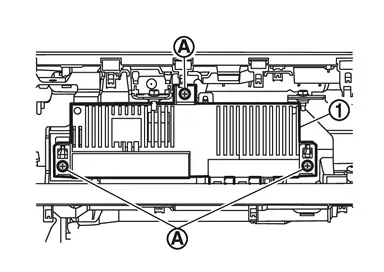
Pull the combination meter outward, then disconnect harness connectors and remove.
INSTALLATION
Installation is in the reverse order of removal.
CAUTION:
-
When replacing the combination meter, always replace it with a new one. The functions controlled by the combination meter does not operate properly in case of reuse of the combination meter from another vehicle.
-
Be sure to perform the configuration when replacing combination meter. Refer to Work Procedure.
Other materials
Engine cooling system
Basic information
The engine cooling system of the Nissan Armada is factory-filled with a precisely
balanced mixture consisting of 50% Genuine NISSAN Long Life Antifreeze/Coolant (blue)
and 50% water. This formulation ensures reliable year-round protection against freezing,
overheating, and c ...
Engine Cooling Fan
Exploded View
Engine cooling fan
: N·m (kg-m, in-lb)
Removal & Installation
WARNING:
Jacking up or lift up the vehicle may the vehicle height to go down which cause a personal injury and/or damage to the air suspension component parts. Refer to Precaution fo ...
Diagnosis and Repair Work Flow
Work Flow
DETAILED FLOWINTERVIEW FROM THE CUSTOMER
CAUTION:
Customers are not professional. Never guess easily like “maybe the customer means that...,� or “ maybe the customer mentions this symptom�.
>>
GO TO 2.
CHECK SYMPTOM
Reproduce the symptom that is indicated by the customer, ...