Removal and Installation
REMOVAL
Disconnect the battery cable from the negative terminal.
Remove display unit display unit finisher RH and LH. Refer to Removal and Installation.
Remove display unit cover. Refer to Removal and Installation.
Remove the mounting screws  of the display unit
  .
.
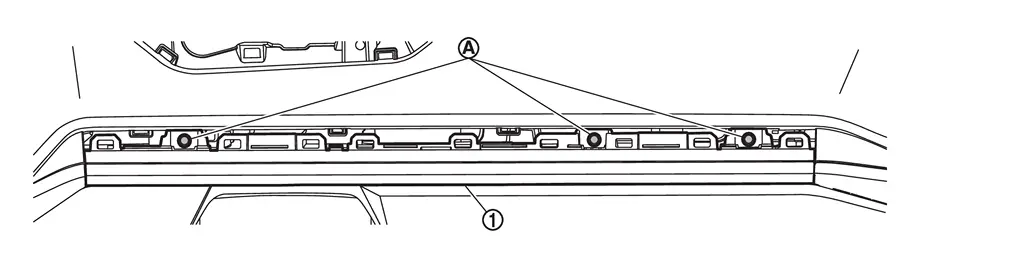
Pull the display unit upward, then disconnect harness connectors and remove.
CAUTION:
Never damage the display unit.
INSTALLATION
Installation is in the reverse order of removal.
CAUTION:
-
When replacing the display unit, always replace it with a new one. The functions controlled by the display unit does not operate properly in case of reuse of the display unit from another vehicle.
-
Be sure to perform the configuration when replacing display unit. Refer to Work Procedure.
Other materials
Vin Registration
Description
VIN Registration is an operation to registering VIN in ECM. It must be performed each time ECM is replaced.NOTE:
Accurate VIN which is registered in ECM may be required for Inspection & Maintenance (I/M). (For details, refer to Work Procedure .)
Work Procedure
CHECK VIN
Check the VIN ...
Led Headlamp Operation Inspection
Work Procedure
CHECK START
In the cool LED status (wait for more than 10 minutes after turning headlamp OFF), turn ON and turn OFF headlamp for the several times. Check that headlamp operates normally each time.
In the cool LED status, turn headlamp ON, wait until headlamp enters to the stable s ...
Precautions
Precaution for Supplemental Restraint System (SRS) "AIR BAG" and "SEAT BELT PRE-TENSIONER"
The Supplemental Restraint System such as “AIR BAG� and “SEAT BELT PRE-TENSIONER�, used along with a front seat belt, helps to reduce the risk or severity of injury to the driver and front passenger fo ...