Work Flow
OVERALL SEQUENCE
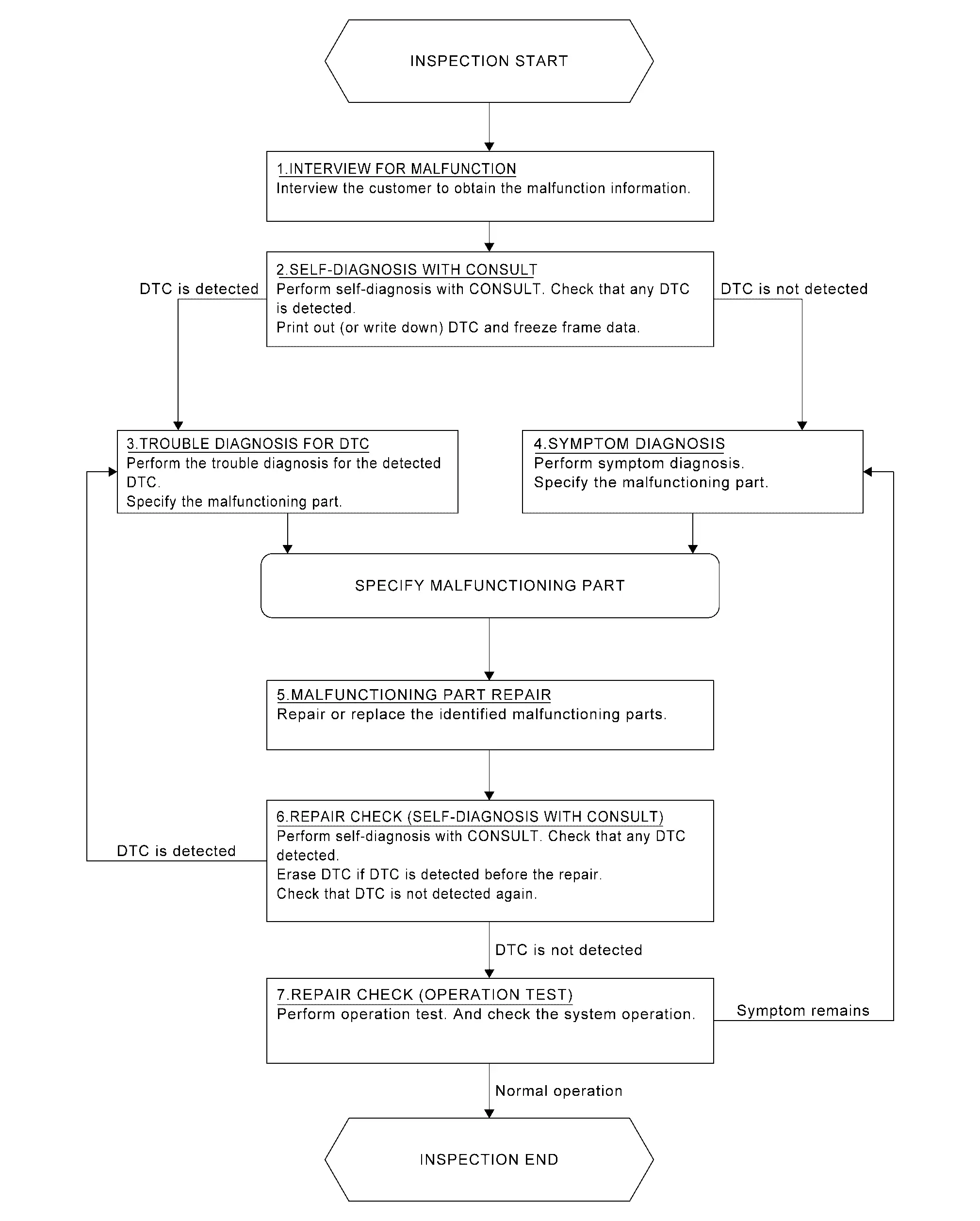
DETAILED FLOW
INTERVIEW FOR MALFUNCTION
It is also important to clarify the customer concerns before starting the inspection. Interview the customer about the concerns carefully and understand the symptoms fully.
 NOTE:
NOTE:
The customers are not professionals. Never assume that “maybe the customer means···� or “maybe the customer mentioned this symptom�.
>>
GO TO 2.
SELF-DIAGNOSIS WITH CONSULT
 With CONSULT
Perform self-diagnosis of �SONAR� using CONSULT. Refer to CONSULT Function.
NOTE:
Skip to step 4 of the diagnosis procedure if “SONAR� is not displayed.
Is any DTC detected?
YES>>GO TO 3.
NO>>GO TO 4.
TROUBLE DIAGNOSIS FOR DTC
-
Check the DTC indicated in the “Self Diagnostic Result�.
-
When DTC is detected, follow the instructions below:
-
Record DTC
-
Freeze Frame Data (FFD)
-
-
Perform the relevant diagnosis referring to the DTC Index. Refer to DTC Index.
>>
GO TO 5.
SYMPTOM DIAGNOSIS
Perform the applicable diagnosis according to the diagnosis chart by symptom. Refer to Symptom Table.
>>
GO TO 5.
MALFUNCTIONING PART REPAIR
Repair or replace the identified malfunctioning parts.
>>
GO TO 6.
REPAIR CHECK (SELF-DIAGNOSIS WITH CONSULT)
With CONSULT
-
Erases self-diagnosis results.
-
Perform self-diagnosis of “SONAR� again after repairing or replacing the specific items.
-
Check if any DTC is detected in self-diagnosis results of “SONAR� .
Is any DTC detected?
YES>>GO TO 3.
NO>>GO TO 7.
REPAIR CHECK (OPERATION TEST)
Perform operation test. Check that the malfunction symptom is solved or no other symptoms occur.
Is there a malfunction symptom?
YES>>GO TO 4.
NO>>INSPECTION END
Other materials
RearView Monitor system limitations
WARNING
The Nissan Armada RearView Monitor has certain operational limitations that
must always be taken into account. Ignoring these limitations or relying solely
on the system without proper visual checks may result in serious injury or even
fatal accidents.
The Nissan Armada camera sys ...
4WD shift switch
Example
Select the appropriate 4WD mode in the Nissan Armada by shifting the 4WD
switch to AUTO, 4H, or 4L (if equipped), depending on current road and driving
conditions. This flexibility allows the Nissan Armada to adapt to both on-road
and off-road environments.
When AUTO mode ...
Air Breather
Exploded View
Clip A
Air breather tube
Clip B
Air breather hose A
Clip C
Clip D
Hose connector
Air breather hose B
Bracket
Clip E
Hose clamp
Air breather
Rear final drive assembly
: vehicle front
: N·m (kg-m, in-lb)
: Alway ...