WARNING
The Nissan Armada RearView Monitor has certain operational limitations that must always be taken into account. Ignoring these limitations or relying solely on the system without proper visual checks may result in serious injury or even fatal accidents.
- The Nissan Armada camera system cannot completely eliminate blind spots and may fail to display all objects behind the vehicle.
- Areas directly below the rear bumper and near the bumper corners are outside the camera’s viewing range. Small or low-lying objects may not be visible, especially those close to the ground.
- Due to the wide-angle lens used in the Nissan Armada, objects on the display may appear farther away than their actual distance.
- The image orientation in the Nissan Armada RearView Monitor may appear reversed compared to what is seen in mirrors.
- The displayed guide lines are for reference only.
Their accuracy may be influenced by passenger load, vehicle angle, suspension position, road surface, and incline.
- Ensure that the liftgate of the Nissan Armada is completely closed before reversing to maintain proper camera function.
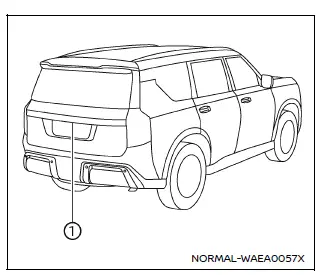
- Never place objects over or near the Nissan Armada rearview camera, which is located above the license plate.
- When washing the Nissan Armada, avoid directing high-pressure water directly
at the camera.
Water intrusion may lead to condensation inside the lens, system malfunction, electrical damage, or fire hazards.
- Avoid striking or applying force to the Nissan Armada camera. It is a precision component and may fail or become damaged, potentially causing electrical issues.
The following Nissan Armada operating characteristics are normal and do not indicate a malfunction:
- In extremely high or low temperatures, the Nissan Armada display may not show objects clearly.
- Direct sunlight or strong glare hitting the camera can reduce image clarity.
- Vertical streaks or lines may appear due to reflected light, especially from the bumper.
- The Nissan Armada display may flicker under fluorescent lighting conditions.
- Colors displayed on the Nissan Armada monitor may slightly differ from real-life object colors.
- In low-light environments, objects may appear dim or unclear.
- A slight delay may occur when switching between camera views.
- If dirt, rain, or snow accumulates on the Nissan Armada camera lens, visibility may be significantly reduced. Regular cleaning is required.
- Do not apply wax to the Nissan Armada camera lens.
If wax residue is present, remove it using a soft cloth dampened with a mild diluted cleaning solution, then dry the surface carefully.
System maintenance
CAUTION
- Do not use alcohol, бензин, thinner or aggressive chemicals to clean the Nissan Armada camera, as this may cause discoloration or damage.
- Avoid scratching or physically damaging the Nissan Armada camera lens, as this may negatively affect image quality and system performance.
If the Nissan Armada rearview camera becomes dirty due to environmental conditions such as rain, snow, or road debris, the image quality may degrade.
To maintain optimal performance, gently clean the camera lens using a soft cloth slightly dampened with a mild cleaning solution, then wipe it dry.
Regular maintenance of the Nissan Armada RearView Monitor ensures consistent visibility, improved safety, and reliable operation during reversing maneuvers.
Additionally, for best results, always combine the Nissan Armada camera system with direct visual checks and mirror use, as no electronic system can fully replace driver awareness.
Other materials
How to use remote keyless entry function
WARNING
In the Nissan Armada, radio frequency signals generated by the Intelligent
Key may interfere with certain medical devices.
Individuals using pacemakers or other electronic medical equipment should
consult the device manufacturer before using the Nissan Armada Intelligent Key.
...
Tire Pressure Sensor Id Registration
Description
This procedure must be performed.
After replacement of a tire pressure sensor or BCM.
After replacement of tire or road wheel.
NOTE:
ID registration is unnecessary if there are no change in the positions of each wheels (tire pressure sensors) before wheel removal and after wheel inst ...
Engine Under Cover
Exploded View
Engine under cover front
Engine under cover rear
N·m (kg-m, ft-lb)
Removal and Installation
WARNING:
REMOVALRemove mounting bolts, and then remove engine under cover rear.
Remove mounting bolts, and then remove engine under cover front.INSTALLATIONInst ...