Basic information
The Nissan Armada RearView Monitor provides reference guidelines only. The actual distance to objects may differ depending on terrain and object positioning.
On uneven surfaces such as slopes or when objects extend outward, the displayed distance may not accurately reflect real-world positioning.
When uncertain, always turn your head to visually confirm surroundings or exit the Nissan Armada to inspect the area behind the vehicle.
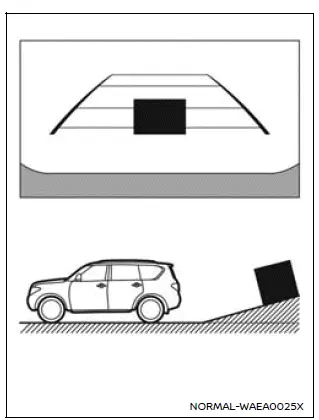
Backing up on a steep uphill
When reversing uphill, the Nissan Armada guide lines may appear closer than actual distances.
Objects shown on the display are typically farther away than they appear.
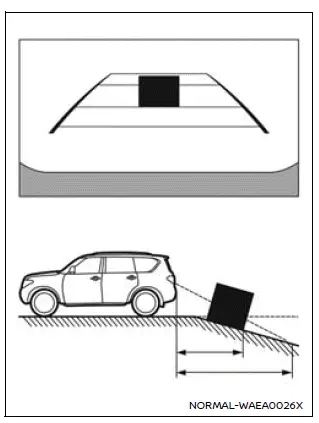
Backing up on a steep downhill
When reversing downhill, the Nissan Armada guide lines may appear farther than the actual distance.
Objects shown on the display are typically closer than they appear.
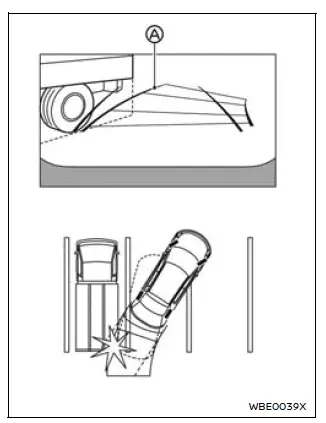
Backing up near a projecting object
The Nissan Armada predictive course lines A may not align with objects that extend into the vehicle’s path.
Even if the lines do not touch the object on the display, a collision may still occur if the object protrudes into the actual reversing path.
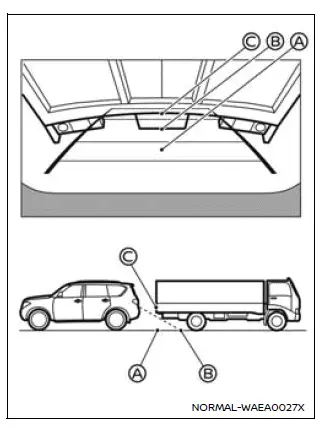
Backing up behind a projecting object
In the Nissan Armada display, position C may appear farther than position B, although both are actually at the same distance.
This optical difference may cause misjudgment, and the vehicle could contact the object if it extends into the reversing path.
Other materials
Meters and gauges
Basic information
Example
The instrument cluster in the Nissan Armada is designed to provide clear, real-time
information about vehicle performance and status. It combines modern digital displays
with traditional gauges to ensure the driver can monitor all critical systems efficiently.
...
Hood
1. To open the hood of the Nissan Armada, pull the hood release handle 1 located
beneath the driver’s side instrument panel. This action will cause the hood to pop
up slightly.
2. Move to the front of the Nissan Armada and locate the secondary safety lever
2. Slide it sideways with your ...
Precautions
Precaution for Supplemental Restraint System (SRS) "AIR BAG" and "SEAT BELT PRE-TENSIONER"
The Supplemental Restraint System such as “AIR BAG� and “SEAT BELT PRE-TENSIONER�, used along with a front seat belt, helps to reduce the risk or severity of injury to the driver and front passenger fo ...