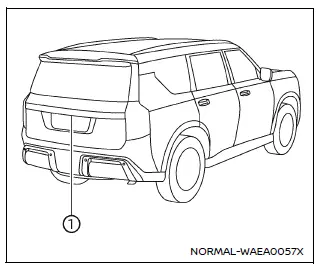
The Nissan Armada RearView Monitor system utilizes a rear-mounted camera 1, positioned just above the license plate, to provide a clear and wide-angle view behind the vehicle.
To activate the Nissan Armada RearView Monitor, turn the ignition switch to the ON position and shift the transmission into R (Reverse). The system will automatically display the rear view on the screen.
This intelligent Nissan Armada feature enhances driver awareness and assists with safer reversing and parking maneuvers.
How to read the displayed lines
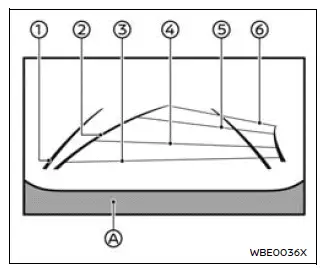
The Nissan Armada RearView Monitor displays guiding lines that help estimate vehicle width and distance relative to the rear bumper line A.
Vehicle width guide lines 1:
These lines represent the approximate width of the Nissan Armada and assist in aligning the vehicle when reversing.
Predictive course lines 2:
The Nissan Armada predictive course lines dynamically adjust based on steering wheel movement, showing the projected path of the vehicle while backing up.
These lines appear automatically when the transmission is in R (Reverse) and provide valuable visual guidance during parking.
Note: The Nissan Armada predictive lines and width indicators may appear wider than the actual vehicle dimensions.
Distance guide lines:
The Nissan Armada monitor includes color-coded lines indicating approximate distances from the rear of the vehicle:
- Red line: approximately 1.5 ft (0.5 m)
- Blue line: approximately 3 ft (1 m)
- Blue line: approximately 7 ft (2 m)
- Blue line: approximately 10 ft (3 m)
Other materials
Informational icons
The Nissan Armada driving recorder system uses a set of informational icons to
clearly indicate its current operating status. These icons are displayed on the
driving recorder screen and provide real-time feedback, allowing the driver to quickly
understand system conditions without navigating ...
Condenser Inlet Pipe
Removal and Installation
REMOVALCAUTION:
Perform lubricant return operation before each refrigeration system disassembly. However, if a large amount of refrigerant or lubricant leak is detected, never perform lubricant return operation. Refer to Perform Lubricant Return Operation.
When disconnec ...
Additional Service When Replacing A/c Auto Amp.
Description
After replaced A/C auto amp. it is necessary to perform control unit configuration with CONSULT. For details, refer to Work Procedure.AFTER REPLACEMENTCAUTION:
When replacing A/C auto amp. write vehicle specification with CONSULT vehicle configuration.
Never perform vehicle configura ...